stdgba
stdgba is a C++23 library for Game Boy Advance development.
It keeps the hardware-first model of classic GBA development, but exposes it through strongly-typed, constexpr-friendly APIs instead of macro-heavy C interfaces.
What stdgba is
- A zero-heap-friendly library for real GBA hardware constraints.
- A typed register/peripheral API built around
inline constexprobjects. - A consteval-first toolkit for things that benefit from compile-time validation.
- A practical replacement for low-level C-era patterns when writing modern C++.
stdgba is not a game engine
You still decide your main loop, memory layout, rendering strategy, and frame budget. stdgba focuses on safer and more expressive building blocks.
Core design goals
- Zero-cost abstractions - generated code should match hand-written low-level intent.
- Compile-time validation - invalid asset/pattern/config inputs should fail at compile time when possible.
- Typed hardware access - peripheral use should be explicit, discoverable, and hard to misuse.
- Practical migration path - where meaningful, docs map familiar tonclib-era workflows to stdgba equivalents.
What you get
registral<T>register wrappers with designated initialisers- fixed-point and angle types with literal support
- BIOS wrappers for sync, math, memory, compression, affine setup
- compile-time image embedding and conversion (
gba/embed) - pattern-based PSG music composition (
gba/music) - static ECS (
gba/ecs) with fixed capacity and deterministic iteration
Quick taste
#include <gba/peripherals>
#include <gba/keyinput>
#include <gba/bios>

int main() {
    // Initialise interrupt handler
    gba::irq_handler = {};

    // Set video mode 0, enable BG0
    gba::reg_dispcnt = { .video_mode = 0, .enable_bg0 = true };

    // Enable VBlank interrupt
    gba::reg_dispstat = { .enable_irq_vblank = true };
    gba::reg_ie = { .vblank = true };
    gba::reg_ime = true;

    gba::keypad keys;
    for (;;) {
        keys = gba::reg_keyinput;
        if (keys.pressed(gba::key_a)) {
            // ...
        }
        gba::VBlankIntrWait();
    }
}
Book roadmap
- Start with Hello VBlank.
- Draw and move your first sprite in Hello Graphics and Keypad.
- Add button-triggered sound in Hello Audio.
- Learn register and frame-loop basics in Core Concepts.
- Get pixels on screen via Graphics.
- Reach for transfer, BIOS, and support APIs in Utilities.
- Explore Audio, ECS, and Additional Types.
Who this is for
- GBA developers who want modern C++ without losing hardware control
- C++ programmers learning GBA development
- Existing tonclib/libtonc users migrating to typed APIs
Hello VBlank
The simplest GBA program that actually does something is a VBlank loop. This is the heartbeat of every GBA game - wait for the display to finish drawing, then update your game state.
The code
#include <gba/interrupt>
#include <gba/peripherals>

int main() {
    // Step 1: Initialise the interrupt handler
    gba::irq_handler = {};

    // Step 2: Tell the display hardware to fire an interrupt each VBlank
    gba::reg_dispstat = { .enable_irq_vblank = true };

    // Step 3: Tell the CPU to accept VBlank interrupts
    gba::reg_ie = { .vblank = true };
    gba::reg_ime = true;

    // Step 4: Main loop
    for (;;) {
        gba::VBlankIntrWait();
        // Your game logic goes here
    }
}
What is happening?
The GBA display draws 160 lines of pixels (the “active” period), then enters a 68-line “vertical blank” period where no pixels are drawn. The VBlank is your window to safely update video memory without visual tearing.
gba::VBlankIntrWait() puts the CPU to sleep (saving battery) until the VBlank interrupt fires. This is the BIOS SWI 0x05.
Step by step
-
gba::irq_handler = {}installs the default interrupt dispatcher. Without this, BIOS interrupt-wait functions will hang forever. -
gba::reg_dispstat = { .enable_irq_vblank = true }writes to the DISPSTAT register using a designated initialiser. Only the.enable_irq_vblankbit is set; all other fields default to zero. -
gba::reg_ie = { .vblank = true }enables the VBlank interrupt in the interrupt enable register.gba::reg_ime = trueis the master interrupt switch. -
gba::VBlankIntrWait()is a BIOS call that halts the CPU until a VBlank interrupt occurs.
tonclib comparison
The equivalent tonclib code:
#include <tonc.h>

int main() {
    irq_init(NULL);
    irq_add(II_VBLANK, NULL);

    for (;;) {
        VBlankIntrWait();
    }
}
The key difference is that stdgba uses designated initialisers ({ .vblank = true }) instead of bitfield macros (II_VBLANK). Typos in field names are compile errors; typos in macro names might silently compile to wrong values.
Putting something on screen
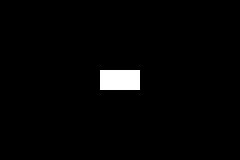
The VBlank loop itself produces a blank screen. To prove the program is running, here is a minimal extension that draws a white rectangle in Mode 3:
#include <gba/bios>
#include <gba/interrupt>
#include <gba/video>

int main() {
    gba::irq_handler = {};
    gba::reg_dispstat = {.enable_irq_vblank = true};
    gba::reg_ie = {.vblank = true};
    gba::reg_ime = true;

    gba::reg_dispcnt = {.video_mode = 3, .enable_bg2 = true};

    // Draw a white 40x20 rectangle centered on the 240x160 screen
    for (int y = 70; y < 90; ++y) {
        for (int x = 100; x < 140; ++x) {
            gba::mem_vram[x + y * 240] = 0x7FFF;
        }
    }

    while (true) {
        gba::VBlankIntrWait();
    }
}
Next steps
- Continue to Hello Graphics and Keypad to draw and move a consteval sprite.
- Then continue to Hello Audio to play a PSG jingle on button press.
Hello Graphics and Keypad
Now that you have a stable VBlank loop, the next step is drawing a visible shape and moving it.
This page pairs two tiny demos that share the same consteval circle sprite:
demo_hello_graphics.cpp: draw the sprite in the centre.demo_hello_keypad.cpp: move the same sprite with the D-pad.
Part 1: draw a shape
#include <gba/bios>
#include <gba/color>
#include <gba/interrupt>
#include <gba/shapes>
#include <gba/video>

#include <cstring>

using namespace gba::shapes;
using gba::operator""_clr;

namespace {

    constexpr auto spr_ball = sprite_16x16(circle(8.0, 8.0, 7.0));

} // namespace

int main() {
    gba::irq_handler = {};
    gba::reg_dispstat = {.enable_irq_vblank = true};
    gba::reg_ie = {.vblank = true};
    gba::reg_ime = true;

    gba::reg_dispcnt = {
        .video_mode = 0,
        .linear_obj_tilemap = true,
        .enable_obj = true,
    };

    gba::pal_bg_mem[0] = "#102040"_clr;
    gba::pal_obj_bank[0][1] = "white"_clr;

    auto* objDst = gba::memory_map(gba::mem_vram_obj);
    std::memcpy(objDst, spr_ball.data(), spr_ball.size());
    const auto tileIdx = gba::tile_index(objDst);

    auto obj = spr_ball.obj(tileIdx);
    obj.x = (240 - 16) / 2;
    obj.y = (160 - 16) / 2;
    obj.palette_index = 0;
    gba::obj_mem[0] = obj;

    for (int i = 1; i < 128; ++i) {
        gba::obj_mem[i] = {.disable = true};
    }

    while (true) {
        gba::VBlankIntrWait();
    }
}
What is happening?
- The setup is the same as Hello VBlank: initialise interrupts and wait on
gba::VBlankIntrWait()in the main loop. sprite_16x16(circle(...))creates the sprite tile data at compile time (consteval).- We copy that tile data into OBJ VRAM, then place it with
obj_mem[0]. - The display runs in Mode 0 with objects enabled (
.enable_obj = true). - Colours use
_clrliterals for readability ("#102040"_clr,"white"_clr).

Part 2: move it with keypad
#include <gba/color>
#include <gba/interrupt>
#include <gba/keyinput>
#include <gba/shapes>
#include <gba/video>

#include <algorithm>
#include <cstring>

using namespace gba::shapes;
using gba::operator""_clr;

namespace {

    constexpr int screen_width = 240;
    constexpr int screen_height = 160;
    constexpr int sprite_size = 16;

    constexpr auto spr_ball = sprite_16x16(circle(8.0, 8.0, 7.0));

    int clamp(int value, int lo, int hi) {
        if (value < lo) {
            return lo;
        }
        if (value > hi) {
            return hi;
        }
        return value;
    }

} // namespace

int main() {
    gba::irq_handler = {};
    gba::reg_dispstat = {.enable_irq_vblank = true};
    gba::reg_ie = {.vblank = true};
    gba::reg_ime = true;

    gba::reg_dispcnt = {
        .video_mode = 0,
        .linear_obj_tilemap = true,
        .enable_obj = true,
    };

    gba::pal_bg_mem[0] = "#102040"_clr;
    gba::pal_obj_bank[0][1] = "white"_clr;

    auto* objDst = gba::memory_map(gba::mem_vram_obj);
    std::memcpy(objDst, spr_ball.data(), spr_ball.size());
    const auto tileIdx = gba::tile_index(objDst);

    auto obj = spr_ball.obj(tileIdx);
    obj.palette_index = 0;

    int spriteX = (screen_width - sprite_size) / 2;
    int spriteY = (screen_height - sprite_size) / 2;
    obj.x = static_cast<unsigned short>(spriteX);
    obj.y = static_cast<unsigned short>(spriteY);
    gba::obj_mem[0] = obj;

    gba::object disabled{.disable = true};
    std::fill(std::begin(gba::obj_mem) + 1, std::end(gba::obj_mem), disabled);

    gba::keypad keys;

    while (true) {
        gba::VBlankIntrWait();
        keys = gba::reg_keyinput;

        spriteX += keys.xaxis();
        spriteY += keys.i_yaxis();

        spriteX = clamp(spriteX, 0, screen_width - sprite_size);
        spriteY = clamp(spriteY, 0, screen_height - sprite_size);

        obj.x = static_cast<unsigned short>(spriteX);
        obj.y = static_cast<unsigned short>(spriteY);
        gba::obj_mem[0] = obj;
    }
}
keys.xaxis()handles left/right.keys.i_yaxis()handles up/down in screen-space coordinates.- Position is clamped to keep the sprite inside the 240x160 screen.
Next step
Continue to Hello Audio to trigger a PSG jingle on button press.
Hello Audio
Now that you can draw and move a sprite, the next step is sound.
This demo plays a short PSG jingle when you press A.
The code
#include <gba/bios>
#include <gba/interrupt>
#include <gba/keyinput>
#include <gba/music>
#include <gba/peripherals>

using namespace gba::music;
using namespace gba::music::literals;

namespace {

    // One-shot PSG jingle (SQ1). Press A to restart playback.
    // .press() applies staccato: each note plays for half duration, rest for half.
    // Compiled at 2_cps (2 cycles per second) for a snappy tempo.
    static constexpr auto jingle = compile<2_cps>(note("c5 e5 g5 c6").channel(channel::sq1).press());

} // namespace

int main() {
    gba::irq_handler = {};
    gba::reg_dispstat = {.enable_irq_vblank = true};
    gba::reg_ie = {.vblank = true};
    gba::reg_ime = true;

    // Basic PSG routing for SQ1 on both speakers.
    gba::reg_soundcnt_x = {.master_enable = true};
    gba::reg_soundcnt_l = {
        .volume_right = 7,
        .volume_left = 7,
        .enable_1_right = true,
        .enable_1_left = true,
    };
    gba::reg_soundcnt_h = {.psg_volume = 2};

    gba::keypad keys;
    auto player = music_player<jingle>{};

    while (true) {
        gba::VBlankIntrWait();
        keys = gba::reg_keyinput;

        if (keys.pressed(gba::key_a)) {
            player = {};
        }

        player();
    }
}
What is happening?
- We set up VBlank + interrupts as in earlier chapters.
- We enable PSG output with
reg_soundcnt_x,reg_soundcnt_l, andreg_soundcnt_h. note("c5 e5 g5 c6").channel(channel::sq1).press()builds a staccato pattern (each note plays half duration, rests half), ensuring the jingle ends in silence naturally.compile<2_cps>(...)compiles at 2 cycles per second (4x faster than the default 0.5 cps), making the jingle snappy and brief.music_player<jingle>advances once per frame, dispatching note events.- Pressing
Aresets the player withplayer = {}, restarting the jingle from the beginning.
Next step
Move on to Registers & Peripherals, then dive deeper into Music Composition.
Registers & Peripherals
Every piece of GBA hardware - the display, sound, timers, DMA, buttons - is controlled through memory-mapped registers. In tonclib, these are #define macros to raw addresses. In stdgba, they are inline constexpr objects with real C++ types.
The registral<T> wrapper
registral<T> is a zero-cost wrapper around a hardware address. It provides type-safe reads and writes through operator overloads:
#include <gba/peripherals>

// Write a struct with designated initialisers
gba::reg_dispcnt = { .video_mode = 3, .enable_bg2 = true };

// Read the current value
auto dispcnt = gba::reg_dispcnt.value();

// Write a raw integer directly (for non-integral register types)
gba::reg_dispcnt = 0x0403u;
How it compiles
registral<T> stores the hardware address as a data member. Every operation compiles to a single ldr/str instruction - exactly what you would write in assembly.
// This:
gba::reg_dispcnt = { .video_mode = 3, .enable_bg2 = true };

// Compiles to the same code as:
*(volatile uint16_t*) 0x4000000 = 0x0403u;
Writing raw integers
When a register stores a non-integral type (a struct with bitfields), you can still write a raw integer value when needed:
// Normal: designated initialiser
gba::reg_dispcnt = { .video_mode = 3, .enable_bg2 = true };

// Raw: write an integer directly
gba::reg_dispcnt = 0x0403u; // Same effect, but less readable
This allows some compatibility with tonclib and similar C libraries that treat registers as raw integers.
The memory_map() helper
When you need a raw pointer (for DMA, memcpy, pointer arithmetic, or interop), use gba::memory_map(...) instead of hard-coded addresses.
#include <gba/peripherals>
#include <gba/video>

// Register pointer
auto* dispcnt = gba::memory_map(gba::reg_dispcnt);

// VRAM pointer (BG tile/map region)
auto* vram_bg = gba::memory_map(gba::mem_vram_bg);
This keeps code tied to named hardware mappings while still compiling to direct memory access.
Read-only and write-only registers
The GBA has registers that are read-only, write-only, or read-write. stdgba encodes this in the type:
| Qualifier | Behaviour |
|---|---|
registral<T> | Read-write |
registral<const T> | Read-only |
registral<volatile T> | Write-only |
For example, gba::reg_keyinput is read-only (you can not write to the keypad), while gba::reg_bg_hofs is write-only (the hardware does not let you read back scroll values).
Array registers
Some registers are arrays (e.g., timer control, DMA channels, palette RAM):
// Timer 0 control
gba::reg_tmcnt_h[0] = { .prescaler = 3, .enable = true };

// BG0 horizontal scroll
gba::reg_bg_hofs[0] = 120;

// Palette memory (256 BG colours + 256 OBJ colours)
gba::pal_bg_mem[0] = { .red = 31 };   // Red
gba::pal_obj_mem[1] = { .blue = 31 }; // Blue
These compile to indexed memory stores with no overhead.
Using std algorithms with array registers
Array registers support range-based iteration and are compatible with <algorithm>:
#include <algorithm>
#include <gba/peripherals>

// Initialise all 4 timers to zero
std::fill(gba::reg_tmcnt_l.begin(), gba::reg_tmcnt_l.end(), 0);

// Copy a preset palette from EWRAM into OBJ palette
std::copy(preset_palette.begin(), preset_palette.end(), gba::pal_obj_mem.begin());

// Check if any timer is running
bool any_running = std::any_of(gba::reg_tmcnt_h.begin(), gba::reg_tmcnt_h.end(),
    [] (auto tmcnt) { return tmcnt.enabled; });

// Initialise all background control registers at once
std::fill(gba::reg_bgcnt.begin(), gba::reg_bgcnt.end(),
          gba::background_control{.priority = 0, .screenblock = 31});
The array wrapper provides standard range interface: .begin(), .end(), .size(), and forward iterators compatible with all <algorithm> calls.
registral_cast
When you need to access the same memory region through a different type - for example, interpreting palette RAM as typed color entries rather than raw short values - use gba::registral_cast.
#include <gba/color>

// mem_pal_bg is registral<short[256]> (raw shorts)
// pal_bg_mem is the same address, reinterpreted as color[256]
inline constexpr auto pal_bg_mem = gba::registral_cast<gba::color[256]>(gba::mem_pal_bg);
The cast preserves the hardware address and stride. It works for all combinations:
| From | To | Example |
|---|---|---|
| Non-array | Non-array | registral_cast<color>(raw_short_reg) |
| Non-array | Array | registral_cast<color[4]>(raw_reg) |
| Array | Array | registral_cast<color[256]>(short_array_reg) |
| Array | Non-array | registral_cast<color>(color_array_reg) |
Palette example
using namespace gba::literals;

// Write palette entries as typed colors
gba::pal_bg_mem[0] = "#000000"_clr;  // transparent/backdrop
gba::pal_bg_mem[1] = "red"_clr;

// 4bpp: access as 16 banks of 16 colours each
gba::pal_bg_bank[0][0] = "black"_clr;
gba::pal_bg_bank[1][3] = "cornflowerblue"_clr;
VRAM example
#include <gba/video>

// VRAM as typed tile arrays
auto tile_ptr = gba::memory_map(gba::mem_tile_4bpp);
// Equivalent to registral_cast internally:
// registral<tile4bpp[4][512]> at 0x6000000
registral_cast is a zero-cost cast: it produces a new registral<To> at exactly the same base address, with no runtime overhead.
Designated initialisers
The biggest ergonomic win is designated initialisers. Instead of remembering which bit is which:
// tonclib: which bits are these?
REG_DISPCNT = DCNT_MODE0 | DCNT_BG0 | DCNT_BG1 | DCNT_OBJ | DCNT_OBJ_1D;
You write self-documenting code:
// stdgba: every field is named
gba::reg_dispcnt = {
    .video_mode = 0,
    .linear_obj_tilemap = true,
    .enable_bg0 = true,
    .enable_bg1 = true,
    .enable_obj = true,
};
Any field you omit will use sensible default values.
Fixed-Point Math
The GBA ARM7TDMI has no floating-point unit. Floating-point is emulated in software, so fixed-point arithmetic is the usual choice for gameplay math, camera transforms, and register-facing values.
The fixed<> type
#include <gba/fixed_point>
using namespace gba::literals;

// 8.8 format (good for small ranges, fine sub-pixel steps)
gba::fixed<short> position = 3.5_fx;

// 16.16 format (high precision for world-space values)
gba::fixed<int> velocity = 0.125_fx;

// 24.8 format (common GBA-friendly choice, tonclib-style)
gba::fixed<int, 8> angle = 1.5_fx;
fixed<Rep, FracBits, IntermediateRep> stores a scaled integer in Rep.
Repcontrols storage width and sign.FracBitscontrols precision (step = 1 / 2^FracBits).IntermediateRepcontrols multiply/divide intermediate width.
Precision and range
For a signed representation:
- precision step:
1 / (1 << FracBits) - minimum:
-2^(integer_bits) - maximum:
2^(integer_bits) - step
where integer_bits = numeric_limits<Rep>::digits - FracBits
(digits excludes the sign bit).
For unsigned representations, minimum is 0.
Common formats
| Type | Format | Approx range | Precision step |
|---|---|---|---|
fixed<short> | 8.8 | -128 to 127.99609375 | 1/256 |
fixed<int> | 16.16 | -32768 to 32767.9999847412 | 1/65536 |
fixed<int, 8> | 24.8 | -8388608 to 8388607.99609375 | 1/256 |
fixed<short, 4> | 12.4 | -2048 to 2047.9375 | 1/16 |
Introspecting format traits
using fx = gba::fixed<int, 8>;
using traits = gba::fixed_point_traits<fx>;

static_assert(traits::frac_bits == 8);
static_assert(std::is_same_v<traits::rep, int>);
The _fx literal
The _fx suffix creates fixed-point literals at compile time:
using namespace gba::literals;

gba::fixed<short> a = 3.14_fx;
gba::fixed<short> b = 2_fx;

auto c = a + b;
auto d = a * b;
_fx is format-agnostic until assignment, then converts to the destination
fixed<> type.
Arithmetic and overflow behaviour
Standard operators are supported:
gba::fixed<short> a = 10.5_fx;
gba::fixed<short> b = 3.25_fx;

auto sum = a + b;
auto diff = a - b;
auto prod = a * b;
auto quot = a / b;

auto neg = -a;
bool gt = a > b;
Multiplication and division use IntermediateRep internally.
fixed<short>uses a 32-bit intermediate by default.fixed<int>defaults tointintermediate (faster on ARM, lower headroom).
If you need safer large products/quotients, use precise<>, which switches to a
64-bit intermediate:
using fast = gba::fixed<int, 16>;
using safe = gba::precise<int, 16>;

fast a = 100.0_fx;
fast b = 400.0_fx;
auto fast_prod = a * b;   // may overflow in edge cases

safe x = 100.0_fx;
safe y = 400.0_fx;
auto safe_prod = x * y;   // wider intermediate
Mixed-type arithmetic and promotion API
Operations require compatible types. For different fixed<> formats, use the
promotion wrappers in <gba/fixed_point> to make intent explicit.
Why wrappers exist
using fix8 = gba::fixed<int, 8>;
using fix4 = gba::fixed<int, 4>;

fix8 a = 3.5_fx;
fix4 b = 1.25_fx;

// auto bad = a + b; // incompatible formats
auto ok  = gba::as_lhs(a) + b;
Promotion wrappers
| Wrapper | Result steering | Typical use |
|---|---|---|
as_lhs(x) | convert other operand to wrapped type | keep left-hand format |
as_rhs(x) | convert wrapped operand to other type | match right-hand format |
as_widening(x) | keep higher fractional precision | avoid precision loss |
as_narrowing(x) | match the narrower side | intentional truncation |
as_average_frac(x) | average fractional bits | balanced precision |
as_average_int(x) | average integer-range bits | balanced range |
as_next_container(x) | promote storage to next wider container | headroom for mixed small types |
as_word_storage(x) | use int/unsigned int storage | ARM-friendly word math |
as_signed(x) | force signed storage type | sign-aware operations |
as_unsigned(x) | force unsigned storage type | non-negative domains only |
with_rounding(wrapper) | rounding meta-wrapper for conversions | explicit rounding policy path |
Practical examples
using fix8 = gba::fixed<int, 8>;
using fix4 = gba::fixed<int, 4>;

fix8 hi = 3.53125_fx;
fix4 lo = 1.25_fx;

auto keep_hi = gba::as_lhs(hi) + lo;        // fix8 result
auto keep_lo = gba::as_rhs(hi) + lo;        // fix4 result
auto wide    = gba::as_widening(lo) + hi;   // fix8 result
auto narrow  = gba::as_narrowing(hi) + lo;  // fix4 result (truncating conversion)
Container promotion example:
using small = gba::fixed<char, 4>;
using med   = gba::fixed<short, 4>;

small a = 3.5_fx;
med   b = 2.0_fx;

auto r1 = gba::as_next_container(a) + b;
auto r2 = gba::as_word_storage(a) + b;
Converting to and from integers
gba::fixed<short> pos = 3.75_fx;

int whole = static_cast<int>(pos);   // truncates toward zero
short raw = gba::bit_cast(pos);      // raw scaled storage bits
bit_cast is useful for register writes that expect fixed-point bit patterns.
tonclib comparison
| stdgba | tonclib |
|---|---|
fixed<int, 8> x = 3.5_fx; | FIXED x = float2fx(3.5f); |
auto y = x * z; | FIXED y = fxmul(x, z); |
auto q = x / z; | FIXED q = fxdiv(x, z); |
int i = static_cast<int>(x); | int i = fx2int(x); |
stdgba uses operators plus explicit promotion wrappers, so expressions stay readable while still making precision/range trade-offs visible in code.
Angles
stdgba provides type-safe angle types optimised for GBA hardware. Angles use binary representation where the full range of an integer maps to one full revolution (360 degrees).
Angle types
angle - intermediate type
The angle type is a 32-bit unsigned integer where the full 0 to 2^32 range represents 0 to 360 degrees. Natural integer overflow handles wraparound:
#include <gba/angle>
using namespace gba::literals;

gba::angle heading = 90_deg;
heading += 45_deg;    // 135 degrees
heading = heading * 2; // 270 degrees
heading += 180_deg;   // 90 degrees (wraps around)
packed_angle<Bits> - storage type
For memory-efficient storage, use packed_angle with a specific bit width. These convert implicitly to angle for arithmetic:
gba::packed_angle<16> stored_heading;  // 2 bytes
gba::packed_angle<8> coarse_dir;       // 1 byte

// Promote to angle for arithmetic
gba::angle heading = stored_heading;
heading += 45_deg;

// Store back (truncates to precision)
stored_heading = heading;
Common aliases:
packed_angle8- 8-bit (256 steps, ~1.4 degree resolution)packed_angle16- 16-bit (65536 steps, ~0.005 degree resolution)
Literals
The gba::literals namespace provides degree and radian literals:
using namespace gba::literals;

gba::angle a = 90_deg;
gba::angle b = 1.5708_rad;  // ~90 degrees
BIOS integration
The GBA BIOS angle functions use 16-bit angles where 0x10000 = 360 degrees. Use packed_angle16 for BIOS results:
gba::packed_angle16 dir = gba::ArcTan2(dx, dy);

// Or keep full precision for further arithmetic
gba::angle precise_dir = gba::ArcTan2(dx, dy);
bit_cast - raw access
gba::bit_cast extracts the underlying integer from an angle without any computation. The full 0..2^32 range represents one complete revolution.
using namespace gba::literals;

gba::angle a = 90_deg;
unsigned int raw = gba::bit_cast(a);  // 0x40000000

gba::packed_angle16 pa = 90_deg;
uint16_t raw16 = gba::bit_cast(pa);  // 0x4000
This is useful when interacting with hardware registers or lookup tables that expect raw integer angles.
Utility functions
lut_index<TableBits> - lookup table index
Converts an angle to an index into a power-of-two-sized lookup table. The full 0..360 degree range maps uniformly onto [0, 2^TableBits) with no gaps.
using namespace gba::literals;

// 256-entry sine table (8-bit indexing)
gba::angle theta = 45_deg;
auto idx = gba::lut_index<8>(theta);  // 0..255

// 512-entry table (9-bit indexing)
auto idx9 = gba::lut_index<9>(theta);  // 0..511
as_signed - signed range view
Reinterprets the angle as a signed integer, treating the range as [-180, +180) degrees rather than [0, 360). Useful for comparisons and threshold tests.
using namespace gba::literals;

gba::angle facing_left = 270_deg;
int s = gba::as_signed(facing_left);  // negative (left of centre)

gba::angle facing_right = 90_deg;
int sr = gba::as_signed(facing_right); // positive (right of centre)
ccw_distance and cw_distance - arc distances
Measure the angular distance between two angles travelling in a specific direction. Both return unsigned values that handle wraparound correctly.
using namespace gba::literals;

// How far is it from 90 to 270 going counter-clockwise?
auto ccw = gba::ccw_distance(90_deg, 270_deg);  // 180 degrees

// How far is it from 270 to 90 going clockwise?
auto cw = gba::cw_distance(270_deg, 90_deg);    // 180 degrees

// Going the short way vs the long way
auto short_way = gba::ccw_distance(0_deg, 90_deg);   // 90 degrees
auto long_way  = gba::cw_distance(0_deg, 90_deg);    // 270 degrees
is_ccw_between - arc containment test
Tests whether an angle lies within a counter-clockwise arc from start to end. Handles wraparound automatically.
using namespace gba::literals;

// Is 90 degrees within the CCW arc from 0 to 180?
bool yes = gba::is_ccw_between(0_deg, 180_deg, 90_deg);   // true
bool no  = gba::is_ccw_between(0_deg, 180_deg, 270_deg);  // false

// Wraparound arc: from 315 to 45 degrees (passing through 0)
bool in_arc = gba::is_ccw_between(315_deg, 45_deg, 0_deg);  // true
tonclib comparison
| stdgba | tonclib |
|---|---|
gba::angle | u32 (raw integer) |
gba::packed_angle<16> | u16 (raw integer) |
90_deg | 0x4000 (magic constant) |
gba::ArcTan2(x, y) | ArcTan2(x, y) |
stdgba wraps raw integers in type-safe wrappers. Overflow arithmetic is identical.
Interrupts
The GBA uses interrupts to notify the CPU about hardware events: VBlank, HBlank, timer overflow, DMA completion, serial communication, and keypad input.
For the raw register bitfields, see Interrupt Peripheral Reference.
Setting up interrupts
Before any BIOS wait function will work, you must install an IRQ handler. The normal stdgba path is the high-level dispatcher exposed as gba::irq_handler:
#include <gba/bios>
#include <gba/interrupt>
#include <gba/peripherals>

// Install the default dispatcher / empty stdgba IRQ stub
gba::irq_handler = {};

// Enable specific interrupt sources
gba::reg_dispstat = { .enable_irq_vblank = true };
gba::reg_ie = { .vblank = true };
gba::reg_ime = true;

// Now VBlankIntrWait() works
gba::VBlankIntrWait();
The three switches
Interrupts require three things to be enabled:
- Source - the hardware peripheral must be configured to fire an interrupt (for example
reg_dispstat.enable_irq_vblank) reg_ie- the Interrupt Enable register must have the corresponding bit setreg_ime- the Interrupt Master Enable must betrue
All three must be set for the interrupt to reach the handler.
Critical sections
Use gba::critical_section to temporarily
disable CPU IRQ handling. It saves the CPSR IRQ disable flag, sets it with
inline ARM assembly, and restores it when the object leaves scope. It does not
modify reg_ime, and critical sections may be nested safely:
#include <gba/critical_section>

{
    const gba::critical_section section;
    // This code cannot be interrupted.
}
It can also be declared directly as an if condition:
if (const gba::critical_section section{}) {
    // This code cannot be interrupted.
}
High-level custom handlers
You can provide a callable (lambda, function pointer, etc.) to gba::irq_handler:
volatile int vblank_count = 0;

gba::irq_handler = [](gba::irq irq) {
    if (irq.vblank) {
        ++vblank_count;
    }
};
The handler receives a gba::irq bitfield with named boolean fields for each interrupt source. stdgba’s internal IRQ wrapper acknowledges REG_IF and the BIOS IRQ flag for you before calling the handler, so BIOS wait functions continue to work.
Multiple interrupt sources
Because the handler receives the full gba::irq bitfield, a single callable
can dispatch to different logic based on which flags are set:
volatile int vblank_count = 0;
volatile int timer2_count = 0;

gba::irq_handler = [](gba::irq irq) {
    if (irq.vblank) ++vblank_count;
    if (irq.timer2) ++timer2_count;
};

gba::reg_dispstat = { .enable_irq_vblank = true };
gba::reg_ie       = { .vblank = true, .timer2 = true };
gba::reg_ime      = true;
Querying the current handler
// bool conversion -- true when a handler is installed
if (gba::irq_handler) { /* handler is set */ }

// has_value() is equivalent
if (gba::irq_handler.has_value()) { /* handler is set */ }

// Retrieve a const reference to the stored callable
const gba::handler<gba::irq>& h = gba::irq_handler.value();
Swapping handlers
swap exchanges the stored callable with a local gba::handler<gba::irq>,
useful for temporarily replacing a handler and then restoring it:
gba::handler<gba::irq> my_handler = [](gba::irq irq) {
    if (irq.timer0) { /* ... */ }
};

// Swap in; old handler is now in my_handler
gba::irq_handler.swap(my_handler);

// ... do work ...

// Restore the original
gba::irq_handler.swap(my_handler);
Uninstalling the dispatcher
To uninstall the stdgba user handler and restore the built-in empty acknowledgement stub, use either of these:
gba::irq_handler = gba::nullisr;
// or
gba::irq_handler.reset();
// or
gba::irq_handler = {};
This removes the current callable, but still leaves a valid low-level IRQ stub installed so BIOS wait functions remain usable.
What a raw handler must do itself
If you install a low-level handler directly, you are responsible for the work normally done by stdgba’s internal wrapper:
- acknowledge
REG_IF - acknowledge the BIOS IRQ flag (
0x03FFFFF8) - preserve the registers and CPU state your handler clobbers
- restore any IRQ masking state you change
- keep BIOS wait functions (
VBlankIntrWait(),IntrWait()) working correctly
If you skip the acknowledgements, the interrupt may immediately retrigger or BIOS wait functions may stop working.
Uninstalling a low-level custom handler
If you want to remove a raw handler and go back to stdgba’s safe empty stub, use:
gba::irq_handler.reset();
If instead you want to return to the normal high-level dispatcher path, assign a callable again:
gba::irq_handler = [](gba::irq irq) {
    if (irq.vblank) {
        // ...
    }
};
Important note about irq_handler state queries
gba::irq_handler.has_value() reports whether the low-level vector currently points at something other than stdgba’s empty handler. That means it will also report true for a raw handler installed directly.
However, gba::irq_handler.value() only returns your callable when the vector points at stdgba’s own dispatcher wrapper. If you install a raw handler directly, value() behaves as if no user callable is installed.
Available interrupt sources
| Field | Source |
|---|---|
.vblank | Vertical blank |
.hblank | Horizontal blank |
.vcounter | V-counter match |
.timer0 | Timer 0 overflow |
.timer1 | Timer 1 overflow |
.timer2 | Timer 2 overflow |
.timer3 | Timer 3 overflow |
.serial | Serial communication |
.dma0-.dma3 | DMA channel completion |
.keypad | Keypad interrupt |
.gamepak | Game Pak interrupt |
tonclib comparison
| stdgba | tonclib |
|---|---|
gba::irq_handler = {}; | irq_init(NULL); |
gba::irq_handler = my_fn; | irq_set(II_VBLANK, my_fn); |
gba::irq_handler = gba::nullisr; | (no direct equivalent) |
gba::irq_handler.reset(); | (no direct equivalent) |
gba::registral<void(*)()>{0x3007FFC} = my_raw_irq; | direct IRQ vector write |
gba::reg_ie = { .vblank = true }; | irq_enable(II_VBLANK); |
Timers
The GBA has four hardware timers (0-3). Each is a 16-bit counter that increments at a configurable rate and can trigger an interrupt on overflow. Timers can cascade - timer N+1 increments when timer N overflows - enabling periods far longer than a single 16-bit counter allows.
Compile-time timer configuration
stdgba configures timers at compile time using std::chrono durations. The compiler selects the best prescaler and cascade chain automatically:
#include <gba/timer>
#include <gba/peripherals>
#include <algorithm>

using namespace std::chrono_literals;

// A 1-second timer with overflow IRQ
constexpr auto timer_1s = gba::compile_timer(1s, true);

// Write the cascade chain to hardware starting at timer 0
std::copy(timer_1s.begin(), timer_1s.end(), gba::reg_tmcnt.begin());
compile_timer returns a std::array of timer register values. A simple duration might need only one timer; a long duration might cascade two or three. The array size is determined at compile time.
You can also start timers at a specific index:
// Use timers 2 and 3 for a long-duration timer
constexpr auto timer_10s = gba::compile_timer(10s, false);  // No IRQ
std::copy(timer_10s.begin(), timer_10s.end(), gba::reg_tmcnt.begin() + 2);
And disable timers by clearing their control registers:
// Disable timer 0
gba::reg_tmcnt_h[0] = {};
Supported durations
Any std::chrono::duration works:
#include <gba/timer>
#include <gba/peripherals>
#include <algorithm>

using namespace std::chrono_literals;

constexpr auto fast = gba::compile_timer(16ms);
constexpr auto slow = gba::compile_timer(30s, true);
constexpr auto precise = gba::compile_timer(100us);

// All three can be loaded without conflicts (each uses different timer indices)
std::copy(fast.begin(), fast.end(), gba::reg_tmcnt.begin() + 0);    // Timers 0+
std::copy(slow.begin(), slow.end(), gba::reg_tmcnt.begin() + 1);    // Timers 1+
std::copy(precise.begin(), precise.end(), gba::reg_tmcnt.begin() + 2);  // Timers 2+
If the duration cannot be represented exactly, compile_timer picks the closest possible configuration. Use compile_timer_exact if you need an exact match (compile error if impossible).
Raw timer registers
For manual control, write directly to the timer registers:
#include <gba/peripherals>

// Timer 0: 1024-cycle prescaler, enable interrupt
gba::reg_tmcnt_l[0] = 0;                                      // Reload value (auto-reload on overflow)
gba::reg_tmcnt_h[0] = {
    .cycles = gba::cycles_1024,
    .overflow_irq = true,
    .enabled = true
};

// Timer 1: cascade from timer 0 (counts overflows)
gba::reg_tmcnt_l[1] = 0;
gba::reg_tmcnt_h[1] = {
    .cascade = true,
    .overflow_irq = true,
    .enabled = true
};
Polling timer state
Read the current timer counter (careful: this captures the live counter value):
// Get current count of timer 0
unsigned short count = gba::reg_tmcnt_l_stat[0];

// Check if timer 2 is running
bool timer2_enabled = (gba::reg_tmcnt_h[2].enabled);
Note: reg_tmcnt_l_stat is a read-only view of the counter registers. The count continuously increments and should be read only when you need the current value.
Prescaler values
| Value | Divider | Frequency |
|---|---|---|
| 0 | 1 | 16.78 MHz |
| 1 | 64 | 262.2 kHz |
| 2 | 256 | 65.5 kHz |
| 3 | 1024 | 16.4 kHz |
tonclib comparison
| stdgba | tonclib |
|---|---|
compile_timer(1s) | Manual prescaler + reload calculation |
gba::reg_tmcnt_h[0] = { ... }; | REG_TM0CNT = TM_FREQ_1024 | TM_ENABLE; |
| Automatic cascade chain | Manual multi-timer setup |
Demo: Analogue Clock with Timer
This demo combines compile-time timer setup, timer IRQ handling, shapes-generated OBJ sprites, and BIOS affine transforms for clock-hand rotation:
#include <gba/angle>
#include <gba/bios>
#include <gba/color>
#include <gba/interrupt>
#include <gba/peripherals>
#include <gba/shapes>
#include <gba/timer>
#include <gba/video>

#include <array>
#include <cstdint>
#include <cstring>

using namespace std::chrono_literals;
using namespace gba::shapes;
using namespace gba::literals;
using namespace gba;

namespace {

    constexpr auto second_timer = compile_timer(1s, true);
    static_assert(second_timer.size() == 1);

    constexpr int clock_center_x = 120;
    constexpr int clock_center_y = 80;
    constexpr int sprite_half_extent = 32;

    // Clock face: visible outline, hour markers, and center hub.
    constexpr auto clock_face = sprite_64x64(palette_idx(1), circle_outline(32.0, 32.0, 30.0, 2), palette_idx(1),
                                             rect(31, 4, 2, 6), palette_idx(1), rect(31, 54, 2, 6), palette_idx(1),
                                             rect(4, 31, 6, 2), palette_idx(1), rect(54, 31, 6, 2), palette_idx(1),
                                             circle(32.0, 32.0, 2.5));

    // Hands are authored pointing straight up.
    // ObjAffineSet rotates visually anti-clockwise for positive angles, so the
    // runtime clock update negates angles to get normal clockwise clock motion.
    constexpr auto hand_hour = sprite_64x64(palette_idx(3), rect(30, 18, 4, 15));

    constexpr auto hand_minute = sprite_64x64(palette_idx(3), rect(31, 12, 2, 21));

    constexpr auto hand_second = sprite_64x64(palette_idx(2), rect(31, 8, 2, 25));

} // namespace

int main() {
    // Set up IRQ.
    std::uint32_t elapsed_seconds = 0;
    irq_handler = {[&elapsed_seconds](irq flags) {
        if (flags.timer2) {
            elapsed_seconds += 1;
        }
    }};
    reg_dispstat = {.enable_irq_vblank = true};
    reg_ie = {.vblank = true, .timer2 = true};
    reg_ime = true;

    // Start a 1-second timer on timer 2.
    reg_tmcnt[2] = second_timer[0];

    // Set up video mode 0 with sprites.
    reg_dispcnt = {
        .video_mode = 0,
        .linear_obj_tilemap = true,
        .enable_obj = true,
    };

    // Bank 0, colour 0 stays transparent for all sprites.
    pal_obj_bank[0][0] = "black"_clr;
    pal_obj_bank[0][1] = "firebrick"_clr;
    pal_obj_bank[0][2] = "lime"_clr;
    pal_obj_bank[0][3] = "royalblue"_clr;

    // Copy sprite data to OBJ VRAM using byte offsets.
    auto* objVram = reinterpret_cast<std::uint8_t*>(memory_map(mem_vram_obj));
    const auto baseTileIndex = tile_index(memory_map(mem_vram_obj));
    std::uint16_t vramOffset = 0;

    std::memcpy(objVram + vramOffset, clock_face.data(), clock_face.size());
    const auto tileIdxFace = static_cast<unsigned short>(baseTileIndex + vramOffset / sizeof(tile4bpp));
    vramOffset += static_cast<std::uint16_t>(clock_face.size());

    std::memcpy(objVram + vramOffset, hand_hour.data(), hand_hour.size());
    const auto tileIdxHour = static_cast<unsigned short>(baseTileIndex + vramOffset / sizeof(tile4bpp));
    vramOffset += static_cast<std::uint16_t>(hand_hour.size());

    std::memcpy(objVram + vramOffset, hand_minute.data(), hand_minute.size());
    const auto tileIdxMinute = static_cast<unsigned short>(baseTileIndex + vramOffset / sizeof(tile4bpp));
    vramOffset += static_cast<std::uint16_t>(hand_minute.size());

    std::memcpy(objVram + vramOffset, hand_second.data(), hand_second.size());
    const auto tileIdxSecond = static_cast<unsigned short>(baseTileIndex + vramOffset / sizeof(tile4bpp));

    auto faceObj = clock_face.obj(tileIdxFace);
    faceObj.x = clock_center_x - sprite_half_extent;
    faceObj.y = clock_center_y - sprite_half_extent;
    obj_mem[0] = faceObj;

    auto hourObj = hand_hour.obj_aff(tileIdxHour);
    hourObj.x = clock_center_x - sprite_half_extent;
    hourObj.y = clock_center_y - sprite_half_extent;
    hourObj.affine_index = 0;
    obj_aff_mem[1] = hourObj;

    auto minuteObj = hand_minute.obj_aff(tileIdxMinute);
    minuteObj.x = clock_center_x - sprite_half_extent;
    minuteObj.y = clock_center_y - sprite_half_extent;
    minuteObj.affine_index = 1;
    obj_aff_mem[2] = minuteObj;

    auto secondObj = hand_second.obj_aff(tileIdxSecond);
    secondObj.x = clock_center_x - sprite_half_extent;
    secondObj.y = clock_center_y - sprite_half_extent;
    secondObj.affine_index = 2;
    obj_aff_mem[3] = secondObj;

    // Disable remaining OAM entries.
    for (int i = 4; i < 128; ++i) {
        obj_mem[i] = {.disable = true};
    }

    std::array<object_parameters, 3> affineParams{
        {
         {.sx = 1.0_fx, .sy = 1.0_fx, .alpha = 0_deg},
         {.sx = 1.0_fx, .sy = 1.0_fx, .alpha = 0_deg},
         {.sx = 1.0_fx, .sy = 1.0_fx, .alpha = 0_deg},
         }
    };

    ObjAffineSet(affineParams.data(), memory_map(mem_obj_aff), affineParams.size(), 8);

    while (true) {
        VBlankIntrWait();

        const std::uint32_t secs = elapsed_seconds;
        const auto hours = static_cast<unsigned int>((secs / 3600U) % 12U);
        const auto mins = static_cast<unsigned int>((secs / 60U) % 60U);
        const auto secUnits = static_cast<unsigned int>(secs % 60U);

        affineParams[0].alpha = -(30_deg * hours + 0.5_deg * mins);
        affineParams[1].alpha = -(6_deg * mins + 0.1_deg * secUnits);
        affineParams[2].alpha = -(6_deg * secUnits);

        ObjAffineSet(affineParams.data(), memory_map(mem_obj_aff), affineParams.size(), 8);
    }
}
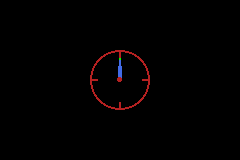
Key points shown in the demo:
compile_timer(1s, true)configures a 1-second overflow interrupt at compile time.- The timer IRQ increments a seconds counter used for hand angles.
ObjAffineSet(...)writes affine matrices each frame to rotate hour/minute/second hands.- Angle literals are used directly in runtime math (
30_deg * hours + 0.5_deg * mins).
Key Input
The GBA has 10 buttons: A, B, L, R, Start, Select, and the 4-direction D-pad.
gba::keypad gives you:
- level checks (
held) - edge checks (
pressed,released) - axis helpers (
xaxis,i_xaxis,yaxis,i_yaxis,lraxis,i_lraxis) - a predefined combo constant named
gba::reset_combo
Reading keys
#include <gba/keyinput>
#include <gba/peripherals>

gba::keypad keys;

// In your game loop:
for (;;) {
    gba::VBlankIntrWait();
    keys = gba::reg_keyinput;  // One sample per frame

    if (keys.held(gba::key_a)) {
        // A is currently held down
    }

    if (keys.pressed(gba::key_b)) {
        // B was just pressed this frame (edge detection)
    }

    if (keys.released(gba::key_start)) {
        // Start was just released this frame
    }
}
Frame update contract
gba::keypad stores previous and current state internally. Each assignment from gba::reg_keyinput updates that state (normally once per frame). This is what powers pressed() and released().
Recommended pattern: call keys = gba::reg_keyinput; exactly once per game frame (usually right before game state needs to be updated).
If you sample multiple times in the same frame, edge checks can appear inconsistent because you advanced the internal history more than once.
The keypad hardware register itself is active-low (0 means pressed), but gba::keypad normalizes this so held(key) reads naturally.
Practical patterns
// One-shot action: only fires on the transition frame.
if (keys.pressed(gba::key_a)) {
    jump();
}

// Release-triggered action: useful for menus and drag/release interactions.
if (keys.released(gba::key_b)) {
    close_menu();
}
D-pad axes
For movement, use the axis helpers. yaxis() uses the mathematical convention where up is positive:
int dx = keys.xaxis();  // -1 (left), 0, or 1 (right)
int dy = keys.yaxis();  // -1 (down), 0, or 1 (up)
These return a tri-state value based on the D-pad. If both left and right are held simultaneously, they cancel out to 0.
Inverted axes
The inverted variants flip the sign. i_xaxis() is useful when your camera or gameplay logic expects right-negative coordinates, and i_yaxis() matches screen coordinates where Y increases downward:
int dx = keys.i_xaxis();  // -1 (right), 0, or 1 (left)
int dy = keys.i_yaxis();  // -1 (up), 0, or 1 (down)

player_x += dx;
player_y += dy;
For most gameplay movement, i_yaxis() is the convenient choice because screen-space Y grows downward.
Shoulder axis
The L and R buttons can also be read as an axis:
int lr = keys.lraxis();    // -1 (L), 0, or 1 (R)
int ilr = keys.i_lraxis(); // -1 (R), 0, or 1 (L)
Key constants
| Constant | Button |
|---|---|
gba::key_a | A |
gba::key_b | B |
gba::key_l | L shoulder |
gba::key_r | R shoulder |
gba::key_start | Start |
gba::key_select | Select |
gba::key_up | D-pad up |
gba::key_down | D-pad down |
gba::key_left | D-pad left |
gba::key_right | D-pad right |
Combos and reset_combo
Use operator| to combine button masks:
auto combo = gba::key_a | gba::key_b;
if (keys.held(combo)) {
    // Both A and B are held
}
stdgba also provides gba::reset_combo, defined as A + B + Select + Start:
if (keys.held(gba::reset_combo)) {
    // Enter your reset path
}
Rationale: this is the long-standing GBA soft-reset convention. Requiring four buttons reduces accidental resets during normal play while still giving a predictable emergency-exit combo.
If you use it for reset, wait until the combo is released before returning to normal flow to avoid immediate retrigger:
if (keys.held(gba::reset_combo)) {
    request_reset();
    do {
        keys = gba::reg_keyinput;
    } while (keys.held(gba::reset_combo));
}
Common Pitfalls
- Sampling
keys = gba::reg_keyinput;multiple times in one frame: this advances history repeatedly and can breakpressed()/released()expectations. - Using
pressed()for continuous movement:pressed()is edge-only, so movement usually belongs onheld()or axis helpers. - Mixing
yaxis()and screen-space coordinates:yaxis()treats up as+1; usei_yaxis()when down-positive screen coordinates are what you want. - Forgetting that
i_xaxis()is also available: if horizontal math is inverted in your coordinate system, usei_xaxis()instead of manually negatingxaxis(). - Forgetting release-wait after reset combo handling: without the short hold-until-release loop, reset paths can retrigger immediately.
- Treating the hardware register as active-high in custom low-level code:
KEYINPUTis active-low; prefergba::keypadunless you intentionally handle bit inversion yourself.
tonclib comparison
| stdgba | tonclib |
|---|---|
keys = gba::reg_keyinput; | key_poll(); |
keys.held(gba::key_a) | key_is_down(KEY_A) |
keys.pressed(gba::key_a) | key_hit(KEY_A) |
keys.released(gba::key_a) | key_released(KEY_A) |
keys.xaxis() | key_tri_horz() |
keys.i_xaxis() | -key_tri_horz() |
keys.yaxis() | key_tri_vert() |
keys.i_yaxis() | -key_tri_vert() |
keys.held(gba::reset_combo) | key_is_down(KEY_A|KEY_B|KEY_SELECT|KEY_START) |
key_tri_vert() and keys.yaxis() both treat up as positive. For screen-space movement where Y increases downward, use keys.i_yaxis().
For keypad API details (gba::keypad, key masks, edge and axis methods), see book/src/reference/keypad.md.
For keypad register details (including active-low hardware semantics), see book/src/reference/peripherals/keypad.md.
Demo: Visual button layout
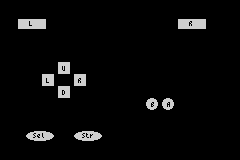
This demo renders a simple GBA-style button layout and updates each button colour from pressed(), released(), and held() state:
#include <gba/bios>
#include <gba/color>
#include <gba/interrupt>
#include <gba/keyinput>
#include <gba/shapes>
#include <gba/video>

#include <array>
#include <cstring>

using namespace gba::shapes;
using gba::operator""_clr;

namespace {

    // D-pad directional buttons: 16x16 squares with direction labels
    constexpr auto dpad_up_button = sprite_16x16(rect(2, 2, 12, 12), palette_idx(0), text(6, 6, "U"));

    constexpr auto dpad_down_button = sprite_16x16(rect(2, 2, 12, 12), palette_idx(0), text(6, 6, "D"));

    constexpr auto dpad_left_button = sprite_16x16(rect(2, 2, 12, 12), palette_idx(0), text(6, 6, "L"));

    constexpr auto dpad_right_button = sprite_16x16(rect(2, 2, 12, 12), palette_idx(0), text(6, 6, "R"));

    // A button: 16x16 circle with label
    constexpr auto a_button = sprite_16x16(circle(8.0, 8.0, 6.0), // Filled circle
                                           palette_idx(0), text(7, 6, "A"));

    // B button: 16x16 circle with label
    constexpr auto b_button = sprite_16x16(circle(8.0, 8.0, 6.0), // Filled circle
                                           palette_idx(0), text(7, 6, "B"));

    // L button: 32x16 wide rectangle
    constexpr auto l_button = sprite_32x16(rect(2, 3, 28, 10), palette_idx(0), text(13, 5, "L"));

    // R button: 32x16 wide rectangle
    constexpr auto r_button = sprite_32x16(rect(2, 3, 28, 10), palette_idx(0), text(13, 5, "R"));

    // Start button: 32x16 oval with label
    constexpr auto start_button = sprite_32x16(oval(2, 3, 28, 10), palette_idx(0), text(10, 5, "Str"));

    // Select button: 32x16 oval with label
    constexpr auto select_button = sprite_32x16(oval(2, 3, 28, 10), palette_idx(0), text(9, 5, "Sel"));

    // Controller layout: buttons with different shapes
    struct ButtonDef {
        int obj_index;   // Which OAM object
        gba::key mask;   // Associated key mask
        int sprite_type; // 0=dpad_up, 1=dpad_down, 2=dpad_left, 3=dpad_right, 4=a, 5=b, 6=l, 7=r, 8=start, 9=select
    };

    // Map out the 10 GBA buttons in OAM space
    std::array<ButtonDef, 10> buttons{
        {
         {0, gba::key_up, 0},     // Up - dpad_up
            {1, gba::key_down, 1},   // Down - dpad_down
            {2, gba::key_left, 2},   // Left - dpad_left
            {3, gba::key_right, 3},  // Right - dpad_right
            {4, gba::key_a, 4},      // A - a_button
            {5, gba::key_b, 5},      // B - b_button
            {6, gba::key_l, 6},      // L - l_button
            {7, gba::key_r, 7},      // R - r_button
            {8, gba::key_start, 8},  // Start - start_button
            {9, gba::key_select, 9}, // Select - select_button
        }
    };

    // Position data for each button (arranged in a GBA-like layout)
    // Adjusted for larger sprite sizes
    struct Position {
        int x, y;
    };

    std::array<Position, 10> positions{
        {
         {56, 60},  // Up - dpad top
            {56, 84},  // Down - dpad bottom
            {40, 72},  // Left - dpad left
            {72, 72},  // Right - dpad right (meet in middle)
            {160, 96}, // A - circle
            {144, 96}, // B - circle
            {16, 16},  // L - left shoulder
            {176, 16}, // R - right shoulder
            {72, 128}, // Start - bottom left
            {24, 128}, // Select - bottom center
        }
    };

} // namespace

int main() {
    gba::irq_handler = {};
    gba::reg_dispstat = {.enable_irq_vblank = true};
    gba::reg_ie = {.vblank = true};
    gba::reg_ime = true;

    // Video mode 0, objects enabled
    gba::reg_dispcnt = {
        .video_mode = 0,
        .linear_obj_tilemap = true,
        .enable_obj = true,
    };

    // Set up palette banks (shared across all button types)
    // Palette 0: untouched (gray)
    gba::pal_obj_bank[0][0] = "#888888"_clr; // background
    gba::pal_obj_bank[0][1] = "#CCCCCC"_clr; // untouched button
    gba::pal_obj_bank[0][2] = "#999999"_clr; // text placeholder

    // Palette 1: pressed (bright green)
    gba::pal_obj_bank[1][0] = "#888888"_clr;
    gba::pal_obj_bank[1][1] = "#00FF00"_clr; // pressed (bright green)
    gba::pal_obj_bank[1][2] = "#FFFFFF"_clr; // text

    // Palette 2: released (red)
    gba::pal_obj_bank[2][0] = "#888888"_clr;
    gba::pal_obj_bank[2][1] = "#FF0000"_clr; // released (red)
    gba::pal_obj_bank[2][2] = "#FFFFFF"_clr; // text

    // Palette 3: held (medium green)
    gba::pal_obj_bank[3][0] = "#888888"_clr;
    gba::pal_obj_bank[3][1] = "#00AA00"_clr; // held (medium green)
    gba::pal_obj_bank[3][2] = "#FFFFFF"_clr; // text

    auto* objVRAM = gba::memory_map(gba::mem_vram_obj);
    auto* vramPtr = reinterpret_cast<std::uint8_t*>(objVRAM);

    // Copy all button sprite shapes to VRAM and track tile indices
    std::uint16_t baseTileIdx = gba::tile_index(objVRAM);
    std::uint16_t tileOffset = 0;

    // D-pad buttons (8x8 squares, each with its own label)
    std::memcpy(vramPtr + tileOffset, dpad_up_button.data(), dpad_up_button.size());
    const auto dpad_up_tile = baseTileIdx + (tileOffset / 32);
    tileOffset += dpad_up_button.size();

    std::memcpy(vramPtr + tileOffset, dpad_down_button.data(), dpad_down_button.size());
    const auto dpad_down_tile = baseTileIdx + (tileOffset / 32);
    tileOffset += dpad_down_button.size();

    std::memcpy(vramPtr + tileOffset, dpad_left_button.data(), dpad_left_button.size());
    const auto dpad_left_tile = baseTileIdx + (tileOffset / 32);
    tileOffset += dpad_left_button.size();

    std::memcpy(vramPtr + tileOffset, dpad_right_button.data(), dpad_right_button.size());
    const auto dpad_right_tile = baseTileIdx + (tileOffset / 32);
    tileOffset += dpad_right_button.size();

    // A button (8x8 circle)
    std::memcpy(vramPtr + tileOffset, a_button.data(), a_button.size());
    const auto a_tile = baseTileIdx + (tileOffset / 32);
    tileOffset += a_button.size();

    // B button (8x8 circle)
    std::memcpy(vramPtr + tileOffset, b_button.data(), b_button.size());
    const auto b_tile = baseTileIdx + (tileOffset / 32);
    tileOffset += b_button.size();

    // L button (16x8 rectangle)
    std::memcpy(vramPtr + tileOffset, l_button.data(), l_button.size());
    const auto l_tile = baseTileIdx + (tileOffset / 32);
    tileOffset += l_button.size();

    // R button (16x8 rectangle)
    std::memcpy(vramPtr + tileOffset, r_button.data(), r_button.size());
    const auto r_tile = baseTileIdx + (tileOffset / 32);
    tileOffset += r_button.size();

    // Start button (16x8 oval)
    std::memcpy(vramPtr + tileOffset, start_button.data(), start_button.size());
    const auto start_tile = baseTileIdx + (tileOffset / 32);
    tileOffset += start_button.size();

    // Select button (16x8 oval)
    std::memcpy(vramPtr + tileOffset, select_button.data(), select_button.size());
    const auto select_tile = baseTileIdx + (tileOffset / 32);
    tileOffset += select_button.size();

    // Store tile indices for use in rendering
    std::array<std::uint16_t, 10> spritesTiles{
        {
         dpad_up_tile, dpad_down_tile,
         dpad_left_tile, dpad_right_tile,
         a_tile, b_tile,
         l_tile, r_tile,
         start_tile, select_tile,
         }
    };

    // Store sprite data for each button (sprite, tile)
    struct SpriteData {
        gba::object obj;
        int x, y;
    };
    std::array<SpriteData, 10> buttonSprites;

    // Initialize all button sprites once
    for (int i = 0; i < 10; ++i) {
        const auto& btn = buttons[i];
        const auto& pos = positions[i];

        gba::object obj;

        switch (btn.sprite_type) {
            case 0: // D-pad Up
                obj = dpad_up_button.obj(spritesTiles[0]);
                break;
            case 1: // D-pad Down
                obj = dpad_down_button.obj(spritesTiles[1]);
                break;
            case 2: // D-pad Left
                obj = dpad_left_button.obj(spritesTiles[2]);
                break;
            case 3: // D-pad Right
                obj = dpad_right_button.obj(spritesTiles[3]);
                break;
            case 4: // A button
                obj = a_button.obj(spritesTiles[4]);
                break;
            case 5: // B button
                obj = b_button.obj(spritesTiles[5]);
                break;
            case 6: // L button
                obj = l_button.obj(spritesTiles[6]);
                break;
            case 7: // R button
                obj = r_button.obj(spritesTiles[7]);
                break;
            case 8: // Start button
                obj = start_button.obj(spritesTiles[8]);
                break;
            case 9: // Select button
                obj = select_button.obj(spritesTiles[9]);
                break;
            default: obj = dpad_up_button.obj(spritesTiles[0]);
        }

        obj.x = pos.x;
        obj.y = pos.y;
        obj.palette_index = 0; // Start with palette 0 (untouched)

        buttonSprites[i] = {obj, pos.x, pos.y};
        gba::obj_mem[i] = obj;
    }

    // Disable remaining OAM entries
    for (int i = 10; i < 128; ++i) {
        gba::obj_mem[i] = {.disable = true};
    }

    gba::keypad keys;

    while (true) {
        gba::VBlankIntrWait();

        keys = gba::reg_keyinput;

        // Update each button's palette based on current state
        for (int i = 0; i < 10; ++i) {
            const auto& btn = buttons[i];
            auto& sprite = buttonSprites[i];

            // Determine palette based on key state
            if (keys.pressed(btn.mask)) {
                // Just pressed this frame (bright green)
                sprite.obj.palette_index = 1;
            } else if (keys.released(btn.mask)) {
                // Just released this frame (red)
                sprite.obj.palette_index = 2;
            } else if (keys.held(btn.mask)) {
                // Currently held (medium green)
                sprite.obj.palette_index = 3;
            } else {
                // Not held (gray)
                sprite.obj.palette_index = 0;
            }

            gba::obj_mem[i] = sprite.obj;
        }
    }
}
Video Modes
The GBA has 6 video modes (0-5), split into two categories:
- Tile modes (0-2) - the display is built from 8x8 pixel tiles arranged on background layers
- Bitmap modes (3-5) - the display is a framebuffer you write pixels to directly
Setting the video mode
#include <gba/peripherals>

// Mode 3: 240x160 bitmap, 15-bit colour, 1 layer
gba::reg_dispcnt = { .video_mode = 3, .enable_bg2 = true };

// Mode 0: 4 tile backgrounds, no rotation
gba::reg_dispcnt = {
    .video_mode = 0,
    .enable_bg0 = true,
    .enable_bg1 = true,
};
Mode summary
| Mode | Type | BG layers | Resolution | Colours |
|---|---|---|---|---|
| 0 | Tile | BG0-BG3 (all regular) | Up to 512x512 | 4bpp or 8bpp |
| 1 | Tile | BG0-BG1 regular, BG2 affine | Up to 1024x1024 | 4bpp/8bpp + 8bpp |
| 2 | Tile | BG2-BG3 (both affine) | Up to 1024x1024 | 8bpp |
| 3 | Bitmap | BG2 | 240x160 | 15-bit direct |
| 4 | Bitmap | BG2 (page flip) | 240x160 | 8-bit indexed |
| 5 | Bitmap | BG2 (page flip) | 160x128 | 15-bit direct |
Mode 3: the simplest mode
Mode 3 is a raw 240x160 framebuffer at 0x06000000. Each pixel is a 15-bit colour:
#include <gba/bios>
#include <gba/interrupt>
#include <gba/video>

int main() {
    gba::irq_handler = {};
    gba::reg_dispstat = {.enable_irq_vblank = true};
    gba::reg_ie = {.vblank = true};
    gba::reg_ime = true;

    gba::reg_dispcnt = {.video_mode = 3, .enable_bg2 = true};

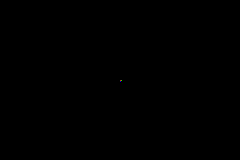
    // Draw a red pixel at (120, 80) - center of screen
    gba::mem_vram[120 + 80 * 240] = 0x001F;

    // Draw a green pixel one to the right
    gba::mem_vram[121 + 80 * 240] = 0x03E0;

    // Draw a blue pixel one below
    gba::mem_vram[120 + 81 * 240] = 0x7C00;

    while (true) {
        gba::VBlankIntrWait();
    }
}
This is the easiest mode to learn with, but it uses the most VRAM (75 KB of the available 96 KB), leaving little room for sprites or other data.
Tile modes for games
Most GBA games use mode 0 or mode 1. Tiles are memory-efficient (a 256x256 background uses only ~2 KB for the map + shared tile data), and the hardware handles scrolling, flipping, and palette lookup in zero CPU time.
See Tiles & Maps for details on tile-based rendering.
Colours & Palettes
The GBA uses 16-bit colours: 5 bits each for red, green, and blue in bits 0-14.
"..."_clr lives in gba::literals and accepts both hex ("#RRGGBB") and CSS web colour names (for example "cornflowerblue").
Named-colour list: MDN CSS named colors.
Colour format
Bit:  15      14-10  9-5    4-0
      grn_lo  Blue   Green  Red
Most software treats bit 15 as unused and works with 15-bit colour (5-5-5). This is perfectly fine for general use.
#include <gba/video>

// Write colours to background palette
gba::pal_bg_mem[0] = { .red = 0 };                  // Black (background colour)
gba::pal_bg_mem[1] = { .red = 31 };                  // Red   (5 bits max = 31)
gba::pal_bg_mem[2] = { .green = 31 };                // Green (5-bit, range 0-31)
gba::pal_bg_mem[3] = { .blue = 31 };                 // Blue
gba::pal_bg_mem[4] = { .red = 31, .green = 31, .blue = 31 }; // White

// Hex colour literals (grn_lo is derived from the green channel)
using namespace gba::literals;
gba::pal_bg_mem[5] = "#FF8040"_clr;
gba::pal_bg_mem[6] = "cornflowerblue"_clr;
Here are several colours displayed as palette swatches using Mode 0 tiles:

#include <gba/bios>
#include <gba/interrupt>
#include <gba/video>

static void fill_tile_solid(int tile_idx) {
    // Fill every nibble with palette index 1 (0x11111111 per row)
    gba::mem_tile_4bpp[0][tile_idx] = {
        0x11111111, 0x11111111, 0x11111111, 0x11111111, 0x11111111, 0x11111111, 0x11111111, 0x11111111,
    };
}

int main() {
    gba::irq_handler = {};
    gba::reg_dispstat = {.enable_irq_vblank = true};
    gba::reg_ie = {.vblank = true};
    gba::reg_ime = true;

    gba::reg_dispcnt = {
        .video_mode = 0,
        .enable_bg0 = true,
    };

    // Use charblock 0 for tiles, screenblock 31 for map
    gba::reg_bgcnt[0] = {.screenblock = 31};

    // Create a solid tile (palette index 1 everywhere)
    fill_tile_solid(1);

    // Set up 8 color swatches across the top row
    using namespace gba;
    using namespace gba::literals;
    pal_bg_bank[0][1] = "red"_clr;            // CSS: red
    pal_bg_bank[1][1] = "lime"_clr;           // CSS: lime (pure green)
    pal_bg_bank[2][1] = "blue"_clr;           // CSS: blue
    pal_bg_bank[3][1] = "gold"_clr;           // CSS: gold
    pal_bg_bank[4][1] = "cyan"_clr;           // CSS: cyan
    pal_bg_bank[5][1] = "magenta"_clr;        // CSS: magenta
    pal_bg_bank[6][1] = "white"_clr;          // CSS: white
    pal_bg_bank[7][1] = "cornflowerblue"_clr; // CSS: cornflowerblue

    // Background color (palette 0, index 0)
    pal_bg_mem[0] = {.red = 2, .green = 2, .blue = 4};

    // Place 3x3 blocks of the solid tile across screen row 8-10
    for (int swatch = 0; swatch < 8; ++swatch) {
        for (int dy = 0; dy < 3; ++dy) {
            for (int dx = 0; dx < 3; ++dx) {
                int map_x = 1 + swatch * 4 + dx;
                int map_y = 8 + dy;
                mem_se[31][map_x + map_y * 32] = {
                    .tile_index = 1,
                    .palette_index = static_cast<unsigned short>(swatch),
                };
            }
        }
    }

    while (true) {
        gba::VBlankIntrWait();
    }
}
Palette memory layout
The GBA has 512 palette entries total (1 KB), split evenly:
| Region | Address | Entries | Used by |
|---|---|---|---|
mem_pal_bg | 0x05000000 | 256 | Background tiles |
mem_pal_obj | 0x05000200 | 256 | Sprites (objects) |
In 4bpp (16-colour) mode, the 256 entries are organised as 16 sub-palettes of 16 colours each. Each tile chooses which sub-palette to use.
In 8bpp (256-colour) mode, all 256 entries form one large palette.
Palette index 0
Palette index 0 is special: it is the transparent colour for both backgrounds and sprites. For the very first background palette (sub-palette 0, index 0), it also serves as the screen backdrop colour - the colour you see when no background or sprite covers a pixel.
// Set the backdrop to dark blue
gba::pal_bg_mem[0] = { .blue = 16 };
Bit 15 and hardware blending
Bit 15 (grn_lo) is usually safe to ignore for everyday palette work.
When colour effects are enabled (brighten, darken, or alpha blend), hardware treats green as an internal 6-bit value and may use grn_lo. This can create hardware-visible differences that many emulators do not reproduce.
For full details, demo code, and emulator-vs-hardware screenshots, see Advanced: Green Low Bit (grn_lo).
tonclib comparison
Colour construction
| stdgba | tonclib | Notes |
|---|---|---|
{ .red = r, .green = g, .blue = b } | RGB15(r, g, b) | 5-bit channels (0-31) |
"#RRGGBB"_clr | RGB8(r, g, b) | 8-bit channels (0-255) |
RGB8 and "#RRGGBB"_clr are direct equivalents - both accept 8-bit per channel values and truncate to 5 bits.
Named colour constants
tonclib defines a small set of CLR_* constants for the primary colours. The stdgba equivalents use CSS web colour names with _clr:
| tonclib | stdgba | Value |
|---|---|---|
CLR_BLACK | "black"_clr | #000000 |
CLR_RED | "red"_clr | #FF0000 |
CLR_LIME | "lime"_clr | #00FF00 |
CLR_YELLOW | "yellow"_clr | #FFFF00 |
CLR_BLUE | "blue"_clr | #0000FF |
CLR_MAG | "magenta"_clr or "fuchsia"_clr | #FF00FF |
CLR_CYAN | "cyan"_clr or "aqua"_clr | #00FFFF |
CLR_WHITE | "white"_clr | #FFFFFF |
CLR_MAROON | "maroon"_clr | #800000 |
CLR_GREEN | "green"_clr | #008000 |
CLR_NAVY | "navy"_clr | #000080 |
CLR_TEAL | "teal"_clr | #008080 |
CLR_PURPLE | "purple"_clr | #800080 |
CLR_OLIVE | "olive"_clr | #808000 |
CLR_ORANGE | "orange"_clr | #FFA500 |
CLR_GRAY / CLR_GREY | "gray"_clr or "grey"_clr | #808080 |
CLR_SILVER | "silver"_clr | #C0C0C0 |
stdgba’s CSS colour set is a strict superset - all 147 CSS Color Level 4 names are supported, including colours like "cornflowerblue"_clr that have no tonclib constant.
Tiles & Maps
Tile modes (0-2) are the backbone of GBA graphics. The display hardware composites 8x8 pixel tiles from VRAM, using a tilemap to arrange them into backgrounds. This is extremely memory-efficient and the scrolling is handled entirely by hardware.
How it works
- Tile data (the pixel art) is stored in VRAM “character base blocks”
- Tilemap (which tile goes where) is stored in VRAM “screen base blocks”
- Palette maps pixel indices to colours
- The hardware reads the map, looks up each tile, applies the palette, and draws the scanline
Loading tile data
Tile graphics are usually pre-converted at build time and copied into VRAM. Each 8x8 tile in 4bpp mode is 32 bytes (4 bits per pixel, 64 pixels):
#include <gba/peripherals>
#include <gba/dma>
#include <gba/video>

// Assuming tile_data is a const array in ROM
extern const unsigned short tile_data[];
extern const unsigned int tile_data_size;

// Copy tile data to character base block 0 (0x06000000)
gba::reg_dma[3] = gba::dma::copy(
    tile_data,
    gba::memory_map(gba::mem_vram_bg),
    tile_data_size / 4
);
Setting up a background
// Configure BG0: 256x256, 4bpp tiles
// Character base = 0 (tile data at 0x06000000)
// Screen base = 31 (map at 0x0600F800)
gba::reg_bgcnt[0] = {
    .charblock = 0,
    .screenblock = 31,
    .size = 0,  // 256x256 (32x32 tiles)
};

// Scroll BG0
gba::reg_bgofs[0][0] = 0;
gba::reg_bgofs[0][1] = 0;
Background sizes
| Size value | Dimensions (pixels) | Dimensions (tiles) |
|---|---|---|
| 0 | 256x256 | 32x32 |
| 1 | 512x256 | 64x32 |
| 2 | 256x512 | 32x64 |
| 3 | 512x512 | 64x64 |
Scrolling
Scrolling is a single register write per axis:
gba::reg_bgofs[0][0] = scroll_x; // BG0 horizontal offset
gba::reg_bgofs[0][1] = scroll_y; // BG0 vertical offset
The hardware wraps seamlessly at the background boundaries. A 256x256 background scrolled past x=255 wraps back to x=0 - perfect for side-scrolling games.
Here is a scrollable checkerboard built from two solid tiles:
#include <gba/interrupt>
#include <gba/video>

int main() {
    gba::irq_handler = {};
    gba::reg_dispstat = {.enable_irq_vblank = true};
    gba::reg_ie = {.vblank = true};
    gba::reg_ime = true;

    gba::reg_dispcnt = {.video_mode = 0, .enable_bg0 = true};
    gba::reg_bgcnt[0] = {.screenblock = 31};

    // Palette
    gba::pal_bg_mem[0] = {.red = 2, .green = 2, .blue = 6};
    gba::pal_bg_bank[0][1] = {.red = 10, .green = 14, .blue = 20};
    gba::pal_bg_bank[0][2] = {.red = 4, .green = 6, .blue = 12};

    // Tile 1: solid light (palette index 1)
    gba::mem_tile_4bpp[0][1] = {
        0x11111111, 0x11111111, 0x11111111, 0x11111111, 0x11111111, 0x11111111, 0x11111111, 0x11111111,
    };

    // Tile 2: solid dark (palette index 2)
    gba::mem_tile_4bpp[0][2] = {
        0x22222222, 0x22222222, 0x22222222, 0x22222222, 0x22222222, 0x22222222, 0x22222222, 0x22222222,
    };

    // Fill the 32x32 tilemap with a checkerboard
    for (int ty = 0; ty < 32; ++ty)
        for (int tx = 0; tx < 32; ++tx)
            gba::mem_se[31][tx + ty * 32] = {
                .tile_index = static_cast<unsigned short>(((tx ^ ty) & 1) ? 2 : 1),
            };

    int scroll_x = 0, scroll_y = 0;

    while (true) {
        gba::VBlankIntrWait();

        ++scroll_x;
        ++scroll_y;

        gba::reg_bgofs[0][0] = static_cast<short>(scroll_x);
        gba::reg_bgofs[0][1] = static_cast<short>(scroll_y);
    }
}

Sprites (Objects)
The GBA calls sprites “objects” (OBJ). Up to 128 sprites can be displayed simultaneously, each with independent position, size, palette, flipping, and priority. The hardware composites sprites automatically.
For field-by-field API details, see gba::object and gba::object_affine.
OAM (Object Attribute Memory)
Sprite attributes are stored in OAM at 0x07000000. Each entry is 8 bytes with three 16-bit attribute words (plus an affine parameter slot shared across entries).
#include <gba/video>

// Place sprite 0 at position (120, 80), using tile 0
gba::obj_mem[0] = {
    .y = 80,
    .x = 120,
    .tile_index = 0,
};
Important: OAM should only be written during VBlank or HBlank. Writing during the active display period can cause visual glitches. Use DMA or a shadow buffer for safe updates.
Sprite sizes
Sprites can be various sizes by combining shape and size fields:
| Shape | Size 0 | Size 1 | Size 2 | Size 3 |
|---|---|---|---|---|
| Square | 8x8 | 16x16 | 32x32 | 64x64 |
| Wide | 16x8 | 32x8 | 32x16 | 64x32 |
| Tall | 8x16 | 8x32 | 16x32 | 32x64 |
Sprite tile data
Sprite tiles live in the lower portion of VRAM (starting at 0x06010000 in tile modes). Like background tiles, they can be 4bpp (16 colours) or 8bpp (256 colours) and use the object palette (pal_obj_mem).
1D vs 2D mapping
The .linear_obj_tilemap field in reg_dispcnt controls how multi-tile sprites index their tile data:
- 1D mapping (
linear_obj_tilemap = true): tiles are laid out sequentially in memory. A 16x16 sprite (4 tiles) uses tiles N, N+1, N+2, N+3. - 2D mapping (
linear_obj_tilemap = false): tiles are laid out in a 32-tile-wide grid. A 16x16 sprite uses tiles at grid positions.
Most games use 1D mapping - it is simpler and wastes less VRAM:
gba::reg_dispcnt = {
    .video_mode = 0,
    .linear_obj_tilemap = true,
    .enable_bg0 = true,
    .enable_obj = true,
};
Hiding a sprite
Set the object disable flag to remove a sprite from the display without deleting its data:
gba::obj_mem[0] = { .disable = true };
Iterators and ranges can also be used to hide multiple sprites at once:
// Hides all sprites
std::ranges::fill(gba::obj_mem, gba::object{ .disable = true });
tonclib comparison
| stdgba | tonclib |
|---|---|
gba::obj_mem[0] = { .y = 80, .x = 120, ... }; | obj_set_attr(&oam_mem[0], ...) |
gba::pal_obj_mem[n] = color; | pal_obj_mem[n] = color; |
Text Rendering
stdgba provides a 4bpp BG text-layer renderer.
The core goal is to render formatted strings efficiently - including typewriter effects - without a full-screen redraw each frame.
Features
- Bitmap fonts embedded from BDF files at compile time via
<gba/embed>. - Compile-time font variant baking:
with_shadow<dx, dy>andwith_outline<thickness>. - Stream/tokenizer support for incremental rendering:
- C-string tokenizer streams (
cstr_stream). - Generator-backed streams from
<gba/format>viastream(gen, ...).
- C-string tokenizer streams (
- Word wrapping using a lookahead to the next break character.
- Incremental rendering via
make_cursor(...)andnext_visible()for typewriter effects. - Bitplane palette profiles for 2-colour, 3-colour, and full-colour (up to 15 colours) text.
- Inline colour escape sequences for per-character palette switching in full-colour mode.
Quick start
The demo below embeds 9x18.bdf, configures the bitplane palette, and draws one visible glyph per frame.
#include <gba/bios>
#include <gba/embed>
#include <gba/format>
#include <gba/interrupt>
#include <gba/text>

#include <array>

int main() {
    using namespace gba::literals;

    static constexpr auto font = gba::text::with_shadow<1, 1>(gba::embed::bdf([] {
        return std::to_array<unsigned char>({
#embed "9x18.bdf"
        });
    }));
    static constexpr auto fmt = "The frame is: {value}"_fmt;

    gba::irq_handler = {};
    gba::reg_dispstat = {.enable_irq_vblank = true};
    gba::reg_ie = {.vblank = true};
    gba::reg_ime = true;

    gba::reg_dispcnt = {.video_mode = 0, .enable_bg0 = true};
    gba::reg_bgcnt[0] = {.screenblock = 31};

    constexpr auto config = gba::text::bitplane_config{
        .profile = gba::text::bitplane_profile::two_plane_three_color,
        .palbank_0 = 1,
        .palbank_1 = 2,
        .start_index = 1,
    };

    gba::text::set_theme(config, {
                                      .background = "#304060"_clr,
                                      .foreground = "white"_clr,
                                      .shadow = "#102040"_clr,
                                  });
    gba::pal_bg_mem[0] = "#304060"_clr;

    unsigned int frame = 0;

    gba::text::linear_tile_allocator alloc{.next_tile = 1, .end_tile = 512};
    using layer_type = gba::text::bg4bpp_text_layer<240, 160>;
    static layer_type::cell_state_map cell_state{};
    layer_type layer{31, config, alloc, cell_state};

    gba::text::stream_metrics metrics{
        .letter_spacing_px = 1,
        .line_spacing_px = 2,
        .tab_width_px = 32,
        .wrap_width_px = 220,
    };

    auto make_cursor = [&] {
        auto gen = fmt.generator("value"_arg = [&] { return frame; });
        auto s = gba::text::stream(gen, font, metrics);
        return layer.make_cursor(font, s, 0, 0, metrics);
    };

    auto cursor = make_cursor();

    while (true) {
        gba::VBlankIntrWait();
        ++frame;

        if (!cursor.next_visible() && frame % 120 == 0) {
            alloc = {.next_tile = 1, .end_tile = 512};
            layer = layer_type{31, config, alloc, cell_state};
            cursor = make_cursor();
        }
    }
}
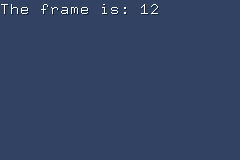
Bitplane profiles
bg4bpp_text_layer<Width, Height> multiplexes multiple palette layers onto 4bpp VRAM tiles using a mixed-radix
encoding scheme. Choose the profile that matches how many colour roles your text needs.
| Profile | Planes | Palette entries | Colour roles |
|---|---|---|---|
two_plane_binary | 2 | 4 | background, foreground |
two_plane_three_color | 2 | 9 | background, foreground, shadow |
three_plane_binary | 3 | 8 | background, foreground |
one_plane_full_color | 1 | 16 | nibble = palette index directly |
two_plane_three_color is the most common choice: it provides foreground, shadow (or
outline decoration), and background using only two VRAM tiles worth of palette space
per 8x8 cell.
one_plane_full_color maps nibble values directly to palette entries, giving up to 15
distinct colours at the cost of one VRAM tile per cell (no cell sharing).
Palette configuration
A bitplane_config binds a profile to concrete palette banks and a starting index:
constexpr auto config = gba::text::bitplane_config{
    .profile    = gba::text::bitplane_profile::two_plane_three_color,
    .palbank_0  = 1,   // plane 0 uses palette bank 1
    .palbank_1  = 2,   // plane 1 uses palette bank 2
    .start_index = 1,  // first occupied entry within each bank
};
Apply colours to palette RAM with set_theme:
gba::text::set_theme(config, {
    .background = "#304060"_clr,
    .foreground = "white"_clr,
    .shadow     = "#102040"_clr,
});
set_theme fills all active planes in one call. Call it again any time to change the
entire colour scheme without re-rendering text.
Font variants
Font variants bake visual effects into the glyph bitmap data at compile time. The renderer then uses a separate decoration bitmap for the shadow/outline colour role, so no extra per-effect bitmap generation is done at runtime.
Drop shadow
// 1px shadow shifted right and down
static constexpr auto font_shadowed = gba::text::with_shadow<1, 1>(base_font);
The template arguments are <ShadowDX, ShadowDY>. The shadow pixels are only drawn where
they do not overlap the foreground glyph, so they never occlude text.
Outline
// 1px outline around every glyph
static constexpr auto font_outlined = gba::text::with_outline<1>(base_font);
The template argument is <OutlineThickness>. Each glyph is expanded by thickness
pixels in every direction; the outline pixels form a separate decoration mask that is
drawn in the shadow colour role.
Both variants return a new font type compatible with all drawing functions - pass them wherever a plain font is accepted.
Streams
A stream wraps a text source and exposes single-character iteration plus a lookahead used by the word-wrap algorithm.
C-string stream
gba::text::stream_metrics metrics{.letter_spacing_px = 1};
auto s = gba::text::cstr_stream{gba::text::cstr_source{"HP: 42/99"}};
Format generator stream
static constexpr auto fmt = "HP: {hp}/{max}"_fmt;

auto gen = fmt.generator("hp"_arg = hp, "max"_arg = max_hp);
auto s   = gba::text::stream(gen, font, metrics);
The generator is copied for lookahead, so it must be copyable (all format generators are).
There is currently no stream(const char*, ...) convenience overload; use
cstr_stream{cstr_source{...}} for C-strings.
Inline colour escapes
In one_plane_full_color mode, embed palette switches directly in the text using
the literal escape sequence \x1B followed by a hex digit (0-F).
// Hex digit = palette nibble: 0-9 = nibbles 0-9, A-F = nibbles 10-15
std::string msg = "Status: \x1B2Error\x1B3 - \x1B1OK";
//                         ^^         ^^       ^^
//                         red        yellow   white
The escape code is consumed silently; it never appears as text and does not affect glyph
counts or word-wrap measurements. The active nibble resets to 1 (foreground) at the
start of each draw_stream or cursor call.
See Full-colour mode for how to configure the palette and the layer
to use one_plane_full_color.
Drawing
draw_stream - batch rendering
Renders a full stream in one call, with layout, word wrapping, and optional character limit for partial reveals:
gba::text::stream_metrics metrics{
    .letter_spacing_px = 1,
    .line_spacing_px   = 2,
    .tab_width_px      = 32,
    .wrap_width_px     = 220,
};

// Draw everything
auto count = layer.draw_stream(font, "HP: 42/99", /*x=*/8, /*y=*/16, metrics);

// Draw only the first 10 characters (typewriter snapshot)
auto count = layer.draw_stream(font, "HP: 42/99", 8, 16, metrics, /*max_chars=*/10);
Returns the number of emitted characters (including whitespace/newlines). Inline colour escape sequences are consumed and are not included in the count.
draw_char - single glyph
// Returns the advance width in pixels
auto advance = layer.draw_char(font, static_cast<unsigned int>('A'), pen_x, baseline_y);
make_cursor + cursor object - incremental typewriter
make_cursor(...) returns a cursor object that draws one character per next() call,
maintaining cursor position between
calls. Use next_visible() to skip whitespace and advance the cursor in the same call,
so a typewriter effect never wastes a frame on a space:
auto cursor = layer.make_cursor(font, s, /*start_x=*/0, /*start_y=*/0, metrics);

// In the update loop - one visible glyph per frame:
if (!cursor.next_visible()) {
    // stream exhausted - restart or do something else
}
The cursor also exposes:
| Method | Description |
|---|---|
next() | Draws the next character step; returns true while characters remain |
next_visible() | Draws the next non-whitespace character; skips layout whitespace in one call |
emitted() | Total processed characters so far |
done() | true when the stream is exhausted |
operator()() | Shorthand for next() |
To restart a typewriter sequence, re-create the layer (to clear tile state) and construct a fresh cursor:
// Reset tile allocator and layer, then create a new cursor
alloc = {.next_tile = 1, .end_tile = 512};
layer = layer_type{31, config, alloc, cell_state};
cursor = layer.make_cursor(font, new_stream, 0, 0, metrics);
Full-colour mode
one_plane_full_color maps nibble values directly to palette entries, giving access to
up to 15 distinct foreground colours in a single bg4bpp_text_layer.
constexpr auto config = gba::text::bitplane_config{
    .profile    = gba::text::bitplane_profile::one_plane_full_color,
    .palbank_0  = 3,
    .start_index = 0,   // must be 0 so nibble 0 = transparent
};
Inline colour escapes
Use the text-format palette extension (:pal) to emit inline colour escapes in generated text
(see Streams – Inline colour escapes above for the escape semantics).
At present, the :pal argument is emitted as a single character and decoded as a hex digit,
so pass '1'..'9' or 'A'..'F' ('0' remains reserved for transparent).
using namespace gba::literals;

constexpr gba::text::text_format<"HP {fg:pal}{hp}/{max}"> fmt{};
auto gen = fmt.generator("fg"_arg = '2', "hp"_arg = hp, "max"_arg = max_hp);
auto s = gba::text::stream(gen, font, metrics);
Make sure the corresponding palette entries are populated. set_theme fills nibbles
1 (foreground) and 2 (shadow); write additional entries directly:
gba::text::set_theme(config, {
    .background = {},             // nibble 0 = transparent
    .foreground = "white"_clr,   // nibble 1
    .shadow     = "#FF4444"_clr, // nibble 2 -- repurposed as accent red
});

// Extra colours beyond the three theme roles
gba::pal_bg_mem[config.palbank_0 * 16 + 3] = "#FFFF00"_clr; // nibble 3 = yellow
gba::pal_bg_mem[config.palbank_0 * 16 + 4] = "#88FF88"_clr; // nibble 4 = green
API reference
bitplane_config
| Field | Type | Description |
|---|---|---|
profile | bitplane_profile | Plane/colour role layout |
palbank_0 | unsigned char | Palette bank for plane 0 (255 = unused) |
palbank_1 | unsigned char | Palette bank for plane 1 (255 = unused) |
palbank_2 | unsigned char | Palette bank for plane 2 (255 = unused) |
start_index | unsigned char | First occupied entry within each bank |
stream_metrics
| Field | Default | Description |
|---|---|---|
letter_spacing_px | 0 | Extra pixels between glyphs |
line_spacing_px | 0 | Extra pixels between lines |
tab_width_px | 32 | Width of a tab character in pixels |
wrap_width_px | 0xFFFF | Maximum line width before wrapping |
linear_tile_allocator
Simple bump allocator over a VRAM tile range. Reset it by re-assigning the struct:
alloc = {.next_tile = 1, .end_tile = 512};
bg4bpp_text_layer<Width, Height>
| Method | Description |
|---|---|
draw_char(font, encoding, x, y) | Draw a single glyph; returns advance width |
draw_stream(font, const char* str, x, y, metrics [, max_chars]) | Draw a full C-string with layout |
make_cursor(font, s, x, y, metrics) | Create an incremental cursor object |
clear() | Reset all tile allocations and clear the tilemap to background |
uses_full_color() | true when the profile is one_plane_full_color |
Notes
- Word wrapping only occurs at word starts (after a break character). Long tokens are allowed to overflow rather than wrapping one character per line.
- The bitplane renderer uses mixed-radix encoding so multiple planes can share a 4bpp tile while selecting different palette banks.
start_index = 0is required when usingone_plane_full_colorso that nibble 0 maps to palette index 0 (transparent in 4bpp tile mode).with_shadowandwith_outlinebake the effect into separate decoration bitmaps at compile time; rendering cost is the same as a plain font plus one extra pass per glyph for the decoration pixels.
Embedding Fonts (BDF)
stdgba embeds bitmap fonts at compile time from BDF files through gba::embed::bdf in <gba/embed>.
BDF format reference: Glyph Bitmap Distribution Format (Wikipedia).
This gives you a typed font object with:
- per-glyph metrics and offsets,
- packed 1bpp glyph bitmap data,
- helpers for BIOS
BitUnPackparameters, - lookup with fallback to
DEFAULT_CHAR.
Quick start
#include <array>
#include <gba/embed>

static constexpr auto font = gba::embed::bdf([] {
    return std::to_array<unsigned char>({
#embed "9x18.bdf"
    });
});

static_assert(font.glyph_count > 0);
The returned type is gba::embed::bdf_font_result<GlyphCount, BitmapBytes>.
Demo
The demo below embeds multiple BDF files and renders them in one text layer.
Demo fonts used:
6x13B.bdfHaxorMedium-12.bdf
Font source: IT-Studio-Rech/bdf-fonts.
The demo applies with_shadow<1, 1> to both embedded fonts and uses the
two_plane_three_color profile so the shadow pass is visible.
#include <gba/bios>
#include <gba/embed>
#include <gba/interrupt>
#include <gba/text>

#include <array>

int main() {
    using namespace gba::literals;

    static constexpr auto base_font_ui = gba::embed::bdf([] {
        return std::to_array<unsigned char>({
#embed "6x13B.bdf"
        });
    });

    static constexpr auto base_font_haxor = gba::embed::bdf([] {
        return std::to_array<unsigned char>({
#embed "HaxorMedium-12.bdf"
        });
    });

    static constexpr auto font_ui = gba::text::with_shadow<1, 1>(base_font_ui);
    static constexpr auto font_haxor = gba::text::with_shadow<1, 1>(base_font_haxor);

    gba::irq_handler = {};
    gba::reg_dispstat = {.enable_irq_vblank = true};
    gba::reg_ie = {.vblank = true};
    gba::reg_ime = true;

    gba::reg_dispcnt = {.video_mode = 0, .enable_bg0 = true};
    gba::reg_bgcnt[0] = {.screenblock = 31};

    constexpr auto config = gba::text::bitplane_config{
        .profile = gba::text::bitplane_profile::two_plane_three_color,
        .palbank_0 = 1,
        .palbank_1 = 2,
        .start_index = 1,
    };

    constexpr auto theme = gba::text::bitplane_theme{
        .background = "#1A2238"_clr,
        .foreground = "#F6F7FB"_clr,
        .shadow = "#0A1020"_clr,
    };

    gba::text::set_theme(config, theme);
    gba::pal_bg_mem[0] = theme.background;

    gba::text::linear_tile_allocator alloc{.next_tile = 1, .end_tile = 512};
    using layer_type = gba::text::bg4bpp_text_layer<240, 160>;
    static layer_type::cell_state_map cell_state{};
    layer_type layer{31, config, alloc, cell_state};

    // Stream metrics for layout
    gba::text::stream_metrics title_metrics{
        .letter_spacing_px = 0,
        .line_spacing_px = 0,
        .tab_width_px = 32,
        .wrap_width_px = 224,
    };
    gba::text::stream_metrics body_metrics{
        .letter_spacing_px = 1,
        .line_spacing_px = 1,
        .tab_width_px = 32,
        .wrap_width_px = 224,
    };

    layer.draw_stream(font_haxor, "Embedded BDF fonts", 4, 8, title_metrics);

    layer.draw_stream(font_haxor, "HaxorMedium-12: ABC abc 0123", 4, 34, body_metrics);

    layer.draw_stream(font_ui, "6x13B: GBA text layer sample", 4, 64, body_metrics);

    layer.draw_stream(font_ui, "glyph_or_default + BitUnPack-ready rows", 4, 84, body_metrics);

    layer.flush_cache();

    while (true) {
        gba::VBlankIntrWait();
    }
}
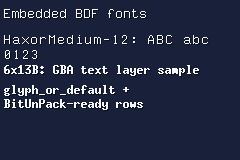
What embed::bdf(...) parses
The parser expects standard text BDF structure and reads these fields:
- font-level:
FONTBOUNDINGBOXCHARSFONT_ASCENTandFONT_DESCENT(fromSTARTPROPERTIESblock)DEFAULT_CHAR(optional, fromSTARTPROPERTIES)
- per-glyph:
STARTCHAR/ENDCHARENCODINGDWIDTHBBXBITMAP
It validates glyph counts and bitmap row sizes at compile time.
BDF to GBA bitmap packing
Each BITMAP row is packed to 1bpp bytes in a BIOS-friendly way:
- leftmost source pixel is written to bit 0 (LSB),
- rows are stored in row-major order,
- byte width is
(glyph_width + 7) / 8.
This layout is designed so BitUnPack can expand glyph rows directly.
Using glyph metadata
const auto& g = font.glyph_or_default(static_cast<unsigned int>('A'));

auto width_px = g.width;
auto height_px = g.height;
auto advance_px = g.dwidth;
Useful members on glyph:
encodingdwidthwidth,heightx_offset,y_offsetbitmap_offsetbitmap_byte_widthbitmap_bytes()
Accessing bitmap data and BitUnPack headers
#include <gba/bios>

const auto& g = font.glyph_or_default(static_cast<unsigned int>('A'));
const unsigned char* src = font.bitmap_data(g);

auto unpack = g.bitunpack_header(
    /*dst_bpp=*/4,
    /*dst_ofs=*/1,
    /*offset_zero=*/false
);

// Example destination buffer for expanded glyph data
unsigned int expanded[128]{};

gba::BitUnPack(src, expanded, unpack);
You can also fetch by encoding directly:
const unsigned char* src = font.bitmap_data(static_cast<unsigned int>('A'));
auto unpack = font.bitunpack_header(static_cast<unsigned int>('A'));
Fallback behaviour
glyph_or_default(encoding) resolves in this order:
- exact glyph encoding,
DEFAULT_CHAR(if present and found),- glyph index
0.
This makes rendering robust when text includes characters not present in your BDF.
Font variants for text rendering
After embedding, you can generate compile-time variants for the text renderer:
#include <gba/text>

static constexpr auto font_shadow = gba::text::with_shadow<1, 1>(font);
static constexpr auto font_outline = gba::text::with_outline<1>(font);
These variants keep the same font-style API but add pre-baked decoration masks.
See also
Embedding Images
The <gba/embed> header converts image files into GBA-ready data entirely at compile time. Combined with C23’s #embed directive, this replaces external asset pipelines like grit with a single #include and a constexpr variable.
For procedural sprite generation without source image files, see Shapes. For animated sprite-sheet workflows, see Animated Sprite Sheets. For type-level API details, see Embedded Sprite Type Reference.
This page focuses on still images: framebuffers, tilemaps, and single-frame sprites.
Supported formats
| Format | Variants | Transparency |
|---|---|---|
| PPM | 24-bit RGB | Index 0 |
| PNG | Grayscale, RGB, indexed, grayscale+alpha, RGBA (8-bit channels) | Alpha < 50% |
| TGA | Uncompressed, RLE, true-colour (15/16/24/32bpp), colour-mapped, grayscale | Alpha < 50% |
Format is auto-detected from the file header.
Conversion functions
| Function | Output | Best for |
|---|---|---|
bitmap15 | Flat gba::color array | Mode 3 or software blitters |
indexed4 | 4bpp sprite payload + 16-colour palette + tilemap | Backgrounds and 4bpp sprites |
indexed8 | 8bpp tiles + 256-colour palette + tilemap | 8bpp backgrounds |
indexed4_sheet<FrameW, FrameH> | sheet4_result | Animated OBJ sheets; covered on the next page |
All converters take a supplier lambda returning std::array<unsigned char, N>.
Quick start
#include <gba/embed>

static constexpr auto bg = gba::embed::indexed4([] {
    return std::to_array<unsigned char>({
#embed "background.png"
    });
});

static constexpr auto hero = gba::embed::indexed4<gba::embed::dedup::none>([] {
    return std::to_array<unsigned char>({
#embed "hero.png"
    });
});
Use dedup::none for OBJ sprites so tiles stay in 1D sequential order. Use the default dedup::flip for backgrounds to save VRAM when tiles repeat.
Example: scrollable background with sprite
This demo embeds a 512x256 background image and a 16x16 character sprite, both as PNG files. The D-pad scrolls the background, and holding A + D-pad moves the sprite:
#include <gba/bios>
#include <gba/embed>
#include <gba/interrupt>
#include <gba/keyinput>
#include <gba/video>

#include <cstring>

constexpr auto bg = gba::embed::indexed4([] {
    return std::to_array<unsigned char>({
#embed "bg_2x1.png"
    });
});

constexpr auto hero = gba::embed::indexed4<gba::embed::dedup::none>([] {
    return std::to_array<unsigned char>({
#embed "sprite.png"
    });
});

int main() {
    gba::irq_handler = {};
    gba::reg_dispstat = {.enable_irq_vblank = true};
    gba::reg_ie = {.vblank = true};
    gba::reg_ime = true;

    gba::reg_dispcnt = {.video_mode = 0, .linear_obj_tilemap = true, .enable_bg0 = true, .enable_obj = true};
    gba::reg_bgcnt[0] = {.screenblock = 30, .size = 1}; // 512x256

    for (auto&& x : gba::obj_mem) {
        x = {.disable = true};
    }

    // Background palette + tiles
    std::memcpy(gba::memory_map(gba::pal_bg_mem), bg.palette.data(), sizeof(bg.palette));
    std::memcpy(gba::memory_map(gba::mem_tile_4bpp[0]), bg.sprite.data(), bg.sprite.size());

    // Background map: stored in screenblock order, memcpy directly
    std::memcpy(gba::memory_map(gba::mem_se[30]), bg.map.data(), sizeof(bg.map));

    // Sprite palette + tiles (no deduplication - sequential for 1D mapping)
    std::memcpy(gba::memory_map(gba::pal_obj_bank[0]), hero.palette.data(), sizeof(hero.palette));
    std::memcpy(gba::memory_map(gba::mem_vram_obj), hero.sprite.data(), hero.sprite.size());

    int scroll_x = 0, scroll_y = 0;
    int sprite_x = 112, sprite_y = 72;

    gba::object hero_obj = hero.sprite.obj();
    hero_obj.y = static_cast<unsigned short>(sprite_y & 0xFF);
    hero_obj.x = static_cast<unsigned short>(sprite_x & 0x1FF);
    gba::obj_mem[0] = hero_obj;

    gba::keypad keys;
    for (;;) {
        gba::VBlankIntrWait();
        keys = gba::reg_keyinput;

        if (keys.held(gba::key_a)) {
            // A + D-pad moves the sprite
            sprite_x += keys.xaxis();
            sprite_y += keys.i_yaxis();

            hero_obj.y = static_cast<unsigned short>(sprite_y & 0xFF);
            hero_obj.x = static_cast<unsigned short>(sprite_x & 0x1FF);
            gba::obj_mem[0] = hero_obj;
        } else {
            // D-pad scrolls the background
            scroll_x += keys.xaxis();
            scroll_y += keys.i_yaxis();

            gba::reg_bgofs[0][0] = static_cast<short>(scroll_x);
            gba::reg_bgofs[0][1] = static_cast<short>(scroll_y);
        }
    }
}

How it works
The background uses a 2x1 screenblock layout (size = 1 in reg_bgcnt), giving 64x32 tiles (512x256 pixels). The indexed4 map is stored in GBA screenblock order, so the entire map can be written to VRAM with one std::memcpy.
The sprite uses dedup::none so its tiles remain sequential - exactly what the GBA expects for 1D OBJ mapping. Without this, deduplication could merge mirrored tiles and break the sprite layout.
Transparent pixels (alpha < 128 in the PNG source) become palette index 0, so the hardware automatically shows the background through the sprite.
Tile deduplication
The indexed4 and indexed8 converters accept a dedup mode as a template parameter:
| Mode | Behaviour | Use case |
|---|---|---|
dedup::flip (default) | Matches identity, horizontal flip, vertical flip, and both | Background tilemaps |
dedup::identity | Matches exact duplicates only | Tilemaps without flip support |
dedup::none | No deduplication; tiles stay sequential | OBJ sprites |
using gba::embed::dedup;

constexpr auto bg = gba::embed::indexed4(supplier);
constexpr auto obj = gba::embed::indexed4<dedup::none>(supplier);
When dedup::flip is active, matching tiles reuse an existing tile index and encode flip flags in the emitted screen_entry. This keeps map VRAM usage low for symmetric art.
Sprite OAM helpers
When image dimensions match a valid GBA sprite size, indexed4 returns a sprite payload with obj() and obj_aff() helpers:
constexpr auto sprite = gba::embed::indexed4<gba::embed::dedup::none>([] {
    return std::to_array<unsigned char>({
#embed "sprite.png"
    });
});

gba::obj_mem[0] = sprite.sprite.obj(0);
gba::obj_aff_mem[0] = sprite.sprite.obj_aff(0);
Valid sprite sizes:
| Shape | Sizes |
|---|---|
| Square | 8x8, 16x16, 32x32, 64x64 |
| Wide | 16x8, 32x8, 32x16, 64x32 |
| Tall | 8x16, 8x32, 16x32, 32x64 |
If the source image does not match one of those shapes, obj() and obj_aff() fail at compile time.
Transparency and palettes
- PPM: palette index 0 is always reserved as transparent; the first visible colour becomes index 1.
- PNG: RGBA/GA alpha maps transparent pixels (alpha < 128) to palette index 0.
- TGA: 32bpp alpha and 16bpp attribute-bit transparency map transparent pixels (alpha < 128) to palette index 0.
- indexed4: images may spread across multiple palette banks when background tiles use <= 15 opaque colours per tile.
- indexed8: one 256-entry palette is shared across the whole image.
Constexpr evaluation limits
All image conversion happens at compile time. Large assets can hit GCC’s constexpr operation limit. If you see constexpr evaluation operation count exceeds limit, raise the limit for that target:
target_compile_options(my_target PRIVATE -fconstexpr-ops-limit=335544320)
Small sprites usually fit within default limits. Large backgrounds, especially 512x256 maps, often need a higher ceiling.
Animated Sprite Sheets
gba::embed::indexed4_sheet<FrameW, FrameH>() turns one sprite-sheet image into frame-packed OBJ tile data at compile time. It is the animation-oriented sibling to Embedding Images: same file formats, same supplier-lambda pattern, but a different output shape tuned for OBJ 1D mapping.
For procedural sprite generation without source image files, see Shapes. For type-level API details, see Animated Sprite Sheet Type Reference.
When to use indexed4_sheet
Use indexed4_sheet when:
- one source image contains multiple animation frames
- every frame has the same width and height
- you want each frame’s tiles laid out contiguously in OBJ VRAM
- you want compile-time flipbook helpers instead of manual tile math
Use plain indexed4<dedup::none>() when you only need one static sprite frame.
Quick start
#include <cstring>
#include <gba/embed>
#include <gba/video>

static constexpr auto actor = gba::embed::indexed4_sheet<16, 16>([] {
	return std::to_array<unsigned char>({
#embed "actor.png"
	});
});

static constexpr auto walk = actor.ping_pong<0, 3>();

const auto base_tile = gba::tile_index(gba::memory_map(gba::mem_vram_obj));
std::memcpy(gba::memory_map(gba::mem_vram_obj), actor.sprite.data(), actor.sprite.size());

unsigned int frame = walk.frame(tick / 8);

gba::obj_mem[0] = actor.frame_obj(base_tile, frame, 0);
The converter validates at compile time that:
- the full image width is a multiple of
FrameW - the full image height is a multiple of
FrameH FrameWxFrameHis a valid GBA OBJ size- the whole sheet fits a single 15-colour palette plus transparent index 0
What sheet4_result gives you
| Member / helper | Purpose |
|---|---|
palette | Shared OBJ palette bank for every frame |
sprite | Frame-packed 4bpp tile payload ready for OBJ VRAM upload |
tile_offset(frame) | Tile offset for a frame, useful with manual tile_index management |
frame_obj(base, frame, pal) | Regular OAM helper for one frame |
frame_obj_aff(base, frame, pal) | Affine OAM helper for one frame |
forward<Start, Count>() | Compile-time sequential flipbook |
ping_pong<Start, Count>() | Compile-time forward-then-reverse flipbook |
sequence<"...">() | Explicit frame order via string literal |
row<R>() | Row-scoped flipbook builder for multi-row sheets |
How frames are laid out
The important difference from plain indexed4() is tile order. indexed4_sheet() repacks tiles frame-by-frame so the GBA can step through animation frames with simple tile offsets.
Source sheet (2 rows x 4 columns, 16x16 frames)

+----+----+----+----+
| f0 | f1 | f2 | f3 |
+----+----+----+----+
| f4 | f5 | f6 | f7 |
+----+----+----+----+

OBJ tile payload emitted by indexed4_sheet

[f0 tiles][f1 tiles][f2 tiles][f3 tiles][f4 tiles][f5 tiles][f6 tiles][f7 tiles]
That means tile_offset(frame) is simply:
frame * tiles_per_frame
No runtime repacking step is needed.
Flipbook builders
Sequential animation
static constexpr auto idle = actor.forward<0, 4>();
Frames: 0, 1, 2, 3
Ping-pong animation
static constexpr auto walk = actor.ping_pong<0, 4>();
Frames: 0, 1, 2, 3, 2, 1
Explicit frame order
static constexpr auto attack = actor.sequence<"01232100">();
Each character selects a frame index. 0-9 map to frames 0-9, a-z continue from 10 upward, and A-Z map the same way as lowercase.
Row-based sheets
For RPG Maker style character sheets with one direction per row, use row<R>() to scope animations to a single row.
static constexpr auto actor = gba::embed::indexed4_sheet<16, 16>([] {
	return std::to_array<unsigned char>({
#embed "hero_walk.png"
	});
});

static constexpr auto down  = actor.row<0>().ping_pong<0, 3>();
static constexpr auto left  = actor.row<1>().ping_pong<0, 3>();
static constexpr auto right = actor.row<2>().ping_pong<0, 3>();
static constexpr auto up    = actor.row<3>().ping_pong<0, 3>();
Row helpers still produce sheet-global frame indices, so the result plugs directly into frame_obj() and tile_offset().
A practical render loop
#include <algorithm>
#include <cstring>
#include <gba/bios>
#include <gba/embed>
#include <gba/video>

static constexpr auto actor = gba::embed::indexed4_sheet<16, 16>([] {
	return std::to_array<unsigned char>({
#embed "actor.png"
	});
});

static constexpr auto walk = actor.ping_pong<0, 4>();

int main() {
	gba::reg_dispcnt = {
		.video_mode = 0,
		.linear_obj_tilemap = true,
		.enable_obj = true,
	};

	std::copy(actor.palette.begin(), actor.palette.end(), gba::pal_obj_bank[0]);
	std::memcpy(gba::memory_map(gba::mem_vram_obj), actor.sprite.data(), actor.sprite.size());

	unsigned int tick = 0;
	const auto base_tile = gba::tile_index(gba::memory_map(gba::mem_vram_obj));

	while (true) {
		gba::VBlankIntrWait();
		const unsigned int frame = walk.frame(tick / 8);
		auto obj = actor.frame_obj(base_tile, frame, 0);
		obj.x = 112;
		obj.y = 72;
		gba::obj_mem[0] = obj;
		++tick;
	}
}
Palette and colour limits
indexed4_sheet builds one shared 16-entry OBJ palette:
- palette index 0 stays transparent
- the whole sheet may use at most 15 opaque colours total
- unlike background-oriented
indexed4(), sheet conversion does not spread tiles across multiple palette banks
That trade-off keeps every frame interchangeable at one base tile and one OBJ palette bank.
Compile-time failure modes
Typical compile-time diagnostics are:
- frame width or height not divisible into the source image
- source image not aligned to 8x8 tile boundaries
- frame dimensions not matching a legal OBJ size
- more than 15 opaque colours across the whole sheet
- invalid frame index in
forward,ping_pong,sequence, orrow
Choosing between the asset paths
| Workflow | Best for |
|---|---|
| Shapes | Simple geometric sprites, HUD markers, debug art, zero external assets |
| Embedding Images | Static backgrounds, portraits, logos, and one-frame sprites |
indexed4_sheet() | Animated sprite sheets with compile-time frame selection |
DMA PCM Playback
The GBA has two Direct Sound channels for playing signed 8-bit PCM. A hardware timer sets the sample rate while DMA keeps the sound FIFO supplied without a CPU write for every sample.
The playback pipeline
Direct Sound A consumes one sample whenever its selected timer overflows. FIFO A holds 32 bytes; when it falls to half full, the hardware asks DMA1 for another four words.
Playback requires four pieces of hardware configuration:
reg_soundcnt_xenables the sound hardware.reg_soundcnt_hroutes Direct Sound A to the speakers, selects timer 0, and clears FIFO A.dma::to_fifo_a()configures DMA1 for repeating, FIFO-triggered word transfers.- Timer 0 overflows at the required sample rate.
Direct Sound samples range from -128 to 127, with 0 representing silence. WAV files store 8-bit PCM as unsigned values, so they must be converted before playback.
Looping a sine wave
The first demo generates a 32-sample sine wave and streams it continuously:
#include <gba/bios>
#include <gba/dma>
#include <gba/interrupt>
#include <gba/peripherals>

#include <array>
#include <cstdint>

namespace {

    constexpr unsigned short samples_per_frame = 96;
    constexpr unsigned short timer_period = 280896 / samples_per_frame;
    constexpr unsigned short timer_reload = 65536 - timer_period;

    constexpr std::array<std::int8_t, 32> sine_period{
        0, 25,  49,  71,  90,  106,  117,  125,  127,  125,  117,  106,  90,  71,  49,  25,
        0, -25, -49, -71, -90, -106, -117, -125, -127, -125, -117, -106, -90, -71, -49, -25,
    };

    constexpr auto make_sample_buffer() {
        std::array<std::int8_t, samples_per_frame + sine_period.size()> result{};
        for (std::size_t index = 0; index < result.size(); ++index) {
            result[index] = sine_period[index % sine_period.size()];
        }
        return result;
    }

    alignas(4) constexpr auto samples = make_sample_buffer();

    void rewind_audio_dma() {
        gba::reg_dmacnt_h[1] = {};
        gba::reg_dma[1] = gba::dma::to_fifo_a(samples.data());
    }

} // namespace

int main() {
    gba::irq_handler = {[](gba::irq flags) {
        if (flags.vblank) {
            rewind_audio_dma();
        }
    }};
    gba::reg_dispstat = {.enable_irq_vblank = true};
    gba::reg_ie = {.vblank = true};

    gba::reg_soundcnt_x = {.master_enable = true};
    gba::reg_soundcnt_h = {
        .dma_a_volume = true,
        .dma_a_right = true,
        .dma_a_left = true,
        .dma_a_reset = true,
    };

    rewind_audio_dma();
    gba::reg_tmcnt_l_reload[0] = timer_reload;
    gba::reg_tmcnt_h[0] = {.cycles = gba::cycles_1, .enabled = true};
    gba::reg_ime = true;

    while (true) {
        gba::VBlankIntrWait();
    }
}
The GBA takes 280896 CPU cycles to draw one frame. The demo plays 96 samples per frame, giving an exact timer period:
timer period = 280896 / 96 = 2926 cycles
sample rate = 16777216 / 2926 = 5734 Hz
timer reload = 65536 - 2926 = 62610
The 32-sample waveform repeats three times per frame. At VBlank, the interrupt handler restarts DMA1 from the beginning of the buffer without breaking the waveform’s phase.
The DMA repeat flag keeps the channel active, but does not reset its source address. The sample buffer therefore includes one extra waveform period for FIFO read-ahead, preventing the final DMA burst from reading beyond the array.
Playing an embedded WAV once
embed::wav() loads an uncompressed mono 8-bit PCM WAV at compile time. It converts unsigned WAV samples to signed
Direct Sound samples, provides a ready-to-write sound.timer configuration and whole-frame playback duration, then uses
the rest of the final frame to fade the last sample to zero. A silent FIFO DMA lookahead follows the fade.
The second demo plays Piano.wav when the program starts. Press A to play it again:
#include <gba/bios>
#include <gba/dma>
#include <gba/embed>
#include <gba/interrupt>
#include <gba/keyinput>
#include <gba/peripherals>

#include <array>
#include <cstddef>

namespace {

    static constexpr auto sound = gba::embed::wav<>([] {
        return std::to_array<unsigned char>({
#embed "Piano.wav"
        });
    });

    volatile std::size_t frames_remaining{};

    void stop_sound() {
        gba::reg_tmcnt_h[0] = {};
        gba::reg_dmacnt_h[1] = {};
        gba::reg_soundcnt_h = {
            .dma_a_volume = true,
            .dma_a_right = true,
            .dma_a_left = true,
            .dma_a_reset = true,
        };
        frames_remaining = 0;
    }

    void play_sound() {
        stop_sound();
        gba::reg_dma[1] = gba::dma::to_fifo_a(sound.samples.data());
        frames_remaining = sound.frame_count;
        gba::reg_tmcnt[0] = sound.timer;
    }

} // namespace

int main() {
    gba::irq_handler = {[](gba::irq flags) {
        if (flags.vblank && frames_remaining != 0) {
            frames_remaining = frames_remaining - 1;
            if (frames_remaining == 0) {
                stop_sound();
            }
        }
    }};
    gba::reg_dispstat = {.enable_irq_vblank = true};
    gba::reg_ie = {.vblank = true};

    gba::reg_soundcnt_x = {.master_enable = true};
    gba::reg_ime = true;

    gba::keypad keys;
    while (true) {
        gba::VBlankIntrWait();
        keys = gba::reg_keyinput;
        if (keys.pressed(gba::key_a)) {
            play_sound();
        }
    }
}
The sample clock is the demo’s only timer. Playback starts immediately after VBlank, then the VBlank handler counts
sound.frame_count video frames and stops timer 0 and DMA1 after the recording has finished. The generated DMA source
fades to zero through the rest of the final frame and includes a silent 16-sample FIFO lookahead, so frame-quantized
stopping cannot read past the buffer or produce a noise burst.
Piano.wav is mono 8-bit PCM at 8363 Hz. The demo uses embed::wav<16384>() to linearly resample it at compile time. This gives timer 0 an exact 1024-cycle period and moves low-rate playback images above the most audible range. Omitting the template argument preserves the source sample rate.
The same WAV is used by the Embedded WAV Samples demo for the hardware wave channel. That path extracts a short 4-bit waveform; embed::wav() retains the complete PCM recording for Direct Sound.
Next steps
- Read DMA Transfers for the other DMA helpers.
- Read Timers for compile-time and raw timer configuration.
- See the Sound Peripheral Reference for the Direct Sound register layout.
Music Composition
The GBA has four PSG (Programmable Sound Generator) channels: two square waves, one wave (sample) channel, and one noise channel. Rather than manually writing register values, stdgba lets you compose music using Strudel notation (a text-based mini-language for patterns) and compiles it to an optimised event table at build time.
Quick Start
#include <gba/music>
#include <gba/peripherals>
#include <gba/bios>

using namespace gba::music;
using namespace gba::music::literals;

int main() {
    // Enable sound output
    gba::reg_soundcnt_x = { .master_enable = true };
    gba::reg_soundcnt_l = {
        .volume_right = 7, .volume_left = 7,
        .enable_1_right = true, .enable_1_left = true,
        .enable_2_right = true, .enable_2_left = true,
        .enable_3_right = true, .enable_3_left = true,
        .enable_4_right = true, .enable_4_left = true
    };
    gba::reg_soundcnt_h = { .psg_volume = 2 };

    // Compile a simple melody
    static constexpr auto music = compile(note("c4 e4 g4 c5"));

    // Play it in a loop
    auto player = music_player<music>{};
    while (player()) {
        gba::VBlankIntrWait();
    }
}
Pattern Syntax
Patterns use Strudel notation. Here’s the reference:
| Syntax | Meaning | Example |
|---|---|---|
c4 e4 g4 | Sequence (space-separated notes) | "c4 e4 g4" |
~ | Rest (silence) | "c4 ~ g4" |
_ | Hold/tie (sustain, no retrigger) | "c4 _ _" (hold for 3 steps) |
[a b] | Subdivision (fit into one parent step) | "[c4 d4] e4" |
<a b c> | Alternating (cycle through each step) | "<c4 d4 e4>" |
<a, b> | Parallel layers (commas create stacked voices) | "<c4, g3>" |
a@3 | Elongation (weight = 3) | "c4@3 e4" |
a!3 | Replicate (repeat 3 times equally) | "c4!3" |
a*2 | Fast (play 2x in one step) | "c4*2" |
a/2 | Slow (stretch over 2 cycles) | "c4/2" |
(3,8) | Euclidean rhythm (Bjorklund: 3 pulses in 8 steps) | "c4(3,8)" |
eb3 | Flat notation (Eb3 = D#3) | "eb3 f3 g3" |
Creating Melodies with note()
note() is the main function for creating pitched patterns:
// Single melody (auto-assigned to square 1)
auto melody = note("c4 e4 g4 c5");

// With modifiers
auto fast = note("c4*2 e4*2");  // Double speed
auto slow = note("c4/2");        // Stretch over 2 cycles
auto rests = note("c4 ~ ~ e4");  // With silences
All notes from C2 to B8 are supported. Octave-1 notes (C1-B1) are rejected at compile time because the PSG hardware cannot represent those frequencies.
Multi-Voice Patterns with Stacking
Create parallel voices using commas inside <>:
// Two voices: melody (sq1) + bass (sq2)
static constexpr auto music = compile(
    note("<c4 e4 g4 c5, c3 c3 c3 c3>")
);

// Or use the stack() combinator
static constexpr auto music = compile(
    stack(
        note("c4 e4 g4 c5"),
        note("c3 c3 c3 c3"),
        s("bd sd bd sd")  // Drums on noise channel
    )
);
The layers are auto-assigned to channels in order: square 1 -> square 2 -> wave -> noise.
PSG Channels (CH1-CH4)
Use one page per channel when you need hardware details:
Quick inline examples:
using namespace gba::music;
using namespace gba::music::literals;

auto lead = "c4 e4 g4 c5"_sq1;
auto bass = note("c3 c3 g2 g2").channel(channel::sq2);
auto pad = note("c4 _ g4 _").channel(channel::wav, waves::triangle);
auto drums = s("bd sd hh sd");

static constexpr auto song = compile(loop(stack(lead, bass, pad, drums)));
Drums with s()
The s() function creates drum patterns using Strudel percussion names. It auto-assigns to the noise channel:
// Kick + snare beat
auto beat = s("bd sd bd sd");

// Euclidean kick pattern
auto kick = s("bd(3,8)");

// Complex drum pattern
auto drums = s("bd [sd rim]*2 bd sd");
20 drum presets are supported: bd, sd, hh, oh, cp, rs, rim, lt, mt, ht, cb, cr, rd, hc, mc, lc, cl, sh, ma, ag.
Chaining with Sequential (seq())
Combine multiple patterns sequentially. Instrument changes are emitted at boundaries:
static constexpr auto music = compile(
    loop(
        seq(
            note("c4 e4 g4 c5"),
            note("d4 f4 a4 d5"),
            note("e4 g4 b4 e5")
        )
    )
);
Compile-Time Tempos
By default, compile() uses 0.5 cycles-per-second (120 BPM in 4/4). Override it:
// Explicit BPM
static constexpr auto music = compile<120_bpm>(note("c4 e4 g4"));

// Or cycles-per-second
static constexpr auto music = compile<1_cps>(note("c4 e4 g4"));

// Or cycles-per-minute
static constexpr auto music = compile<30_cpm>(note("c4 e4 g4"));
Pattern Functions
All patterns support transformation methods:
auto melody = note("c4 e4 g4 c5");

melody.add(12);       // Transpose up one octave
melody.sub(5);        // Transpose down 5 semitones
melody.rev();         // Reverse the sequence
melody.ply(2);        // Stutter (repeat each note 2x)
melody.press();       // Staccato (half duration + rest)
melody.late(1, 8);    // Shift 1/8 cycle later (swing)
User-Defined Literal Shorthands
For convenience, single-note assignments use UDLs:
using namespace gba::music::literals;

auto melody = "c4 e4 g4"_sq1;   // Assign to square 1
auto bass = "c3 c3"_sq2;         // Assign to square 2
auto sample = "c4 d4"_wav;       // Use wave channel
auto drums = "bd sd hh"_s;       // Drums (noise channel)
WAV Channel & Custom Waveforms
The wave channel (CH3) can play 4-bit sampled audio. Use built-in waveforms or embed .wav files:
For a deeper guide to wav_embed(), resampling limits, and custom sample authoring, see Embedded WAV Samples.
// Built-in waveforms
using namespace gba::music::waves;

auto melody = note("c4 e4 g4").channel(channel::wav, sine);

// Embed a .wav file (requires C++26 #embed and GCC 15+)
static constexpr auto piano = gba::music::wav_embed([] {
    return std::to_array<unsigned char>({
#embed "Piano.wav"
    });
});

static constexpr auto music = compile(
    note("<c4 e4 g4, c3>")
        .channels(layer_cfg{channel::wav, piano}, channel::sq2)
);
Playing Music
Use music_player with NTTP (non-type template parameter) syntax:
static constexpr auto music = compile(note("c4 e4 g4 c5"));

auto player = music_player<music>{};  // Pass as template argument

// Play in VBlank loop
while (player()) {
    gba::VBlankIntrWait();
}
music_player::operator() returns false when the pattern ends (for non-looping patterns) or loops forever.
Performance
Music playback uses tail-call recursive dispatch over compile-time batches. Per-frame cost:
- Idle frame (no events): ~400 cycles (~0.6% of VBlank)
- 4-channel batch dispatch: ~760 cycles (~1.1% of VBlank)
This leaves >99% of VBlank budget for game logic.
Embedded WAV Samples
The <gba/music> header provides consteval WAV parsing and resampling for the GBA’s wave channel (PWM output with 64??4-bit custom waveforms). Combined with C23’s #embed directive, custom acoustic instruments and samples can be baked into the ROM at compile time.
For procedural sprite generation, see Shapes. For music composition with square-wave channels, see Music Composition.
Why embed WAV samples
The GBA wave channel (CH4) plays back a 64-sample, 4-bit waveform at a frequency determined by the timer reload value. Instead of generic square/triangle/saw tones, embedded PCM samples add:
- Acoustic instruments: Piano, flute, bells, drums
- Sound effects: Explosions, coins, hits, chimes
- Complex timbres: Any 64-sample periodic waveform
Since the GBA only has 32 KB of EWRAM and 256 KB of WRAM, samples must be highly compressed. The 4-bit quantization and 64-sample limit constraint audio to short, punchy instruments - not long-form music or speech.
WAV embedding API
| Function | Input | Output | Use case |
|---|---|---|---|
wav_embed() | C-array or supplier lambda | std::array<uint8_t, 64> | Parse .wav file + resample |
wav_from_samples() | std::array<uint8_t, 64> (4-bit values 0-15) | std::array<uint8_t, 64> | Direct 4-bit waveform data |
wav_from_pcm8() | const uint8_t (&data)[N] (8-bit PCM) | std::array<uint8_t, 64> | Resample 8-bit PCM to 64 samples |
All three are consteval and produce compile-time waveform constants.
Built-in waveforms (no file needed):
| Waveform | Access | Description |
|---|---|---|
| Sine | gba::music::waves::sine | Smooth sine wave |
| Triangle | gba::music::waves::triangle | Continuous triangle |
| Sawtooth | gba::music::waves::saw | Linear sawtooth |
| Square | gba::music::waves::square | 50% duty cycle |
Simple example: embedded Piano
The demo_hello_audio_wav demo plays a four-note jingle using embedded Piano.wav:
#include <gba/bios>
#include <gba/interrupt>
#include <gba/keyinput>
#include <gba/music>
#include <gba/peripherals>

#include <array>

using namespace gba::music;
using namespace gba::music::literals;

namespace {

    // Embed Piano.wav sample data for the wav channel (64 x 4-bit waveform).
    // The wav_embed() function parses RIFF/WAV headers and resamples to GBA format.
    static constexpr auto piano = wav_embed([] {
        return std::to_array<unsigned char>({
#embed "Piano.wav"
        });
    });

    // A simple melodic phrase played on the wav channel with embedded Piano timbre.
    // Press A to restart playback.
    // .press() applies staccato: each note plays for half duration, rest for half.
    // Compiled at 1_cps (1 cycle per second) for slower, more legato playback.
    static constexpr auto jingle = compile<1_cps>(note("c5 e5 g5 c6").channel(channel::wav, piano).press());

} // namespace

int main() {
    gba::irq_handler = {};
    gba::reg_dispstat = {.enable_irq_vblank = true};
    gba::reg_ie = {.vblank = true};
    gba::reg_ime = true;

    // Basic PSG routing for the WAV channel on both speakers.
    gba::reg_soundcnt_x = {.master_enable = true};
    gba::reg_soundcnt_l = {
        .volume_right = 7,
        .volume_left = 7,
        .enable_4_right = true,
        .enable_4_left = true,
    };
    gba::reg_soundcnt_h = {.psg_volume = 2};

    gba::keypad keys;
    auto player = music_player<jingle>{};

    while (true) {
        gba::VBlankIntrWait();
        keys = gba::reg_keyinput;

        if (keys.pressed(gba::key_a)) {
            player = {};
        }

        player();
    }
}
Place Piano.wav in the demos directory. The #embed directive is placed on its own line inside the compound initialiser braces.
Resampling and quantization
wav_embed() performs nearest-neighbor resampling: PCM samples are read from the RIFF/WAV file header (supporting mono/stereo, 8/16-bit formats) and resampled to exactly 64 x 4-bit samples for the GBA hardware. Stereo input is mixed to mono; stereo is not supported by the hardware.
Quantization from N-bit to 4-bit uses simple scaling: (sample >> (N - 4)). Complex samples (speech, noise) lose clarity; sine waves and simple acoustic timbres sound best.
Built-in waveforms
For fast prototyping without external .wav files:
#include <gba/music>

using namespace gba::music;

// Use compiled sine wave (always available)
auto sine_melody = compile(
    note("c4 e4 g4 c5").channel(channel::wav, waves::sine)
);

// Mix instruments: sine bass layer, square melody layer
auto layered = compile(
    stack(
        note("c2 c2 c2 c2").channel(channel::wav, waves::sine),
        note("c5 e5 g5 c6").channel(channel::sq1)
    )
);
Advanced: custom waveforms from samples
For hand-crafted 4-bit waveforms, use wav_from_samples():
#include <gba/music>

// Organ pipe sound: 64 custom 4-bit values
static constexpr auto organ = gba::music::wav_from_samples(
    std::array<uint8_t, 64>{
        // First 16 samples of a custom profile
        15, 14, 12, 10, 8, 6, 5, 4, 4, 4, 5, 6, 8, 10, 12, 14,
        // Continue pattern...
        15, 14, 12, 10, 8, 6, 5, 4, 4, 4, 5, 6, 8, 10, 12, 14,
        15, 14, 12, 10, 8, 6, 5, 4, 4, 4, 5, 6, 8, 10, 12, 14,
        15, 14, 12, 10, 8, 6, 5, 4, 4, 4, 5, 6, 8, 10, 12, 14,
    }
);

auto synth = compile(
    note("c4 e4 g4 c5").channel(channel::wav, organ)
);
Values are clamped to 0-15 (4-bit range). Each full period should smoothly loop back to avoid clicks at the waveform boundary.
Practical constraints
- 64 samples maximum: The GBA hardware uses a fixed 64-byte waveform buffer for CH4.
- 4-bit quantization: ~24 dB dynamic range. Loud timpani and quiet pizzicato do not mix well.
- No polyphony: Only one waveform plays at a time on CH4. Combine with
stack()to play multiple square-wave channels simultaneously. - Frequency limits: WAV channel operates from ~32 Hz (timer reload = 255) to ~131 kHz (reload = 0). Most musical pitches fall in the 32 Hz-8 kHz range due to the timer’s integer reload values.
See Music Composition for combining WAV with square-wave and noise channels, and Channel WAV/CH4 for register-level details.
Multi-Player Link
The GBA Multi-Player serial mode connects two to four systems. Every transfer exchanges one 16-bit word with every connected system: player 0 is the parent that starts each transfer, and players 1 through 3 are children.
gba::link_multi builds a typed message stream over those transfers. A codec defines the value sent by the game, while
stdgba handles framing, escaping, integrity checks, player discovery, and buffering independently for every peer.
Creating the link
Define the codec at namespace scope, then use it as the first template argument. Capacity is the maximum framed
outgoing value and the pending wire-data capacity for each peer.
#include <gba/codec>
#include <gba/link>

constexpr auto message_codec = gba::codec::uint8_codec;
constexpr std::size_t link_capacity = 32;

using link_type = gba::link_multi<message_codec, link_capacity>;
auto& link = gba::link.emplace<link_type>(gba::sio_baud_115200);
gba::link represents the GBA’s single serial port. emplace replaces the active link, constructs the new type
directly in static storage, and returns a typed reference to it.
All connected systems must use the same codec and baud rate. Available Multi-Player baud rates are gba::sio_baud_9600,
gba::sio_baud_38400, gba::sio_baud_57600, and gba::sio_baud_115200.
Interrupt and polling contract
Enable the serial interrupt and forward it to link.irq():
gba::irq_handler = [&link](const gba::irq flags) {
    if (flags.serial) {
        link.irq();
    }
};
gba::reg_ie = {.serial = true};
gba::reg_ime = true;
The IRQ handler only captures the completed hardware transfer and stages the next word. Call poll() continuously from
your main loop to process completed transfers, update the topology, dispatch errors, and start new rounds:
for (;;) {
    link.poll();

    // Update the game and render when needed.
}
Do not limit poll() to once per video frame. Link throughput and message latency depend on how frequently it runs.
Sending and receiving
send() begins sending one encoded value to every connected peer. It returns false if another value is still in
flight or if the framed value exceeds Capacity.
if (!link.sending()) {
    link.send(local_state);
}
Each remote player has an independent receive stream:
const auto local_player = link.player();
for (const auto player : gba::multi_players) {
    if (player == local_player) {
        continue;
    }

    while (auto incoming = link.read(player)) {
        apply_remote_state(gba::multi_player_index(player), *incoming);
    }
}
player() returns the local gba::multi_player identifier, is_parent() identifies player 0, and connected() returns the current
four-player connection mask. A newly configured link initially reports no connected players; topology is learned as
transfer rounds complete.
Demo: Four-player movement
The demo serialises one player value containing position, facing direction, and animation frame. Each GBA controls its
own character and renders the latest state received from every connected peer.
#include <gba/bios>
#include <gba/codec>
#include <gba/embed>
#include <gba/interrupt>
#include <gba/keyinput>
#include <gba/link>
#include <gba/memory>
#include <gba/peripherals>
#include <gba/video>

#include <algorithm>
#include <array>
#include <cstddef>
#include <cstring>

namespace codec = gba::codec;

constexpr auto p1_sheet = gba::embed::indexed4_sheet<16, 16>([] {
    return std::to_array<unsigned char>({
#embed "link_multiplay_p1.png"

    });
});
constexpr auto p2_sheet = gba::embed::indexed4_sheet<16, 16>([] {
    return std::to_array<unsigned char>({
#embed "link_multiplay_p2.png"

    });
});
constexpr auto p3_sheet = gba::embed::indexed4_sheet<16, 16>([] {
    return std::to_array<unsigned char>({
#embed "link_multiplay_p3.png"

    });
});
constexpr auto p4_sheet = gba::embed::indexed4_sheet<16, 16>([] {
    return std::to_array<unsigned char>({
#embed "link_multiplay_p4.png"

    });
});
using sheet_type = decltype(p1_sheet);

constexpr std::size_t link_capacity = 16; // Reserve enough wire storage for one framed player update

enum facing : unsigned char {
    facing_down = 0,
    facing_right = 1,
    facing_up = 2,
    facing_left = 3
};

struct player {
    unsigned char x = 0;
    unsigned char y = 0;
    unsigned char dir = facing_down;
    unsigned char anim = 0;
    gba::object obj{};

    constexpr player() = default;
    constexpr player(unsigned char x, unsigned char y, unsigned char dir, unsigned char anim);
    constexpr player(unsigned char x, unsigned char y, gba::object obj);

    static constexpr auto codec = codec::make_tuple_codec(codec::member<&player::x>(codec::uint8_codec),
                                                          codec::member<&player::y>(codec::uint8_codec),
                                                          codec::member<&player::dir>(codec::uint8_codec),
                                                          codec::member<&player::anim>(codec::uint8_codec))
                                      .apply<player>();

    void move(int dx, int dy, unsigned int frame);
    void apply(const player& state);
    const gba::object& draw(const gba::object& base, bool visible);
};

std::array<player, 4> make_players(const std::array<gba::object, 4>& objects);

int main() {
    gba::bitpool objVram{gba::memory_map(gba::mem_vram_obj), 1024};
    const auto upload = [&objVram](const auto& sheet, const unsigned short palIdx) {
        std::memcpy(gba::memory_map(gba::pal_obj_bank[palIdx]), sheet.palette.data(), sizeof(sheet.palette));
        void* dest = objVram.allocate(sheet.sprite.size());
        std::memcpy(dest, sheet.sprite.data(), sheet.sprite.size());
        return sheet.frame_obj(gba::tile_index(dest), 0, palIdx);
    };
    const std::array baseObj{
        upload(p1_sheet, 0),
        upload(p2_sheet, 1),
        upload(p3_sheet, 2),
        upload(p4_sheet, 3),
    };

    // Configure the serial port for typed four-player communication
    auto& link = gba::link.emplace<gba::link_multi<player::codec, link_capacity>>(gba::sio_baud_115200);

    std::ranges::fill(gba::obj_mem, gba::object{.disable = true});
    gba::reg_dispcnt = {.linear_obj_tilemap = true, .enable_obj = true};
    gba::irq_handler = [&link](const gba::irq flags) {
        if (flags.serial) {
            link.irq(); // Capture the completed transfer and stage the next link word
        }
    };
    gba::reg_dispstat = {.enable_irq_vblank = true};
    gba::reg_ie = {.vblank = true, .serial = true}; // Enable the serial link interrupt
    gba::reg_ime = true;

    // Wait until at least one remote player joins the link
    while (link.connected_count() < 2) {
        link.poll(); // Process link transfers and start the next multiplayer round
    }
    const auto myPlayer = link.player();

    auto players = make_players(baseObj);

    unsigned int frame = 0;
    gba::keypad keys;

    while (true) {
        ++frame;

        keys = gba::reg_keyinput;
        const int dx = keys.xaxis();
        const int dy = keys.i_yaxis();
        players[gba::multi_player_index(myPlayer)].move(dx, dy, frame);

        // Do not replace a player update that is still being transmitted
        if (!link.sending()) {
            link.send(players[gba::multi_player_index(myPlayer)]); // Encode and queue the local player's latest state
        }

        // Check each possible remote player's independent receive stream
        for (const auto player : gba::multi_players) {
            if (player == myPlayer) {
                continue; // The local state is authoritative and never arrives over the link
            }
            // Drain all complete updates received from this remote player
            while (auto incoming = link.read(player)) {
                players[gba::multi_player_index(player)].apply(*incoming);
            }
        }

        while (gba::reg_vcount < 159) {
            link.poll(); // Keep the link moving while waiting for the safe OAM update period
        }

        gba::VBlankIntrWait();

        // Snapshot which player slots currently have a connected system
        const auto connected = link.connected();
        for (std::size_t id = 0; id < 4; ++id) {
            // Hide remote sprites whose systems are not connected
            gba::obj_mem[id] =
                players[id].draw(baseObj[id], id == gba::multi_player_index(myPlayer) || connected[id]);
        }

        while (gba::reg_vcount >= 160) {
            link.poll(); // Continue servicing the link throughout the remainder of VBlank
        }
    }
}

constexpr int max_x = 240 - sheet_type::frame_width;
constexpr int max_y = 160 - sheet_type::frame_height;
constexpr int spawn_inset = 40;
constexpr std::array walk_table{0, 1, 0, 2};

constexpr int clampi(const int value, const int low, const int high) noexcept {
    return value < low ? low : (value > high ? high : value);
}

constexpr player::player(const unsigned char x, const unsigned char y, const unsigned char dir,
                         const unsigned char anim)
    : x(x), y(y), dir(dir), anim(anim) {}

constexpr player::player(const unsigned char x, const unsigned char y, const gba::object obj) : x(x), y(y), obj(obj) {}

void player::move(const int dx, const int dy, const unsigned int frame) {
    if (dx != 0) {
        dir = dx > 0 ? facing_right : facing_left;
    } else if (dy != 0) {
        dir = dy > 0 ? facing_down : facing_up;
    }
    x = static_cast<unsigned char>(clampi(x + dx, 0, max_x));
    y = static_cast<unsigned char>(clampi(y + dy, 0, max_y));
    anim = dx != 0 || dy != 0 ? walk_table[(frame / 10) % 4] : 0;
}

void player::apply(const player& state) {
    x = state.x;
    y = state.y;
    dir = state.dir;
    anim = state.anim;
}

const gba::object& player::draw(const gba::object& base, const bool visible) {
    obj.disable = !visible;
    if (visible) {
        const unsigned int frame = static_cast<unsigned int>(dir) * sheet_type::columns + anim;
        obj.tile_index = base.tile_index + sheet_type::tile_offset(frame);
        obj.x = static_cast<unsigned short>(x);
        obj.y = static_cast<unsigned short>(y);
    }
    return obj;
}

std::array<player, 4> make_players(const std::array<gba::object, 4>& objects) {
    constexpr std::array spawn_positions{
        std::array{        spawn_inset,         spawn_inset},
        std::array{max_x - spawn_inset,         spawn_inset},
        std::array{        spawn_inset, max_y - spawn_inset},
        std::array{max_x - spawn_inset, max_y - spawn_inset},
    };

    return {
        player{spawn_positions[0][0], spawn_positions[0][1], objects[0]},
        player{spawn_positions[1][0], spawn_positions[1][1], objects[1]},
        player{spawn_positions[2][0], spawn_positions[2][1], objects[2]},
        player{spawn_positions[3][0], spawn_positions[3][1], objects[3]},
    };
}

The demo polls throughout active display and the remainder of VBlank, but writes OAM only immediately after
VBlankIntrWait().
Errors and topology changes
Errors are sticky until explicitly cleared. Query one peer with errors(player) or has_error(player, error), and
clear them with clear_error() or clear_errors().
link.on_error([](const std::size_t player, const gba::link_error error) {
    handle_link_error(player, error);
});
The callback runs from poll(), never from interrupt context. gba::link_error::topology_changed is reported when a
remote player connects, disconnects, or the local player changes. Other errors distinguish receive overflow,
malformed framing, integrity failure, codec failure, and hardware failure.
See also
Normal Link
Normal serial mode is a direct connection between two systems. It transfers either 8-bit or 32-bit words and requires one system to supply the transfer clock.
gba::link_normal exposes the same typed, framed message model as Multi-Player mode, but there is only one remote peer.
Selecting 8-bit or 32-bit mode
The optional third template argument selects the hardware word width. It defaults to unsigned char for Normal 8-bit
mode; use unsigned int for Normal 32-bit mode.
#include <gba/codec>
#include <gba/link>

constexpr auto message_codec = gba::codec::uint8_codec;
constexpr std::size_t link_capacity = 32;

using normal8_type = gba::link_normal<message_codec, link_capacity>;
using normal32_type = gba::link_normal<message_codec, link_capacity, unsigned int>;
The word width changes how framed bytes are transported, not the codec’s value type. Both connected systems must select the same width and codec.
Creating both ends
Exactly one system must be constructed as the parent:
auto& link = gba::link.emplace<normal8_type>(is_parent);
Pass true on the system that supplies the shift clock and false on the other system. The application is responsible
for assigning these roles consistently; unlike Multi-Player mode, Normal mode does not assign player IDs.
Interrupt and polling contract
Forward serial interrupts to the active link:
gba::irq_handler = [&link](const gba::irq flags) {
    if (flags.serial) {
        link.irq();
    }
};
gba::reg_ie = {.serial = true};
gba::reg_ime = true;
Call poll() continuously from your main loop:
for (;;) {
    link.poll();

    if (!link.sending()) {
        link.send(local_value);
    }

    while (auto incoming = link.read()) {
        handle_remote_value(*incoming);
    }
}
The IRQ handler captures raw completed words and stages the next word. Framing, decoding, callbacks, and starting
transfers happen in poll(). Polling only once per video frame unnecessarily limits throughput.
Sending, receiving, and recovery
send() returns false while another value is in flight or when the framed value exceeds Capacity. read() returns
the next complete decoded value, or an empty std::optional when no complete value is available.
Normal mode exposes one sticky error state because it has one peer:
if (link.has_error(gba::link_error::integrity_failure)) {
    link.clear_error(gba::link_error::integrity_failure);
}

link.on_error([](const std::size_t, const gba::link_error error) {
    handle_link_error(error);
});
Error callbacks run from poll(), not interrupt context. If a transfer stalls after a cable or peer failure, reset()
stops the current hardware transfer, clears queued transport state, and allows polling to start a fresh transfer.
See also
Link Protocol
gba::link_multi and gba::link_normal use the same byte-stream protocol above the GBA serial hardware. The
selected codec produces a payload, stdgba places that payload in an integrity-checked frame, and
the frame is packed into the native transfer words of the selected serial mode.
This protocol is internal to stdgba. It is not the raw protocol used by commercial games, and a peer must implement the same codec, framing, and transport rules to communicate with a stdgba link.
Protocol layers
Each value passes through three layers:
- Codec: Converts the C++ value to a sequence of payload bytes.
- Frame: Adds delimiters and a CRC, then escapes reserved bytes.
- Transport: Packs the wire bytes into 8-, 16-, or 32-bit GBA serial transfers.
The reverse process runs independently for each remote peer, so a partial or malformed frame from one peer cannot corrupt another peer’s decoder state.
Codec payload
The codec completely defines the payload format. Both ends must use compatible codecs; the link protocol does not carry a schema, type identifier, payload length, or protocol version. See Composing Codecs for the codec model and available combinators.
Fixed-width fundamental codecs emit the GBA object representation, which is little-endian. Composite codecs emit their component codecs in the order specified by the codec. Applications that expect protocol evolution should include a version or message tag in their own codec.
For user-defined types, keep the codec as a static member of the type it represents. The codec chapter shows this pattern and explains how to build streams containing several message types.
Frame format
Before escaping, a frame has this logical layout:
0xC0 | payload | CRC low | CRC high | 0xC0
0xC0 is both the opening and closing delimiter. A receiver ignores data until it observes a delimiter, allowing it to
join an existing stream or recover synchronization after damaged data.
The two-byte CRC is CRC-16-CCITT with:
| Property | Value |
|---|---|
| Polynomial | 0x1021 |
| Initial value | 0xFFFF |
| Input reflection | No |
| Output reflection | No |
| Final XOR | 0x0000 |
| Trailer byte order | Little-endian |
The CRC covers the unescaped codec payload only. It does not include either delimiter or the CRC trailer itself.
An empty codec payload is valid. Its frame contains the opening delimiter, the CRC of the empty payload, and the closing delimiter.
Byte escaping
Four byte values are reserved on the wire:
| Payload or CRC byte | Wire encoding | Purpose |
|---|---|---|
0x00 | 0xDB 0xDE | Idle padding |
0xC0 | 0xDB 0xDC | Frame delimiter |
0xDB | 0xDB 0xDD | Escape prefix |
0xFF | 0xDB 0xDF | Disconnected-player sentinel |
Escaping applies to both payload bytes and CRC bytes. Unescaped 0x00, 0xC0, 0xDB, and 0xFF never appear as frame
contents.
0x00 is used when a hardware transfer word has no frame byte available. Receivers discard it as idle padding. Escaping
zero-valued data keeps this indistinguishable padding out of the codec payload.
Multi-Player hardware reports a missing participant as 0xFFFF. Escaping every 0xFF ensures a valid 16-bit wire word
can never equal that sentinel.
An unknown escape sequence, an incomplete escape at a delimiter, or a frame shorter than its two-byte CRC trailer is malformed. A CRC mismatch is reported separately as an integrity failure.
Packing into serial words
Wire bytes are packed into hardware words with the earliest byte in the least-significant lane:
bytes:  12 34 56 78
word:   0x78563412
Unused high lanes are filled with 0x00 idle bytes.
| Link type | Hardware word | Bytes per transfer |
|---|---|---|
| Normal 8-bit | 8 bits | 1 |
| Multi-Player | 16 bits | 2 |
| Normal 32-bit | 32 bits | 4 |
Framing is independent of the word size. A frame may begin or end in any byte lane, and several transfers may be needed for one encoded value.
In Multi-Player mode, each round yields one word from every connected player. stdgba maintains one frame parser and codec decoder per remote player. In Normal mode there is only one peer stream.
Sending and flow control
send() encodes and frames the complete value from main code. This keeps codec and framing work out of the serial IRQ.
The IRQ consumes prepared wire bytes and stages the next hardware word immediately.
Only one outgoing frame may be in flight. send() returns false when:
- the previous frame has not been fully staged, or
- the escaped frame, including delimiters and CRC, is larger than
Capacity.
Because escaping can turn one logical byte into two wire bytes, Capacity must account for worst-case expansion. For a
fixed payload of N bytes, the largest possible frame is:
2 * N + 6
This is two delimiters plus at most twice the payload and twice the two CRC bytes.
Receive processing and recovery
The serial IRQ records completed raw words in a bounded queue. poll() drains that queue, separates peer streams,
removes idle bytes, parses frames, and dispatches errors. read() then feeds complete frame payloads into the selected
codec.
The receiver recovers at the next 0xC0 delimiter after malformed input. Errors are exposed as:
| Error | Meaning |
|---|---|
receive_overflow | IRQ snapshots or pending peer bytes exceeded their bounded capacity |
malformed_frame | Invalid escaping or an incomplete frame |
integrity_failure | Received CRC did not match the payload |
decode_failure | The codec rejected the payload or did not finish at the frame boundary |
hardware_failure | The GBA serial hardware reported an error |
topology_changed | A Multi-Player peer or local player ID changed |
These errors are sticky until cleared. Error callbacks and decoding run from poll() or read(), never from serial
interrupt context.
See also
Composing Codecs
<gba/codec> lets you describe binary formats as small constexpr values. A codec owns no message state: it creates an
encoder for a value or a fresh decoder for an incoming byte stream.
This design is inspired by the Muesli codec library. Codecs can be used directly
with byte buffers and also define the payload type and representation transported by
gba::link.
The codec model
Every codec provides:
value_type, the C++ value represented by the codecmake_encoder(value), which creates an encoder whosenext()method yields one byte at a timemake_decoder(), which creates a decoder that accepts one byte at a time throughfeed()
Decoder operations return gba::codec::step:
| Step | Meaning |
|---|---|
more | The byte was accepted and more input is required |
done | A complete value is available from value() |
error | The bytes do not form a valid value |
The incremental interface does not allocate by itself or require the complete input to be buffered. The same codec can decode a span, a link-cable frame, or another byte-at-a-time source.
Encoding and decoding buffers
Use encode() with a fixed-capacity output span:
#include <gba/codec>

#include <array>
#include <cstddef>
#include <cstdint>

constexpr auto codec = gba::codec::uint32_codec;

std::array<std::byte, codec.encoded_size> bytes{};
const auto encoded = gba::codec::encode(codec, std::uint32_t{0x12345678}, bytes);
encode() returns the number of bytes written, or gba::codec::error::overflow if the destination is too small.
decode() returns both a std::expected-like result and the number of bytes consumed:
const auto decoded = gba::codec::decode(codec, bytes);
if (decoded.value) {
    const std::uint32_t value = *decoded.value;
}
The possible errors are:
| Error | Meaning |
|---|---|
incomplete | The input ended before the value was complete |
invalid | The input is not a valid representation |
overflow | A bounded codec or output buffer exceeded its capacity |
encode_to() appends to a sink supporting push_back(std::byte), such as std::vector<std::byte>.
Fundamental codecs
The fixed-width codecs use the target’s object representation and are little-endian on GBA:
gba::codec::uint8_codec
gba::codec::int16_codec
gba::codec::uint32_codec
gba::codec::float_codec
gba::codec::byte_codec
Corresponding signed and unsigned codecs are provided for widths from 8 to 64 bits. identity_codec<T> provides the
same byte-for-byte representation for a suitable trivially copyable type.
Use bool_codec for booleans. It emits 0 or 1 and rejects every other input rather than accepting an invalid bool
object representation.
constant_codec<Value>, monostate_codec, and nullptr_codec represent values that require no payload bytes.
stdgba value types
Codecs are provided for stdgba’s compact value types:
gba::codec::color_codec
gba::codec::keypad_codec
gba::codec::angle_codec
gba::codec::packed_angle_codec<16>
gba::codec::fixed_point_codec<gba::fixed<short>>
These codecs preserve the type’s raw representation. color_codec uses the native 16-bit GBA palette format, including
grn_lo. keypad_codec preserves both samples held by gba::keypad, so the receiver can query held, pressed, and
released keys. packed_angle_codec<Bits> uses the compact storage type selected for that precision, while
fixed_point_codec<T> preserves the exact fractional-bit representation of T.
Tuples and user-defined types
make_tuple_codec() concatenates heterogeneous component formats:
constexpr auto position_codec =
    gba::codec::make_tuple_codec(
        gba::codec::uint8_codec,
        gba::codec::uint8_codec);
Its value type is the corresponding std::tuple. Use member() and apply<T>() to project that format onto a
user-defined type.
The preferred style is to make the codec a static member of the type it represents. This keeps the value and its wire format together:
struct position {
    unsigned char x;
    unsigned char y;

    constexpr position(unsigned char x, unsigned char y)
        : x(x), y(y) {}

    static constexpr auto codec =
        gba::codec::make_tuple_codec(
            gba::codec::member<&position::x>(gba::codec::uint8_codec),
            gba::codec::member<&position::y>(gba::codec::uint8_codec))
            .apply<position>();
};
Encoding reads the selected members. Decoding constructs position from the decoded values in codec order. Members
omitted from the codec remain local state and are not serialised.
pair_codec(a, b) is the corresponding convenience builder for std::pair.
Collections and optional values
Use the collection combinators to build larger formats:
| Builder | Value type | Representation |
|---|---|---|
array_of<N>(element) | std::array<T, N> | Exactly N consecutive elements |
vector_of(element) | std::vector<T> | Varint length followed by the elements |
basic_string_of(character) | std::basic_string<T> | Varint length followed by characters |
string_codec | std::string | Varint length followed by bytes |
optional_of(inner) | std::optional<T> | Presence byte followed by the value when present |
vector_of and string codecs allocate because their decoded sizes are dynamic. Prefer fixed arrays or bounded codecs in
memory-constrained and latency-sensitive paths.
Variants
make_variant_codec() creates a tagged union. It emits a zero-based alternative index followed by the selected
alternative:
constexpr auto message_codec =
    gba::codec::make_variant_codec(
        position::codec,
        gba::codec::uint8_codec);

using message = decltype(message_codec)::value_type;
The value type is std::variant<position, std::uint8_t>. A discriminant outside the available alternatives is rejected
as invalid.
Variants are useful for link protocols because one framed stream can carry several message types while retaining compile-time type checking.
Variable-length integers
unsigned_varint_codec uses an unsigned LEB128-style encoding. Values below 128 occupy one byte. signed_varint_codec
applies zigzag encoding first, keeping small positive and negative values compact.
Both codecs are bounded to at most ten bytes and do not allocate.
Transforming representations
transform(inner, encode_fn, decode_fn) exposes a different logical type while retaining an existing wire
representation:
struct percentage {
    unsigned char value;

    static constexpr auto codec = gba::codec::transform(
        gba::codec::uint8_codec,
        [](percentage value) { return value.value; },
        [](unsigned char value) { return percentage{value}; });
};
The encode function maps the public value to the inner codec’s value. The decode function maps the inner value back to the public type.
Fixed-size codecs
A codec satisfying gba::codec::FixedSizeCodec exposes a compile-time encoded_size. Fundamental codecs, fixed arrays,
and composites made entirely from fixed-size codecs preserve this property:
constexpr auto codec =
    gba::codec::make_tuple_codec(
        gba::codec::uint8_codec,
        gba::codec::uint32_codec);

static_assert(gba::codec::FixedSizeCodec<decltype(codec)>);
static_assert(codec.encoded_size == 5);
Fixed-size codecs make buffer sizing straightforward. A variable-size codec can still be used with a bounded
gba::link, but the encoded and escaped frame must fit the link’s configured capacity.
Defining a custom codec
A custom codec only needs to satisfy the gba::codec::Codec concept:
struct example_codec {
    using value_type = example;

    struct decoder {
        gba::codec::step state() const;
        gba::codec::step feed(std::byte byte);
        value_type value() const;
    };

    struct encoder {
        std::optional<std::byte> next();
    };

    decoder make_decoder() const;
    encoder make_encoder(const value_type& value) const;
};
Add static constexpr std::size_t encoded_size when every encoded value always has the same size. Decoders may also
expose error_reason() to report a specific gba::codec::error; otherwise a failed decoder is reported as invalid.
See also
Backup Storage
gba::backup is a codec-driven save API built on top of the raw SRAM/Flash/EEPROM access described in
Low-Level Save Access. Instead of hand-rolling offsets and byte layouts, you declare one codec
per value you want to persist; stdgba builds a small on-cartridge directory that maps each codec to its own record and
auto-places every field, fixed- or variable-size, in the backend.
Creating the backup slot
Define each value’s codec as a static constexpr member, then list every codec as a template argument to a
backup_* factory. gba::backup.emplace(...) builds the directory (reading it back if the backend already holds
one), replaces whatever table was previously held, and returns a reference to the newly built table:
#include <gba/backup>
#include <gba/codec>

struct player_save {
    std::uint8_t x = 0;
    std::uint8_t y = 0;

    static constexpr auto codec = gba::codec::make_tuple_codec(gba::codec::member<&player_save::x>(gba::codec::uint8_codec),
                                                                gba::codec::member<&player_save::y>(gba::codec::uint8_codec))
                                      .apply<player_save>();
};

struct settings_save {
    bool invert = false;

    static constexpr auto codec = gba::codec::make_tuple_codec(gba::codec::member<&settings_save::invert>(gba::codec::bool_codec))
                                      .apply<settings_save>();
};

auto& saves = gba::backup.emplace(gba::backup_sram<player_save::codec, settings_save::codec>);
gba::backup represents the cartridge’s one backup chip, much like gba::link represents the GBA’s one serial port.
Like gba::link, it erases its held type until assigned; unlike gba::link, emplace(...) here also builds the
table for you, from a backup_* factory, so the common case never needs the held type spelled out. Reach the same
table again from elsewhere, without the reference emplace(...) returned, by naming its type explicitly:
using save_table = decltype(gba::backup_sram<player_save::codec, settings_save::codec>)::table_type;

gba::backup.get<save_table>().emplace<player_save>(player);
Available factories: gba::backup_sram (byte-addressable, no setup), gba::backup_flash_64k / backup_flash_128k
(4KB sectors, Macronix/Panasonic/Sanyo/SST chips, auto-detected on first access), gba::backup_flash_atmel (128-byte
pages), and gba::backup_eeprom_512b / backup_eeprom_8k (8-byte blocks). Every field in a table shares one backend.
Loading and storing values
get<T>() returns std::optional<T>, std::nullopt if the field was never stored (or has been erased).
emplace<T>(args...) constructs a T from args, or default-constructs it with none, and stores it, returning
false only if the value did not fit:
player_save player = saves.get<player_save>().value_or(player_save{});

if (!saves.get<settings_save>().has_value()) {
    saves.emplace<settings_save>(); // first boot: default-construct and store
}
settings_save settings = *saves.get<settings_save>();

// ...later, in response to input:
saves.emplace<player_save>(player);
T is looked up by decoded value type, so it must be unique across every codec passed to the backup_* factory (a
field can also be reached by its declaration index, e.g. saves.get<0>(), which does allow repeated types).
erase<T>() erases a field; a subsequent get<T>() reports no value again.
Fixed- vs. variable-size codecs
A codec built entirely from fixed-width components (uint8_codec, bool_codec, make_tuple_codec of such, etc.) is
detected at compile time and reserves its bytes once, at the front of the backend, alongside the directory itself;
this space can never fragment. A codec that can vary in size (e.g. one built with gba::codec::vector_of()) is placed
in a shared dynamic arena that follows the fixed region, and is only ever as large as the value currently stored.
Prefer fixed-size codecs for values with a known upper bound (positions, settings, small structs). Reserve variable-size codecs for genuinely variable-length data; see Redundancy & Fragmentation for how the dynamic arena is kept usable over the cartridge’s lifetime.
Demo: Position and settings persistence
The demo saves the ball’s position on A and toggles (and saves) an inverted-colours setting on SELECT. Both fields live in one SRAM-backed table; the settings field is default-constructed on first boot, when no prior save exists.
/// @file demo_backup_save.cpp
/// @brief Persist a sprite's position and a background colour setting across resets.
///
/// Two independently placed `gba::backup` fields share one SRAM chip: `player_save` (the
/// ball's position, saved with A) and `settings_save` (an inverted-colours toggle, saved
/// with SELECT). Both are loaded once at boot, falling back to defaults when absent.

#include <gba/backup>
#include <gba/bios>
#include <gba/codec>
#include <gba/color>
#include <gba/interrupt>
#include <gba/keyinput>
#include <gba/shapes>
#include <gba/video>

#include <algorithm>
#include <cstring>

using namespace gba::shapes;
using gba::operator""_clr;

namespace {

    constexpr int screen_width = 240;
    constexpr int screen_height = 160;
    constexpr int sprite_size = 16;

    constexpr auto spr_ball = sprite_16x16(circle(8.0, 8.0, 7.0));

    struct player {
        std::uint8_t x = (screen_width - sprite_size) / 2;
        std::uint8_t y = (screen_height - sprite_size) / 2;

        static constexpr auto codec =
            gba::codec::make_tuple_codec(gba::codec::member<&player::x>(gba::codec::uint8_codec),
                                         gba::codec::member<&player::y>(gba::codec::uint8_codec))
                .apply<player>();
    };

    struct settings {
        bool invert = false;

        static constexpr auto codec =
            gba::codec::make_tuple_codec(gba::codec::member<&settings::invert>(gba::codec::bool_codec))
                .apply<settings>();
    };

    int clamp(const int value, const int lo, const int hi) {
        if (value > hi) {
            return value < lo ? lo : hi;
        }
        return value < lo ? lo : value;
    }

    void apply_theme(const bool invert) {
        gba::pal_bg_mem[0] = invert ? "white"_clr : "#102040"_clr;
        gba::pal_obj_bank[0][1] = invert ? "#102040"_clr : "white"_clr;
    }

} // namespace

int main() {
    gba::irq_handler = {};
    gba::reg_dispstat = {.enable_irq_vblank = true};
    gba::reg_ie = {.vblank = true};
    gba::reg_ime = true;

    gba::reg_dispcnt = {
        .linear_obj_tilemap = true,
        .enable_obj = true,
    };

    // One SRAM-backed table for both fields; each is auto-placed on its own aligned offset.
    auto& backup = gba::backup.emplace(gba::backup_sram<player::codec, settings::codec>);

    // Load the ball's last saved position, or fall back to player_save's default centre.
    player player = backup.get<::player>().value_or(::player{});

    // Load the settings, default-constructing and storing them if this is the first boot.
    if (!backup.get<settings>().has_value()) {
        backup.emplace<settings>();
    }
    settings settings = *backup.get<::settings>();

    apply_theme(settings.invert);

    auto* objDst = gba::memory_map(gba::mem_vram_obj);
    std::memcpy(objDst, spr_ball.data(), spr_ball.size());

    auto obj = spr_ball.obj(gba::tile_index(objDst));
    obj.x = player.x;
    obj.y = player.y;
    gba::obj_mem[0] = obj;

    std::fill(std::begin(gba::obj_mem) + 1, std::end(gba::obj_mem), gba::object{.disable = true});

    gba::keypad keys;

    while (true) {
        gba::VBlankIntrWait();
        keys = gba::reg_keyinput;

        const int x = clamp(player.x + keys.xaxis(), 0, screen_width - sprite_size);
        const int y = clamp(player.y + keys.i_yaxis(), 0, screen_height - sprite_size);
        player.x = static_cast<std::uint8_t>(x);
        player.y = static_cast<std::uint8_t>(y);

        // Save on the rising edge of A, so a held button doesn't wear out Flash/EEPROM
        // with repeated writes (SRAM has no such limit, but the pattern still applies).
        if (keys.pressed(gba::key_a)) {
            backup.emplace<::player>(player);
        }

        if (keys.pressed(gba::key_select)) {
            settings.invert = !settings.invert;
            apply_theme(settings.invert);
            backup.emplace<::settings>(settings);
        }

        obj.x = player.x;
        obj.y = player.y;
        gba::obj_mem[0] = obj;
    }
}

See also
Redundancy & Fragmentation
Interrupting a save mid-write, most commonly by removing power, must never corrupt the previous value while the
new one is only partially written. gba::backup_redundant() tags an individual field’s codec so its value is never
overwritten in place: before writing the new value, the table persistently records its intended location. Only after
the write completes does it promote that location to the current value. A write cut short at any point therefore
leaves the previous value untouched and signals that the most recent save attempt was interrupted.
The directory itself uses two CRC-checked generations in separate backend write units, so recording an intent cannot destroy the last committed directory if power fails during that update.
Marking a field redundant
Wrap the codec, not the table:
struct settings_save {
    bool invert = false;

    static constexpr auto codec = gba::backup_redundant(
        gba::codec::make_tuple_codec(gba::codec::member<&settings_save::invert>(gba::codec::bool_codec))
            .apply<settings_save>());
};

auto& saves = gba::backup.emplace(gba::backup_sram<settings_save::codec>);
emplace<T>(...) behaves exactly as for a non-redundant field: the alternation is internal. A redundant field whose
last write was interrupted is the exception: get<T>() returns std::nullopt rather than silently loading the
previous value, so the game can inform the player that their latest save did not complete.
For a fixed-size codec, the table reserves two granularity-aligned slots up front (twice the space of a
non-redundant fixed field) and alternates between them on every emplace<T>(...). For a variable-size codec, each
emplace<T>(...) is placed in a free run of the dynamic arena that excludes the field’s own current allocation,
defragmenting first if nothing else is currently big enough. The old allocation remains reserved until the new value
is promoted, so it remains available if the save is interrupted.
Recovering the alternate copy
If a redundant save was interrupted, get<T>() returns std::nullopt and get_alternate<T>() loads the previous
committed value. This lets the game tell the player exactly what happened before loading the recoverable value:
if (auto settings = saves.get<settings_save>()) {
    apply(*settings);
} else if (auto previous = saves.get_alternate<settings_save>()) {
    show_save_interrupted_message();
    apply(*previous);
}
get_alternate<T>() also supports a redundant fixed-size field’s inactive slot after a completed save. That remains
useful when your value embeds its own integrity check and the active value fails it. For a variable-size field, the
alternate is available only while an interrupted save is pending: after a successful save its former allocation is
released for reuse.
For example, a fixed-size value with its own CRC can recover from an otherwise valid, completed save whose active payload fails that application-level check:
if (auto settings = saves.get<settings_save>(); settings && checksum_ok(*settings)) {
    apply(*settings);
} else if (auto previous = saves.get_alternate<settings_save>()) {
    apply(*previous);
}
Fragmentation in the dynamic arena
Every variable-size field, redundant or not, shares one dynamic arena following the fixed-size region. As fields grow, shrink, or are erased, the arena’s free space can end up split across more than one run: a large enough hole for some new or grown value may not exist even though the total free space would be enough.
is_fragmented() and defragment() operate on the whole table rather than one field, so, unlike get<T>() or
emplace<T>(...), they take no type argument:
if (saves.is_fragmented()) {
    saves.defragment();
}
is_fragmented() reports whether free space is currently split; defragment() compacts every allocated field to the
arena’s front, in ascending order of current position, consolidating the free space into one trailing run.
emplace<T>(...) already calls defragment() automatically, once, whenever a variable-size field doesn’t fit as-is,
so most code never needs to call it directly. Call it explicitly to recover space proactively (e.g. after
deleting a large record) or to retry a save that failed because a single grown value could not yet be relocated.
defragment() is a no-op while a redundant field has a pending interrupted save, preserving that field’s recoverable
previous allocation until the game handles it.
Fixed-size fields never fragment: their bytes are reserved once, at the front of the backend, and never move.
See also
Low-Level Save Access
The GBA supports three save memory types. stdgba provides APIs for all three: SRAM, Flash, and EEPROM.
For a higher-level, codec-driven API built on top of these (typed records, automatic placement, redundancy, and fragmentation recovery), see Backup Storage.
SRAM (32KB)
SRAM is the simplest save type - byte-addressable static RAM at 0x0E000000. Read and write directly through the gba::mem_sram registral:
#include <gba/save>

// Write a byte
gba::mem_sram[0] = std::byte{0x42};

// Read it back
auto val = gba::mem_sram[0];
SRAM must be accessed one byte at a time (no 16/32-bit access). Data persists as long as the cartridge battery lasts.
Flash (64KB / 128KB)
Flash memory uses sector-erased NOR storage. Unlike SRAM, Flash requires a command protocol - you cannot write directly. stdgba provides two chip-family APIs that compile command sequences at build time:
gba::flash::standard- Macronix, Panasonic, Sanyo, SST chipsgba::flash::atmel- Atmel chips (128-byte page writes, no separate erase)
Standard Flash example
#include <gba/save>

namespace sf = gba::flash::standard;

// Define callbacks for writing and reading sector data
void fill(sf::sector_span buf) {
    buf[0] = std::byte{0x42};
}

void recv(sf::const_sector_span buf) {
    // process loaded data...
}

// Compile a command sequence at build time
constexpr auto cmds = sf::compile(
    sf::erase_sector(0),
    sf::write_sector(0, fill),
    sf::read_sector(0, recv)
);

// Execute at runtime
auto err = cmds.execute();
Flash detection
Before using Flash, detect the chip to populate the global state:
auto info = gba::flash::detect();
// info.mfr      - manufacturer (macronix, panasonic, sanyo, sst, atmel)
// info.chip_size - flash_64k or flash_128k
Flash specifics
- Writing is slow (milliseconds per byte)
- Flash has a limited number of erase cycles (~100,000)
- Flash and ROM share the same bus - interrupts that read ROM must be disabled during Flash operations
EEPROM (512B / 8KB)
EEPROM is serial memory accessed via DMA3 in 8-byte blocks. Two APIs for the two sizes:
gba::eeprom::eeprom_512b- 64 blocks, 6-bit addressinggba::eeprom::eeprom_8k- 1024 blocks, 14-bit addressing
Both provide raw block access and sequential stream types:
#include <gba/save>

namespace ee = gba::eeprom::eeprom_512b;

// Stream-based write
ee::ostream out;
ee::block data = {std::byte{0xAA}};
out.write(&data, 1);

// Stream-based read
ee::istream in;
ee::block buf;
in.read(&buf, 1);
DMA Transfers
<gba/dma> gives you two layers of control:
- raw register access (
reg_dmasad,reg_dmadad,reg_dmacnt_l,reg_dmacnt_h,reg_dma) - helper constructors on
gba::dmafor common transfer patterns
Use the helper layer for most gameplay code, then drop to raw registers when you need an exact hardware setup.
For full register/type tables, see DMA Peripheral Reference.
Why DMA matters on GBA
DMA moves data without per-element CPU loops. Typical wins:
- bulk tile/map/palette uploads
- repeated clears/fills
- VBlank/HBlank timed updates
- DirectSound FIFO streaming
The ARM7TDMI is fast enough for logic, but memory traffic can eat frame budget quickly. DMA is the default path for larger copies.
Note: stdgba provides a hand-tuned implementation of
std::memset/memclr(via the__aeabi_memset*entry points).For large contiguous buffers in RAM (especially EWRAM), this can be faster than an immediate DMA fill.
API map
| API | What it represents | Typical use |
|---|---|---|
reg_dmasad[4] | source address register per channel | manual setup |
reg_dmadad[4] | destination address register per channel | manual setup |
reg_dmacnt_l[4] | transfer unit count per channel | manual setup |
reg_dmacnt_h[4] | dma_control flags per channel | timing, size, repeat, enable |
reg_dma[4] | combined volatile dma[4] descriptor write | one-shot configuration |
dma_control | low-level control bitfield | explicit register programming |
dma::copy() | immediate 32-bit copy | VRAM/OAM/block copies |
dma::copy16() | immediate 16-bit copy | palette or halfword tables |
dma::fill() | immediate 32-bit fill (src fixed) | clears/pattern fills |
dma::fill16() | immediate 16-bit fill | halfword fills |
dma::on_vblank() | VBlank-triggered repeating transfer | per-frame buffered updates |
dma::on_hblank() | HBlank-triggered repeating transfer | scanline effects |
dma::to_fifo_a() | repeating FIFO A stream setup | DirectSound A |
dma::to_fifo_b() | repeating FIFO B stream setup | DirectSound B |
Choosing helper vs raw registers
Use gba::dma helpers when:
- transfer pattern is standard (copy/fill/vblank/hblank/fifo)
- you want fewer control-bit mistakes
- you do not need unusual flag combinations
Use raw registers when:
- you need custom
dma_controlfields not covered by helper defaults - you are debugging exact channel state
- you are doing unusual timing/control experiments
Immediate transfer examples
32-bit copy
#include <gba/dma>

// Copy 256 words now.
gba::reg_dma[3] = gba::dma::copy(src, dst, 256);
16-bit copy
#include <gba/dma>

// Copy 256 halfwords now.
gba::reg_dma[3] = gba::dma::copy16(src16, dst16, 256);
32-bit fill
#include <gba/dma>

static constexpr unsigned int zero = 0;
gba::reg_dma[3] = gba::dma::fill(&zero, dst, 1024);
fill() and fill16() use fixed-source mode; the source points at the value to repeat.
Timed transfer examples
VBlank repeating transfer
Useful for per-frame buffered copies such as OAM shadow updates.
#include <gba/dma>

// Run once per VBlank until disabled.
gba::reg_dma[3] = gba::dma::on_vblank(shadow_oam, oam_dst, 128);

// Later, stop channel 3.
gba::reg_dmacnt_h[3] = {};
HBlank repeating transfer (HDMA)
Useful for scanline effects (scroll gradients, wave distortions, etc.).
#include <gba/dma>

// One halfword per HBlank from a scanline table.
gba::reg_dma[0] = gba::dma::on_hblank(scanline_values, bg_hofs_reg_ptr, 1);

// Later, stop channel 0.
gba::reg_dmacnt_h[0] = {};
DirectSound FIFO streaming
#include <gba/dma>

// Common convention: DMA1 -> FIFO A, DMA2 -> FIFO B.
gba::reg_dma[1] = gba::dma::to_fifo_a(samples_a);
gba::reg_dma[2] = gba::dma::to_fifo_b(samples_b);
These helpers set fixed destination, repeat, 32-bit units, and sound FIFO timing.
Manual register setup (raw path)
Equivalent to helper-style configuration when you need full control:
#include <gba/dma>

gba::reg_dmasad[3] = src;
gba::reg_dmadad[3] = dst;
gba::reg_dmacnt_l[3] = 256;
gba::reg_dmacnt_h[3] = {
    .dest_op = gba::dest_op_increment,
    .src_op = gba::src_op_increment,
    .dma_type = gba::dma_type::word,
    .dma_cond = gba::dma_cond_now,
    .enable = true,
};
Safety and correctness notes
count/unitsmeans transfer units, not bytes.dma_type::half-> halfwordsdma_type::word-> words
- For
fill()and repeating transfers, source memory must remain valid while DMA can still run. - Repeating channels keep firing until disabled (
reg_dmacnt_h[n] = {}). - Channel conventions are common practice, not hard rules:
- DMA0: HBlank effects
- DMA1/DMA2: DirectSound FIFO
- DMA3: bulk/general transfers
- For VRAM/OAM writes, prefer VBlank/HBlank-safe timing patterns.
See also
Shapes
stdgba provides a consteval API for generating sprite pixel data from geometric shapes. All pixel data is computed at compile time and stored directly in ROM.
For file-based asset pipelines, see Embedding Images.
Quick start
#include <gba/shapes>
using namespace gba::shapes;

// Define 16x16 sprite geometry
constexpr auto sprite = sprite_16x16(
    circle(8.0, 8.0, 4.0),   // palette index 1
    rect(2, 2, 12, 12)        // palette index 2
);

// Load colours into palette memory
gba::pal_obj_bank[0][1] = { .red = 31 };    // red circle
gba::pal_obj_bank[0][2] = { .green = 31 };  // green rectangle

// Copy pixel data to VRAM
auto* dest = gba::memory_map(gba::mem_vram_obj);
std::memcpy(dest, sprite.data(), sprite.size());

// Set OAM attributes
gba::obj_mem[0] = sprite.obj(gba::tile_index(dest));
How it works
Each sprite_WxH() call takes a list of shape groups. Each group is assigned a sequential palette index starting from 1 (palette index 0 is transparent). The shapes within each group are rasterized into 4bpp pixel data.
Available sprite sizes
| Size | Function | Bytes |
|---|---|---|
| 8x8 | sprite_8x8() | 32 |
| 16x16 | sprite_16x16() | 128 |
| 16x32 | sprite_16x32() | 256 |
| 32x16 | sprite_32x16() | 256 |
| 32x32 | sprite_32x32() | 512 |
| 32x64 | sprite_32x64() | 1024 |
| 64x32 | sprite_64x32() | 1024 |
| 64x64 | sprite_64x64() | 2048 |
Shape types
| Shape | Signature | Notes |
|---|---|---|
| Circle | circle(cx, cy, r) | Float centre + radius for pixel alignment |
| Oval | oval(x, y, w, h) | Bounding box coordinates |
| Rectangle | rect(x, y, w, h) | Bounding box coordinates |
| Triangle | triangle(x1, y1, x2, y2, x3, y3) | Three vertices |
| Line | line(x1, y1, x2, y2, thickness) | Endpoints + thickness |
| Circle Outline | circle_outline(cx, cy, r, thickness) | Hollow circle |
| Oval Outline | oval_outline(x, y, w, h, thickness) | Hollow oval |
| Rect Outline | rect_outline(x, y, w, h, thickness) | Hollow rectangle |
| Text | text(x, y, "string") | Built-in 3x5 font |
Circle pixel alignment
The float centre and radius control how circles align to the pixel grid:
circle(8.0, 8.0, 4.0)   // 8px even diameter, centre between pixels
circle(8.0, 8.0, 3.5)   // 7px odd diameter, centre on pixel 8
oval(4, 4, 8, 8)         // Same 8px circle via bounding box
Erasing with palette index 0
Palette index 0 is transparent. Switch to it to cut holes in shapes:
constexpr auto donut = sprite_16x16(
    circle(8.0, 8.0, 6.0),     // Filled circle (palette 1)
    palette_idx(0),              // Switch to transparent
    circle(8.0, 8.0, 3.0)       // Erase inner circle
);
Grouping shapes
Use group() to assign multiple shapes to the same palette index:
constexpr auto sprite = sprite_16x16(
    group(circle(8.0, 8.0, 3.0), line(0, 0, 16, 16, 1)),  // Both palette 1
    group(rect(0, 0, 16, 16))                               // Palette 2
);
OAM attributes
Each sprite result provides a pre-filled obj method that sets the correct shape, size, and colour depth for OAM:
auto obj_attrs = sprite.obj(gba::tile_index(dest));
obj_attrs.x = 120;
obj_attrs.y = 80;
gba::obj_mem[0] = obj_attrs;
Example output
Several consteval shapes rendered as sprites:
#include <gba/bios>
#include <gba/interrupt>
#include <gba/shapes>
#include <gba/video>

#include <cstring>

using namespace gba::shapes;

// Compile-time sprites
constexpr auto spr_circle = sprite_16x16(circle(8.0, 8.0, 7.0));

constexpr auto spr_donut = sprite_16x16(circle(8.0, 8.0, 7.0), palette_idx(0), circle(8.0, 8.0, 3.0));

constexpr auto spr_rect = sprite_16x16(rect(1, 1, 14, 14));

constexpr auto spr_triangle = sprite_16x16(triangle(8, 1, 15, 14, 1, 14));

constexpr auto spr_face = sprite_32x32(circle(16.0, 16.0, 14.0), // Head (palette 1)
                                       group(                    // Eyes (palette 2)
                                           circle(11.0, 12.0, 2.5), circle(21.0, 12.0, 2.5)),
                                       group( // Mouth (palette 3)
                                           oval(10, 20, 12, 4)),
                                       palette_idx(0),     // Erase
                                       oval(11, 21, 10, 2) // Inner mouth cutout
);

constexpr auto spr_label = sprite_64x32(text(2, 2, "stdgba"),
                                        group(),                      // Reserve palette 2
                                        rect_outline(0, 0, 64, 14, 1) // Border (palette 3)
);

int main() {
    gba::irq_handler = {};
    gba::reg_dispstat = {.enable_irq_vblank = true};
    gba::reg_ie = {.vblank = true};
    gba::reg_ime = true;

    gba::reg_dispcnt = {
        .video_mode = 0,
        .linear_obj_tilemap = true,
        .enable_obj = true,
    };

    // Background
    gba::pal_bg_mem[0] = {.red = 4, .green = 6, .blue = 10};

    // Sprite palettes
    gba::pal_obj_bank[0][1] = {.red = 28, .green = 8, .blue = 8};  // Red
    gba::pal_obj_bank[1][1] = {.red = 8, .green = 28, .blue = 8};  // Green
    gba::pal_obj_bank[2][1] = {.red = 8, .green = 8, .blue = 28};  // Blue
    gba::pal_obj_bank[3][1] = {.red = 28, .green = 28, .blue = 8}; // Yellow

    // Face palette
    gba::pal_obj_bank[4][1] = {.red = 31, .green = 25, .blue = 12}; // Skin
    gba::pal_obj_bank[4][2] = {.red = 4, .green = 4, .blue = 8};    // Eyes
    gba::pal_obj_bank[4][3] = {.red = 24, .green = 8, .blue = 8};   // Mouth

    // Label palette
    gba::pal_obj_bank[5][1] = {.red = 31, .green = 31, .blue = 31}; // Text
    gba::pal_obj_bank[5][3] = {.red = 16, .green = 20, .blue = 28}; // Border

    // Copy tile data to OBJ VRAM
    auto* dest = gba::memory_map(gba::mem_vram_obj);
    auto* base = dest;

    auto copy_sprite = [&](const auto& spr) {
        auto idx = gba::tile_index(dest);
        std::memcpy(dest, spr.data(), spr.size());
        dest += spr.size() / sizeof(*dest);
        return idx;
    };

    auto idx_circle = copy_sprite(spr_circle);
    auto idx_donut = copy_sprite(spr_donut);
    auto idx_rect = copy_sprite(spr_rect);
    auto idx_triangle = copy_sprite(spr_triangle);
    auto idx_face = copy_sprite(spr_face);
    auto idx_label = copy_sprite(spr_label);

    // Place sprites across the screen
    auto place = [](int slot, auto spr_data, unsigned short tile_idx, unsigned short x, unsigned short y,
                    unsigned short pal) {
        auto obj = spr_data.obj(tile_idx);
        obj.x = x;
        obj.y = y;
        obj.palette_index = pal;
        gba::obj_mem[slot] = obj;
    };

    place(0, spr_circle, idx_circle, 20, 64, 0);
    place(1, spr_donut, idx_donut, 52, 64, 1);
    place(2, spr_rect, idx_rect, 84, 64, 2);
    place(3, spr_triangle, idx_triangle, 116, 64, 3);
    place(4, spr_face, idx_face, 156, 56, 4);
    place(5, spr_label, idx_label, 88, 120, 5);

    // Hide remaining sprites
    for (int i = 6; i < 128; ++i) {
        gba::obj_mem[i] = {.disable = true};
    }

    while (true) {
        gba::VBlankIntrWait();
    }
}
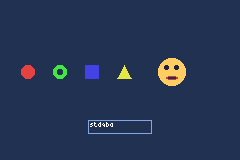
BIOS Functions
The GBA BIOS provides built-in routines accessible through software interrupts (SWI). stdgba wraps these in C++ functions, some of which are constexpr - the compiler evaluates them at compile time when possible and falls back to the BIOS call at runtime.
Common functions
Halting and waiting
#include <gba/bios>

// Wait for VBlank interrupt (most common - used every frame)
gba::VBlankIntrWait();

// Halt CPU until any interrupt
gba::Halt();

// Halt CPU until a specific interrupt
gba::IntrWait(true, { .vblank = true });
Math
// Square root (constexpr when argument is known at compile time)
auto root = gba::Sqrt(144u);  // 12

// Arc tangent
auto angle = gba::ArcTan2(dx, dy);

// Division (avoid - the compiler's division is usually better)
auto [quot, rem] = gba::Div(100, 7);
Memory copy
// CpuSet: 32-bit word copy/fill via BIOS
gba::CpuSet(src, dst, { .count = 256, .set_32bit = true });

// CpuFastSet: 32-bit copy in 8-word chunks (must be aligned, count multiple of 8)
gba::CpuFastSet(src, dst, { .count = 256 });
Note: For general memory copying, prefer standard
memcpy/memset- stdgba’s optimised ARM assembly implementations are faster than the BIOS routines in most cases.
Decompression
// Decompress LZ77 data to work RAM (byte writes)
gba::LZ77UnCompWram(compressed_data, dest);

// Decompress LZ77 data to video RAM (halfword writes)
gba::LZ77UnCompVram(compressed_data, dest);

// Huffman decompression
gba::HuffUnCompReadNormal(compressed_data, dest);

// Run-length decompression
gba::RLUnCompReadNormalWrite8bit(compressed_data, dest);
Reset
// Soft reset (restart the ROM)
gba::SoftReset();  // [[noreturn]]

// Clear specific memory regions
gba::RegisterRamReset({
    .ewram = true,
    .iwram = true,
    .palette = true,
    .vram = true,
    .oam = true,
});
Constexpr BIOS functions
Several BIOS math functions are constexpr in stdgba. When called with compile-time arguments, the compiler evaluates them directly and embeds the result:
// Evaluated at compile time - no SWI at runtime
constexpr auto root = gba::Sqrt(256u);  // 16

// Evaluated at runtime - SWI 0x08
volatile unsigned int x = 256;
auto root2 = gba::Sqrt(x);  // BIOS call
This is possible because stdgba provides constexpr implementations of the algorithms alongside the SWI wrappers. The compiler chooses the appropriate path automatically.
tonclib comparison
| stdgba | tonclib |
|---|---|
gba::VBlankIntrWait() | VBlankIntrWait() |
gba::Sqrt(n) | Sqrt(n) |
gba::CpuSet(s, d, cfg) | CpuSet(s, d, mode) |
gba::SoftReset() | SoftReset() |
gba::ArcTan2(x, y) | ArcTan2(x, y) |
The API names match the BIOS function names from the community documentation. The main difference is type safety: stdgba uses structs with named fields for configuration instead of raw integers with magic bit patterns.
Memory Utilities
<gba/memory> collects the low-level allocation and data-layout helpers that show up repeatedly in real GBA projects:
bitpoolfor fixed-capacity VRAM or RAM allocationunique<T>andmake_unique()for RAII ownershipbitpool_buffer_resourceforstd::pmrcontainers backed by a bitpoolplex<Ts...>for trivially copyable tuple-like register payloads- optimised
memcpy,memmove, andmemsetwrappers tuned for ARM7TDMI
For raw VRAM addresses and palette/OAM memory maps, see Video Memory.
Why this module exists
The GBA gives you tight, fixed memory regions instead of a desktop-style heap:
- 32 KiB IWRAM for hot code and stack
- 256 KiB EWRAM for larger runtime data
- 32 KiB OBJ VRAM and 64 KiB BG VRAM with hardware-specific layout rules
That environment pushes you toward fixed-capacity allocators, predictable ownership, and careful copy/fill paths. <gba/memory> packages those patterns into APIs that stay small enough for the platform.
API map
| API | What it does | Typical use |
|---|---|---|
bitpool | 32-chunk bitmap allocator over a caller-owned region | OBJ VRAM tiles, BG blocks, arena-style RAM |
bitpool::allocate() | Raw byte allocation | Reserve tile or buffer space |
bitpool::allocate_unique() | Raw allocation + RAII deallocation | Temporary VRAM ownership |
bitpool::make_unique() | Placement-new object + RAII destruction | Pool-owned runtime objects |
bitpool::subpool() | Carve one pool out of another | Reserve a sheet- or scene-local arena |
bitpool_buffer_resource | PMR adapter over bitpool | std::pmr::vector or std::pmr::string |
unique<T> | Small owning pointer with type-erased deleter | Resource ownership without std::unique_ptr |
plex<Ts...> | Tuple-like object guaranteed to fit in 32 bits | Register pairs like timer reload + control |
memcpy / memmove / memset | Fast wrappers over specialized AEABI back ends | Bulk transfers and clears |
bitpool - a 32-chunk allocator
bitpool manages a contiguous region using a 32-bit mask. Each bit represents one chunk of equal size.
chunk 0  chunk 1  chunk 2  ...  chunk 31
  bit0     bit1     bit2           bit31
That means every pool has exactly 32 allocatable chunk positions. You choose the chunk size to fit the memory region you care about.
Examples:
| Region | Total size | Sensible chunk size | Why |
|---|---|---|---|
| OBJ VRAM | 32 KiB | 1024 bytes | 32 chunks exactly cover the whole region |
| Small scratch arena | 4 KiB | 128 bytes | Good for many tiny fixed blocks |
| BG map staging | 8 KiB | 256 bytes | One chunk per quarter screenblock |
#include <gba/memory>
#include <gba/video>

gba::bitpool obj_vram{gba::memory_map(gba::mem_vram_obj), 1024};

auto tiles = obj_vram.allocate_unique<unsigned char>(2048);
if (tiles) {
    std::memcpy(tiles.get(), sprite_data, 2048);
}
Core queries
| Function | Meaning |
|---|---|
bitpool::capacity() | Always 32 chunks |
chunk_size() | Bytes per chunk |
size() | Total bytes managed (capacity() * chunk_size()) |
Raw allocation
allocate(bytes) rounds up to whole chunks and returns the first contiguous run that fits.
alignas(4) unsigned char buffer[1024];
gba::bitpool pool{buffer, 32};

void* a = pool.allocate(32);  // 1 chunk
void* b = pool.allocate(64);  // 2 contiguous chunks

pool.deallocate(a, 32);
pool.deallocate(b, 64);
Important properties:
- allocation is simple and deterministic: scan the 32-bit mask for a free run
- deallocation is O(1): clear the matching bits
- chunk size must be a power of two
- large requests can fail if the free space is split into non-contiguous holes
So bitpool is not a general heap replacement. It is best when you deliberately size chunks around your asset granularity.
Alignment-aware allocation
allocate(bytes, chunkAlignment) steps the search in chunk-sized increments derived from chunkAlignment.
alignas(32) unsigned char buffer[256];
gba::bitpool pool{buffer, 16};

void* aligned = pool.allocate(16, 32);
The alignment is effectively rounded up to chunk boundaries. If your chunks are already 1024 bytes wide, asking for 4-byte alignment changes nothing.
VRAM workflow
bitpool is especially useful when OBJ tile ownership changes at runtime.
#include <gba/memory>
#include <gba/video>

gba::bitpool obj_tiles{gba::memory_map(gba::mem_vram_obj), 1024};

auto slot = obj_tiles.allocate_unique<unsigned char>(1024);
if (!slot) {
    // No room for another sprite sheet chunk
    return;
}

std::memcpy(slot.get(), sprite_sheet, 1024);
const auto tile = gba::tile_index(slot.get());
gba::obj_mem[0] = sprite.obj(tile);
The same pattern works well for BG VRAM, because tile graphics (4 charblocks) and screen entries (32 screenblocks) share the same 64 KiB mem_vram_bg region.
A convenient chunking is “one chunk per screenblock”:
- 1 screenblock = 0x800 bytes (2 KiB)
- 1 charblock = 0x4000 bytes (16 KiB) = 8 screenblocks
That makes bitpool a good fit for allocating both tile graphics and tilemaps from one shared pool.
#include <gba/memory>
#include <gba/video>

// BG VRAM is 64 KiB. Using 0x800-byte chunks gives exactly 32 chunks:
// one per screenblock.
gba::bitpool bg_vram{gba::memory_map(gba::mem_vram_bg), 0x800};

auto tiles = bg_vram.allocate_unique<unsigned char>(0x4000); // 1 charblock
auto map   = bg_vram.allocate_unique<unsigned char>(0x800);  // 1 screenblock

const auto cbb = gba::char_map(tiles.get());
const auto sbb = gba::screen_map(map.get());

gba::reg_bgcnt[0] = {
    .charblock = cbb,
    .screenblock = sbb,
};
This pattern works well for:
- allocating BG charblocks + screenblocks for background layers
- staging background tilemap uploads
- swapping sprite sets between scenes
- reserving temporary OBJ tiles for effects
- carving a VRAM upload arena out of EWRAM or VRAM
allocate_unique() - raw bytes with RAII
If you want ownership without placement-new, use allocate_unique<T>().
{
    auto sprite_tiles = obj_vram.allocate_unique<unsigned char>(512);
    if (sprite_tiles) {
        std::memcpy(sprite_tiles.get(), data, 512);
    }
} // returned to the pool here
T only controls pointer type and default alignment. No constructor runs.
make_unique() - construct an object in pool memory
If you want an actual object stored inside the pool, use make_unique().
struct cache_entry {
    unsigned short tile_base;
    unsigned short frame_count;
};

auto entry = obj_vram.make_unique<cache_entry>(12, 4);
On destruction, the object destructor runs first, then the bytes are returned to the pool.
subpool() - reserve one arena inside another
Subpools let you split a parent pool into smaller lifetime domains.
gba::bitpool obj_vram{gba::memory_map(gba::mem_vram_obj), 1024};

auto enemy_bank = obj_vram.subpool(4096, 1024);
auto boss_bank  = obj_vram.subpool(8192, 1024);
This is useful when one group of assets should be freed all at once. For example, a scene can own a subpool and drop the whole reservation when unloading.
Important lifetime rule:
- the parent pool must outlive every subpool created from it
bitpool_buffer_resource - PMR bridge
If you want STL-like dynamic containers but still want to control exactly where the bytes come from, wrap a pool as a std::pmr::memory_resource.
#include <memory_resource>
#include <vector>

alignas(4) unsigned char arena[4096];
gba::bitpool pool{arena, 128};
gba::bitpool_buffer_resource resource{pool};

std::pmr::vector<int> values{&resource};
values.push_back(1);
values.push_back(2);
values.push_back(3);
This does not magically remove dynamic allocation costs, but it keeps them inside a bounded arena you control.
unique<T> and make_unique()
gba::unique<T> is a small owning pointer with a type-erased deleter stored inline. It is useful even outside bitpool, because it lets you attach custom destruction behaviour without dragging in the full standard smart-pointer machinery.
auto owned = gba::make_unique<int>(42);
if (owned) {
    *owned = 100;
}
Use cases:
- ownership of pool allocations
- placement-new objects in custom arenas
- temporary wrappers around manually managed resources
plex<Ts...> - tuple-like data that fits registers
plex<Ts...> is a trivially copyable heterogeneous aggregate that is guaranteed to fit in 32 bits. Unlike std::tuple, it is designed to be safe for hardware-oriented use cases such as register pairs and packed configuration values.
#include <bit>
#include <gba/memory>

gba::plex<unsigned short, unsigned short> pair{0x1234, 0x5678};
auto [lo, hi] = pair;

auto raw = std::bit_cast<unsigned int>(pair);
Typical uses:
- timer reload + control (
gba::timer_configis aplex) - paired register writes
- tiny aggregate values you want to destructure with structured bindings
plex supports:
- 1 to 4 elements
- structured bindings via
get<I>() - comparisons and
swap() - deduction guides and
make_plex(...)
Optimised memcpy, memmove, and memset
stdgba ships custom wrappers in source/memcpy.cpp, source/memmove.cpp, and source/memset.cpp. They let the compiler inline small constant cases and jump straight to specialized AEABI entry points when alignment is provable.
memcpy
| Specialization | Trigger |
|---|---|
| No-op | n == 0 known at compile time |
| Inline word copy | aligned source + dest, n % 4 == 0, 0 < n < 64 |
| Inline byte copy | 1 <= n <= 6 |
| Fast aligned AEABI path | both pointers provably word-aligned |
| Generic AEABI path | everything else |
memmove
| Specialization | Trigger |
|---|---|
| No-op | n == 0 known at compile time |
| Inline overlap-safe byte move | 1 <= n <= 6 |
| Fast aligned AEABI path | both pointers provably word-aligned |
| Generic AEABI path | everything else |
memset
| Specialization | Trigger |
|---|---|
| No-op | n == 0 known at compile time |
| Inline word stores | aligned destination, n % 4 == 0, 0 < n < 64, constant fill byte |
| Inline byte stores | 1 <= n <= 12 |
| Fast aligned AEABI path | destination provably word-aligned |
| Generic AEABI path | everything else |
These paths matter because the ARM7TDMI is sensitive to call overhead, alignment checks, and instruction fetch bandwidth. Small constant copies and clears are common in sprite/OAM/tile code, so letting the compiler collapse them early saves cycles.
In practice you usually just call std::memcpy, std::memmove, or std::memset as normal. The library provides the tuned implementation underneath.
Choosing the right tool
| Problem | Recommended tool |
|---|---|
| Reserve OBJ VRAM tiles for a runtime-loaded sprite sheet | bitpool |
| Keep a pool allocation alive until a sprite/effect is destroyed | allocate_unique() |
| Construct a small object inside a bounded arena | make_unique() |
| Give a PMR container a fixed arena | bitpool_buffer_resource |
| Pack <= 32 bits of heterogenous register data | plex |
| Copy/fill bytes quickly | memcpy / memmove / memset |
Functional
<gba/functional> provides a lightweight, heap-free type-erased callable wrapper
designed for GBA embedded development.
Overview
The standard library’s std::function allocates on the heap when the stored
callable is too large for its internal buffer, and its virtual-dispatch overhead
is higher than necessary for a single-core embedded target. gba::function
avoids both problems:
- No heap allocation – callables are stored in a 12-byte inline buffer.
Oversized callables are rejected at compile time via
static_assert. - Function-pointer dispatch – avoids virtual-table overhead.
- Copyable and movable – full value semantics, including assignment from
nullptr.
gba::function<Sig>
#include <gba/functional>

gba::function<void(int)> fn = [](int x) { /* ... */ };
fn(42);
The template parameter Sig is a function signature such as void(int) or
int(float, float).
Construction
// Default-construct (null / empty)
gba::function<void()> empty;

// Construct from a lambda
int counter = 0;
gba::function<void()> inc = [&counter] { ++counter; };

// Construct from a free function
void on_tick() { /* ... */ }
gba::function<void()> tick = on_tick;

// Assign null
inc = nullptr;
Invocation
if (fn) {
    fn(42);   // only call when non-null
}
Invoking a null gba::function is undefined behaviour – guard with the bool
conversion operator before calling.
Null checks and reassignment
gba::function<void(int)> fn;

if (!fn) {
    fn = [](int x) { /* ... */ };
}

fn = nullptr;  // reset to empty
gba::handler<Args...>
handler is a convenience alias for void-returning functions:
// Equivalent to gba::function<void(int)>
gba::handler<int> h = [](int x) { process(x); };
h(42);
It is the idiomatic type for GBA event callbacks (VBlank handler, key-press callback, etc.) where the return value is not needed.
Small-buffer constraint
The inline storage is 12 bytes. Any callable larger than 12 bytes triggers a
static_assert at compile time:
int a, b, c, d;   // four ints = 16 bytes - too large
gba::function<void()> fn = [a, b, c, d] { /* ... */ };
// error: Callable too large for small buffer optimization
To capture more state, store it in a struct and capture a pointer or reference to it instead:
struct State {
    int a, b, c, d;
};

State state{1, 2, 3, 4};

// Capture a pointer - sizeof(State*) == 4 bytes, fits easily
gba::function<void()> fn = [&state] {
    state.a += state.b;
};
Usage with gba::irq_handler
gba::irq_handler (from <gba/interrupt>) stores a gba::handler<gba::irq>,
so any callable that accepts a gba::irq can be assigned directly:
#include <gba/interrupt>

gba::irq_handler = [](gba::irq irq) {
    if (irq.vblank) { /* frame logic */ }
};
For the full interrupt setup and irq_handler API (has_value, swap,
reset, nullisr), see Interrupts.
Type sizes
| Type | Size |
|---|---|
gba::function<void()> | 20 bytes |
gba::function<void(int)> | 20 bytes |
gba::handler<> | 20 bytes (alias) |
The 20-byte total comes from: 4-byte invoke pointer + 4-byte ops-table pointer + 12-byte inline storage.
Summary
| Feature | gba::function | std::function |
|---|---|---|
| Heap allocation | Never | When callable > SBO buffer |
| Inline storage | 12 bytes (fixed) | Implementation-defined |
| Oversized callable | static_assert at compile time | Heap fallback |
| Dispatch mechanism | Function pointer | Virtual dispatch |
| Null / empty state | Yes (nullptr / default) | Yes |
| Copy / move | Yes | Yes |
Compression
stdgba provides consteval compression functions that compress data entirely at compile time. The compressed output is compatible with the GBA BIOS decompression routines, so assets can be stored compressed in ROM and decompressed at runtime with a single BIOS call.
Supported algorithms
| Algorithm | Best for | Header format |
|---|---|---|
| LZ77 | Repeated patterns (tiles, maps) | BIOS-compatible |
| Huffman | Skewed symbol frequencies (text) | BIOS-compatible |
| RLE | Long runs of identical values | BIOS-compatible |
| BitPack | Reducing bit depth (e.g., 32-bit to 4-bit) | BIOS-compatible |
LZ77 compression
#include <gba/compress>
#include <gba/bios>

// Compress tilemap data at compile time
constexpr auto compressed_map = gba::lz77_compress([] {
    return std::array<unsigned short, 1024>{
        0, 0, 0, 1, 1, 1, 2, 2, 2, // ...
    };
});

// Decompress at runtime using BIOS
alignas(4) std::array<unsigned short, 1024> buffer;
gba::LZ77UnCompWram(compressed_map, buffer.data());
Use LZ77UnCompWram for general RAM targets and LZ77UnCompVram for video RAM (which requires halfword writes).
Huffman compression
constexpr auto compressed_text = gba::huffman_compress([] {
    return std::array<unsigned char, 256>{ /* text data */ };
});

alignas(4) std::array<unsigned char, 256> buffer;
gba::HuffUnCompReadNormal(compressed_text, buffer.data());
RLE compression
constexpr auto compressed_fill = gba::rle_compress([] {
    return std::array<unsigned char, 512>{ /* data with runs */ };
});

alignas(4) std::array<unsigned char, 512> buffer;
gba::RLUnCompReadNormalWrite8bit(compressed_fill, buffer.data());
Bit packing
Bit packing reduces the bit depth of data elements. Useful for compacting palette indices or other small values:
constexpr auto packed = gba::bit_pack<4>([] {
    return std::array<unsigned int, 64>{ 0, 1, 2, 3, /* 4-bit values in 32-bit containers */ };
});
Combining with differential filtering
For data with gradual changes (audio waveforms, gradients), apply a differential filter before compression:
#include <gba/filter>
#include <gba/compress>

constexpr auto filtered = gba::diff_filter<1>([] {
    return std::array<unsigned char, 512>{
        128, 130, 132, 134, 136, // ...
    };
});

constexpr auto compressed = gba::lz77_compress([] { return filtered; });
String Formatting
stdgba provides a compile-time string formatting library designed for GBA constraints. Format strings are parsed at compile time, and arguments are bound by name using user-defined literals.
Basic usage
#include <gba/format>
using namespace gba::literals;

// Define a format string (parsed at compile time)
constexpr auto fmt = "HP: {hp}/{max}"_fmt;

// Format into a buffer
char buf[32];
fmt.to(buf, "hp"_arg = 42, "max"_arg = 100);
// buf contains "HP: 42/100"
Without literals
If you prefer not to use literal operators:
constexpr auto fmt = gba::format::make_format<"HP: {hp}/{max}">();
constexpr auto hp = gba::format::make_arg<"hp">();
constexpr auto max_hp = gba::format::make_arg<"max">();

char buf[32];
fmt.to(buf, hp = 42, max_hp = 100);
Placeholder forms
| Form | Meaning |
|---|---|
{name} | Named placeholder with default formatting |
{name:spec} | Named placeholder with format spec |
{} | Implicit positional placeholder |
{:spec} | Implicit positional placeholder with format spec |
{0} | Explicit positional placeholder |
{0:spec} | Explicit positional placeholder with format spec |
{{ / }} | Escaped literal braces |
Format spec grammar
The format spec follows a Python-style mini-language:
[[fill]align][sign][#][0][width][grouping][.precision][type]
| Field | Syntax | Default | Applies to |
|---|---|---|---|
| fill | any ASCII character before align | ' ' | all aligned outputs |
| align | < left, > right, ^ centre, = sign-aware | type-dependent | all (= is numeric-only) |
| sign | +, -, or space | - behaviour | numeric types |
# | alternate form | off | integral prefixes, fixed-point decimal point retention |
0 | zero-fill (equivalent to fill=0 align==) | off | numeric types |
| width | decimal digits | 0 | all types |
| grouping | , or _ | none | integer, fixed-point, angle decimal output |
| precision | . followed by digits | unset | strings, fixed-point, angle degrees/radians/turns, angle hex |
| type | trailing presentation character | per value category | see tables below |
Integer type codes
| Code | Meaning | # alternate form |
|---|---|---|
| (default) | decimal | - |
d | decimal | - |
b | binary | 0b prefix |
o | octal | 0o prefix |
x | hex lowercase | 0x prefix |
X | hex uppercase | 0X prefix |
n | grouped decimal | - |
c | single character from code point | - |
Integer grouping inserts a separator every 3 digits for decimal/octal, or every 4 digits for binary/hex.
String type codes
| Code | Meaning |
|---|---|
| (default) | emit string as-is |
s | same as default |
Precision truncates the string to at most N characters before width/alignment is applied.
Fixed-point type codes
| Code | Meaning |
|---|---|
| (default) | fixed decimal, trailing fractional zeros trimmed |
f / F | fixed decimal with exactly .N fractional digits |
e | scientific notation lowercase (1.23e+03) |
E | scientific notation uppercase (1.23E+03) |
g | general format – uses fixed for small values, scientific for large |
G | general format uppercase |
% | multiply by 100 and append % |
Grouping applies to the integer part only. # with .0f retains the decimal point.
Angle type codes
| Code | Meaning |
|---|---|
| (default) | degrees |
r | radians |
t | turns (0.0 - 1.0) |
i | raw integer value of the angle storage |
x | raw hex lowercase |
X | raw hex uppercase |
For x/X, precision controls the number of emitted hex digits (most-significant digits are kept). If omitted, the native width is used (8 for gba::angle, Bits/4 for gba::packed_angle<Bits>). # adds a 0x/0X prefix.
Examples
Integers
constexpr auto fmt = "Addr: {a:#010x}"_fmt;
char buf[16];
fmt.to(buf, "a"_arg = 0x2A);
// buf contains "Addr: 0x0000002a"
constexpr auto fmt = "Gold: {gold:_d}"_fmt;
char buf[16];
fmt.to(buf, "gold"_arg = 9999);
// buf contains "Gold: 9_999"
Strings
constexpr auto fmt = "{name:*^7.3}"_fmt;
char buf[16];
fmt.to(buf, "name"_arg = "Hello");
// buf contains "**Hel**"
Fixed-point
#include <gba/fixed_point>
using fix8 = gba::fixed<int, 8>;
constexpr auto fmt = "X: {x:,.2f}"_fmt;
char buf[32];
fmt.to(buf, "x"_arg = fix8(1234.5));
// buf contains "X: 1,234.50"
Scientific notation:
constexpr auto fmt = "X: {x:.2e}"_fmt;
char buf[32];
fmt.to(buf, "x"_arg = fix8(1234.5));
// buf contains "X: 1.23e+03"
Percent formatting:
constexpr auto fmt = "HP: {x:%}"_fmt;
char buf[32];
fmt.to(buf, "x"_arg = fix8(0.5));
// buf contains "HP: 50%"
Angles
#include <gba/angle>
using namespace gba::literals;
constexpr auto fmt = "Angle: {a:.4r}"_fmt;
char buf[32];
fmt.to(buf, "a"_arg = 90_deg);
// buf contains "Angle: 1.5708"
Compact raw hex view of a packed angle:
constexpr auto fmt = "Rot: {a:#.4X}"_fmt;
char buf[16];
fmt.to(buf, "a"_arg = gba::packed_angle16{0x4000});
// buf contains "Rot: 0X4000"
Compile-time formatting
constexpr auto result = "HP: {hp}"_fmt.to_static("hp"_arg = 42);
// result is a compile-time array containing "HP: 42"
to_static also accepts gba::literals::fixed_literal values (e.g. 3.14_fx), which are compile-time-only and cannot be used with runtime output paths.
Typewriter generator
The generator API emits one character at a time, perfect for RPG-style text rendering:
constexpr auto fmt = "You found {item}!"_fmt;
auto gen = fmt.generator("item"_arg = "Sword");
while (auto ch = gen()) {
draw_char(*ch);
wait_frames(2); // Typewriter delay
}
Lazy (lambda) arguments
Arguments can also be bound to a callable (for example, a lambda). The callable is invoked when formatting reaches that placeholder.
This is useful for typewriter-style output: you can defer looking up a value until the moment the generator starts emitting that argument.
constexpr auto fmt = "HP: {hp}/{max}"_fmt;
// player.hp is read when the generator reaches {hp}, not when it is created.
auto gen = fmt.generator(
"hp"_arg = [&] { return player.hp; },
"max"_arg = [&] { return player.max_hp; }
);
while (auto ch = gen()) {
draw_char(*ch);
wait_frames(2);
}
For string arguments, the supplier should return a stable pointer (for example, a string stored in memory) rather than a temporary buffer.
Word boundary lookahead
The generator provides until_break() to check how many characters remain until the next word boundary. Use this for line wrapping:
auto gen = fmt.generator("hp"_arg = 42);
int col = 0;
while (auto ch = gen()) {
if (col + gen.until_break() > 30) {
newline();
col = 0;
}
draw_char(*ch);
++col;
}
Output paths
All output paths share the same rendering semantics and produce identical results for the same inputs:
| Path | Description |
|---|---|
generator() | Streaming character-by-character emission |
to(buf, ...) | Render into a caller-provided buffer |
to_array(...) | Render into a std::array |
to_static(...) | Compile-time render into a constexpr array |
Invalid spec rejection
Invalid format spec combinations are rejected at compile time. Examples of rejected specs:
| Spec | Reason |
|---|---|
+s | sign on string type |
,s | grouping on string type |
=s | sign-aware alignment on string type |
.2i | precision on raw integer angle type |
#c | alternate form on character type |
Deferred features
The following features are not supported in the current implementation:
!s/!rconversion flags- Dynamic width / precision (
{x:{w}.{p}f}) - Nested replacement fields inside format specs
- Runtime-parsed format strings
- Built-in
float/doubleformatting
Design notes
- Format strings are parsed entirely at compile time - no runtime parsing overhead
- Arguments are bound by name, not position, making format strings self-documenting
- Arguments may be bound to callables (lambdas) for lazy evaluation at placeholder time
- The generator API emits digits MSB-first, enabling typewriter effects without buffering
- No heap allocation - all formatting uses caller-provided buffers
- The generator uses a deterministic phase/state machine with category-specialised emission states
Logging
stdgba provides a logging system with pluggable backends for emulator debug output. It auto-detects whether the game is running under mGBA or no$gba and routes log messages to the appropriate debug console.
Setup
#include <gba/logger>
using namespace gba::literals;
int main() {
// Auto-detect emulator and initialise
if (gba::log::init()) {
gba::log::info("Game started!");
}
}
init() returns true if a supported emulator was detected, false otherwise (a null backend is installed so logging calls are safe but do nothing).
Log levels
Five severity levels are available:
gba::log::fatal("Critical error");
gba::log::error("Something failed");
gba::log::warn("Potential problem");
gba::log::info("Status update");
gba::log::debug("Verbose trace");
Filtering by level
gba::log::set_level(gba::log::level::warn);
// Only fatal, error, and warn messages are output
Runtime level selection
Use write() when the log level is determined at runtime:
gba::log::level lvl = config.verbose ? gba::log::level::debug : gba::log::level::info;
gba::log::write(lvl, "Message");
Formatted logging
Log messages support the same format string syntax as <gba/format>:
For full format syntax ({x}, {x:X}, named args, and generator behaviour), see String Formatting.
using namespace gba::literals;
gba::log::info("HP: {hp}"_fmt, "hp"_arg = 42);
gba::log::warn("Sector {s} failed"_fmt, "s"_arg = 3);
Custom backends
Implement the gba::log::backend interface to route logs anywhere:
struct screen_logger : gba::log::backend {
int line = 0;
std::size_t write(gba::log::level lvl, const char* msg, std::size_t len) override {
draw_text(0, line++, msg);
return len;
}
};
screen_logger my_logger;
gba::log::set_backend(&my_logger);
Built-in backends
| Backend | Emulator | Detection |
|---|---|---|
mgba_backend | mGBA | Writes to 0x4FFF780 debug registers |
nocash_backend | no$gba | Writes to 0x4FFFA00 signature-based output |
null_backend | (fallback) | Discards all output |
init() tries mGBA first, then no$gba, then falls back to the null backend.
Testing, Assertions & Benchmarking
stdgba provides lightweight APIs for unit testing, assertions, and cycle-accurate benchmarking on hardware or emulator.
For debugger value rendering, see GDB Pretty Printers.
Test API
The gba::test singleton provides simple assertion and expectation checking. Tests run on real GBA hardware or mGBA emulator, with results reported via log output.
Basic test structure
#include <gba/testing>
int main() {
gba::test("example test case", [] {
gba::test.expect.eq(2 + 2, 4);
});
return gba::test.finish(); // Must call finish() to exit
}
Every test must:
- Call
gba::test(name, lambda)to define a test case - Use
gba::test.expect.*orgba::test.assert.*inside the lambda - Call
gba::test.finish()at the end ofmain()
The test framework automatically exits via SWI 0x1A (or a custom exit SWI in -DSTDGBA_EXIT_SWI=0x##).
Expectation checks
Expectations continue execution on failure and count failures for the final report:
gba::test("expectations", [] {
gba::test.expect.eq(2 + 2, 4, "arithmetic"); // Pass
gba::test.expect.ne(0, 1, "inequality"); // Pass
gba::test.expect.lt(1, 2); // Pass
gba::test.expect.le(1, 1); // Pass
gba::test.expect.gt(2, 1); // Pass
gba::test.expect.ge(1, 1); // Pass
gba::test.expect.is_true(true); // Pass
gba::test.expect.is_false(false); // Pass
gba::test.expect.is_zero(0); // Pass
gba::test.expect.at_least(5, 3); // Pass (5 >= 3)
});
Assertion checks
Assertions stop execution on failure immediately:
gba::test("assertions", [] {
gba::test.assert.eq(5, 5); // Pass, continue
gba::test.assert.eq(5, 6); // FAIL, stop test
gba::test.expect.eq(1, 1); // Never reached
});
Range and container checks
Test ranges and containers element-wise:
#include <array>
#include <gba/testing>
int main() {
gba::test("ranges", [] {
std::array<int, 3> a = {1, 2, 3};
std::array<int, 3> b = {1, 2, 3};
gba::test.expect.range_eq(a, b, "array equality");
std::array<int, 3> c = {1, 2, 4};
gba::test.expect.range_ne(a, c, "array inequality");
});
return gba::test.finish();
}
Running tests on mGBA
Build your test executable, then run with mgba-headless:
# Build
cmake --build build --target my_test - -j 8
# Run (exit SWI 0x1A, return exit code in r0, timeout 10 seconds)
timeout 15 mgba-headless -S 0x1A -R r0 -t 10 build/tests/my_test.elf
echo "Exit code: $?"
The test framework writes results to the logger, viewable via:
mGBAdebug console (Ctrl+D or Tools -> GDB)no$gbadebug window- Custom logger backend
Benchmark API
The gba::benchmark module provides cycle-accurate timing using cascading hardware timers.
Cycle counter
A cycle_counter wraps two cascading timers to form a 32-bit counter:
#include <gba/benchmark>
gba::benchmark::cycle_counter counter;
counter.start();
// ... code to measure ...
unsigned int cycles = counter.stop();
By default, cycle_counter uses TM2+TM3, leaving TM0+TM1 free for audio or other uses. Override via:
using namespace gba::benchmark;
cycle_counter counter(make_timer_pair(timer_pair_id::tm0_tm1));
Valid pairs: (0,1), (1,2), (2,3).
Measuring code
Use measure() to run a function and return its cycle cost:
#include <gba/benchmark>
unsigned int work(unsigned int n) {
unsigned int sum = 0;
for (unsigned int i = 0; i < n; ++i) {
sum += i;
}
return sum;
}
int main() {
// Measure one run
auto cycles = gba::benchmark::measure(work, 1024u);
// Measure and average 8 runs
auto avg = gba::benchmark::measure_avg(8, work, 1024u);
return 0;
}
measure() returns the cycle count. measure_avg() runs the function N times and returns the average, reducing noise from interrupts or cache effects.
Preventing dead-code elimination
Use do_not_optimize() to wrap code so the compiler cannot eliminate it:
#include <gba/benchmark>
gba::benchmark::cycle_counter counter;
counter.start();
gba::benchmark::do_not_optimize([&] {
// Compiler cannot dead-code eliminate or reorder this
volatile unsigned int x = 0;
for (int i = 0; i < 100; ++i) x += i;
});
auto cycles = counter.stop();
Without do_not_optimize(), the compiler may optimise away unused computations, giving misleading cycle counts.
Combined example
Test a function with both assertions and benchmarks:
#include <gba/benchmark>
#include <gba/testing>
// Function under test
unsigned int sum_of_squares(unsigned int n) {
unsigned int sum = 0;
for (unsigned int i = 1; i <= n; ++i) {
sum += i * i;
}
return sum;
}
int main() {
// Unit test
gba::test("sum_of_squares", [] {
gba::test.expect.eq(sum_of_squares(1), 1, "sum(1) = 1");
gba::test.expect.eq(sum_of_squares(3), 14, "sum(1..3) = 14");
gba::test.expect.eq(sum_of_squares(5), 55, "sum(1..5) = 55");
});
// Benchmark
gba::test("sum_of_squares benchmark", [] {
using namespace gba::benchmark;
auto cycles = measure_avg(4, sum_of_squares, 100u);
gba::test.expect.lt(cycles, 5000, "reasonable cycle cost");
});
return gba::test.finish();
}
Tips & Best Practices
- Always call
gba::test.finish(): It flushes logs and signals the exit SWI to mgba-headless. - Use
expect.*for non-critical checks: Failures don’t stop the test, so you can gather multiple failures at once. - Use
assert.*for setup validation: Stop immediately if preconditions fail, preventing cascade failures. - Add descriptive messages: The third parameter makes test-failure output readable.
- Benchmark multiple runs: Use
measure_avg()to reduce noise from VBlank interrupts. - Isolate what you measure: Wrap only the code under test with
do_not_optimize(). - Test on hardware too: emulator behaviour may differ from real GBA in timing or memory access patterns.
Reference
| Function | Purpose |
|---|---|
gba::test(name, fn) | Run test case |
gba::test.expect.eq(a, b) | Expect a == b |
gba::test.expect.ne(a, b) | Expect a != b |
gba::test.expect.lt(a, b) | Expect a < b |
gba::test.expect.le(a, b) | Expect a <= b |
gba::test.expect.gt(a, b) | Expect a > b |
gba::test.expect.ge(a, b) | Expect a >= b |
gba::test.expect.is_true(x) | Expect x is true |
gba::test.expect.is_false(x) | Expect x is false |
gba::test.expect.is_zero(x) | Expect x == 0 |
gba::test.expect.range_eq(a, b) | Expect ranges a and b are equal |
gba::test.expect.range_ne(a, b) | Expect ranges a and b are not equal |
gba::test.assert.* | Same as expect, but stops on failure |
gba::test.finish() | Exit the test (required) |
gba::benchmark::measure(fn, args...) | Measure cycles for one run |
gba::benchmark::measure_avg(n, fn, args...) | Measure and average N runs |
gba::benchmark::do_not_optimize(fn) | Prevent dead-code elimination |
gba::benchmark::cycle_counter | Manual 32-bit timer pair counter |
GDB Pretty Printers
stdgba ships Python pretty-printers under gdb/ so common library types are shown in a readable form while debugging.
Instead of raw storage fields, GDB can show decoded values such as fixed-point numbers, angles in degrees, key masks, timer configuration, and music tokens.
Quick start
Load the aggregate script once per GDB session:
source D:/CLionProjects/stdgba/gdb/stdgba.py
To load them automatically, add the same source ... line to your .gdbinit.
When loaded successfully, GDB prints status lines including:
Loading stdgba pretty printers...stdgba pretty printers loaded successfully
Available printers
The aggregate loader gdb/stdgba.py imports and registers these printer modules:
| Module | Example types |
|---|---|
gdb/fixed_point.py | gba::fixed<Rep, FracBits> |
gdb/angle.py | gba::angle, gba::packed_angle<Bits> |
gdb/format.py | gba::format::compiled_format, arg_binder, bound_arg, format_generator |
gdb/music.py | gba::music::note, bpm_value, token_type, ast_type, token, pattern types |
gdb/log.py | gba::log::level |
gdb/video.py | gba::color, gba::object |
gdb/keyinput.py | gba::keypad |
gdb/key.py | gba::key |
gdb/registral.py | gba::registral<T> |
gdb/memory.py | gba::plex<...>, gba::unique<T>, gba::bitpool |
gdb/benchmark.py | gba::benchmark::cycle_counter |
gdb/interrupt.py | gba::irq, gba::irq_handler |
gdb/timer.py | gba::timer::compiled_timer |
gdb/link.py | gba::link_error, gba::link_multi<...>, gba::link_normal<...>, gba::link_slot |
gdb/backup.py | gba::bits::backup::table<...>, gba::backup_slot |
You can also source any individual module directly if you only want one printer.
Practical workflow
tests/debug/test_pretty_printers.cpp constructs representative values for all supported printer categories and includes a dedicated breakpoint marker comment.
Build the manual test target:
cmake --build build --target test_pretty_printers - -j 8
Start GDB with the produced ELF:
arm-none-eabi-gdb build/tests/test_pretty_printers.elf
Inside GDB:
source D:/CLionProjects/stdgba/gdb/stdgba.py
break main
run
# Step/next until the BREAKPOINT HERE marker in test_pretty_printers.cpp
print fix8_val
print angle_90
print key_combo
print test_pool
print link_multi
print backup_table
Expected output is human-readable (for example fixed-point decimal form and decoded key masks), rather than only raw integer fields. Link transport printers show sending, busy, connection, and per-peer error state. Backup table printers show only directory allocation metadata, including pending redundant saves; they never read or decode backup-chip payloads.
Notes
test_pretty_printersis listed intests/CMakeLists.txtunderMANUAL_TESTS, so it is intentionally excluded from CTest automation.- Pretty-printers are a debugger convenience only; they do not affect generated ROM code or runtime behaviour.
- The GDB build must include Python scripting support; some bundled cross-GDB builds omit it.
- If GDB warns about auto-load restrictions, allow the script path in your local GDB security settings before sourcing the file.
EWRAM & IWRAM Overlays
The GBA has two work RAM regions:
- EWRAM (256 KB at
0x02000000) - external, 16-bit bus, 2 wait states - IWRAM (32 KB at
0x03000000) - internal, 32-bit bus, 0 wait states
Both regions are limited. Overlays let you swap different data or code into the same RAM region at runtime, effectively multiplying the usable space.
How overlays work
The toolchain linker script defines 10 overlay slots for each region (.ewram0-.ewram9 and .iwram0-.iwram9). All overlays of the same type share the same RAM address - only one can be active at a time. The initialisation data for each overlay is stored separately in ROM.
ROM: [overlay 0 data] [overlay 1 data] [overlay 2 data] ...
| |
v v
RAM: [ shared region ] - only one at a time
Placing data in overlays
Use the [[gnu::section]] attribute:
// Level 1 map data in EWRAM overlay 0
[[gnu::section(".ewram0")]]
int level1_map[1024] = { /* ... */ };
// Level 2 map data in EWRAM overlay 1
[[gnu::section(".ewram1")]]
int level2_map[1024] = { /* ... */ };
Alternatively, name source files with the overlay pattern (e.g., level1.ewram0.cpp) and the linker will route their .text sections automatically.
Getting overlay metadata
<gba/overlay> provides section descriptors with ROM source, WRAM destination, and byte size - but does not perform the copy. You choose how to load:
#include <gba/overlay>
auto ov = gba::overlay::ewram<0>;
// ov.rom - pointer to initialization data in ROM
// ov.wram - pointer to shared WRAM destination
// ov.bytes - size of the section in bytes
The template parameter provides compile-time bounds checking: ewram<10> is a compile error.
Loading overlays
You pick the copy method that suits your situation:
#include <gba/overlay>
#include <gba/bios>
#include <gba/dma>
#include <cstring>
auto ov = gba::overlay::ewram<0>;
// Option 1: memcpy
std::memcpy(ov.wram, ov.rom, ov.bytes);
// Option 2: CpuSet (BIOS)
gba::CpuSet(ov.rom, ov.wram, {.count = ov.bytes / 4, .set_32bit = true});
// Option 3: DMA (zero CPU time, good for large overlays)
gba::reg_dma[3] = gba::dma::copy(ov.rom, ov.wram, ov.bytes / 4);
Switching overlays
Loading a new overlay into the same region simply overwrites the previous one:
// Load level 1 data
auto ov0 = gba::overlay::ewram<0>;
std::memcpy(ov0.wram, ov0.rom, ov0.bytes);
// level1_map is now accessible
// Switch to level 2 (replaces level 1 in RAM)
auto ov1 = gba::overlay::ewram<1>;
std::memcpy(ov1.wram, ov1.rom, ov1.bytes);
// level2_map is now accessible (level1_map is overwritten)
IWRAM code overlays
IWRAM is fast - ARM code runs at full speed with no wait states. Use IWRAM overlays to swap performance-critical code modules:
// In physics.iwram0.cpp - placed in overlay 0 automatically
void physics_update() { /* hot loop */ }
// In render.iwram1.cpp - placed in overlay 1 automatically
void render_scene() { /* hot loop */ }
// Load physics code into IWRAM and run it
auto ov = gba::overlay::iwram<0>;
gba::CpuSet(ov.rom, ov.wram, {.count = ov.bytes / 4, .set_32bit = true});
physics_update();
// Swap in rendering code
auto ov1 = gba::overlay::iwram<1>;
gba::CpuSet(ov1.rom, ov1.wram, {.count = ov1.bytes / 4, .set_32bit = true});
render_scene();
Both functions occupy the same IWRAM addresses but contain different code. Only one can be called at a time.
Warning: calling a function from an overlay that is not currently loaded will execute whatever garbage is in RAM. Always load before calling.
ARM Codegen
<gba/codegen> compiles ARM instruction sequences at C++ consteval time,
installs them into executable RAM at runtime, and provides zero-overhead patching
to fill in runtime values without re-copying.
Quick start
The main power of codegen is patching: compile the ARM instruction sequence once, then replace runtime values (like loop counts, thresholds, or offsets) without re-copying.
#include <gba/codegen>
#include <gba/args>
#include <cstring>
using namespace gba::codegen;
using namespace gba::literals;
// 1. Define a template with named patch arguments
static constexpr auto add_const = arm_macro([](auto& b) {
b.add_imm(arm_reg::r0, arm_reg::r0, "c"_arg) // r0 = r0 + c
.bx(arm_reg::lr);
});
// 2. Install into executable RAM (once)
alignas(4) std::uint32_t code[add_const.size()] = {};
std::memcpy(code, add_const.data(), add_const.size_bytes());
// 3. Patch and call - reuse the same code buffer with different constants
constexpr auto patch = add_const.patcher<int(int)>();
auto add_10 = patch(code, "c"_arg = 10u);
int result = add_10(5); // 15 = 5 + 10
auto add_100 = patch(code, "c"_arg = 100u);
result = add_100(5); // 105 = 5 + 100
Named placeholders such as "c"_arg are filled at patch time.
No re-copy needed - the same code buffer switches from adding 10 to adding 100.
Building templates
arm_macro (preferred)
static constexpr auto tpl = arm_macro([](auto& b) {
b.mov_imm(arm_reg::r0, 42)
.bx(arm_reg::lr);
});
arm_macro infers the required capacity automatically.
All instruction encodings are validated at consteval time - invalid operands are
compile errors, not runtime surprises.
arm_macro_builder<N> (explicit capacity)
Use when the capacity must be fixed at the call site, for example inside a constinit
variable or a constexpr template:
constexpr auto tpl = [] {
auto b = arm_macro_builder<4>{};
b.mov_imm(arm_reg::r0, 42).bx(arm_reg::lr);
return b.compile();
}();
b.mark() returns the current word index - useful for computing forward branch targets
before emitting the branch instruction.
compiled_block<N> accessors
| Member | Type | Description |
|---|---|---|
data() | const arm_word* | Pointer to first instruction word |
size() | std::size_t | Number of instruction words |
size_bytes() | std::size_t | Byte count (size() * 4) |
operator[] | arm_word | Read a single instruction word |
Patch arguments
Codegen supports two patching styles:
- named arguments:
"name"_arg - positional slots:
imm_slot(n),s12_slot(n),b_slot(n),instr_slot(n)
Positional slots use an index n (0-31) that maps to a call-site argument.
| Slot | Instruction(s) | Value |
|---|---|---|
imm_slot(n) | mov_imm, add_imm, sub_imm, orr_imm, and_imm, eor_imm, bic_imm, mvn_imm, rsb_imm, cmp_imm, tst_imm | 0-255 |
s12_slot(n) | ldr_imm, str_imm | -4095 … +4095 |
b_slot(n) | b_to, b_if | 24-bit signed word offset |
instr_slot(n) | instruction(...) / word(...) / literal_word(...) | Any 32-bit word |
word_slot and literal_slot are aliases for instr_slot.
// Named patch args (primary)
static constexpr auto named_tpl = arm_macro([](auto& b) {
b.mov_imm(arm_reg::r0, "x"_arg)
.add_imm(arm_reg::r0, arm_reg::r0, "y"_arg)
.bx(arm_reg::lr);
});
// Positional slots (alternative)
static constexpr auto slot_tpl = arm_macro([](auto& b) {
b.mov_imm(arm_reg::r0, imm_slot(0)) // arg 0 -> 8-bit immediate
.ldr_imm(arm_reg::r1, arm_reg::r2, s12_slot(1)) // arg 1 -> +/-4095 byte offset
.instruction(instr_slot(2)) // arg 2 -> full 32-bit word
.bx(arm_reg::lr);
});
Patching
The primary workflow uses compiled_block::patcher() with named arguments.
This keeps call sites self-documenting and order-independent.
Preferred: compiled_block::patcher() (named args)
static constexpr auto tpl = arm_macro([](auto& b) {
b.mov_imm(arm_reg::r0, "value"_arg).bx(arm_reg::lr);
});
constexpr auto patch = tpl.patcher<int()>();
alignas(4) std::uint32_t code[tpl.size()] = {};
std::memcpy(code, tpl.data(), tpl.size_bytes());
auto fn = patch(code, "value"_arg = 42u); // patch + typed function pointer
Named patch arguments are order-independent and self-documenting.
Zero-overhead variant: block_patcher<tpl> (positional)
Use this when you want fully compile-time patch metadata and positional patch values.
static constexpr auto tpl = arm_macro([](auto& b) {
b.mov_imm(arm_reg::r0, imm_slot(0)).bx(arm_reg::lr);
});
constexpr auto fn_patch = block_patcher<tpl>{}.typed<int()>();
auto fn = fn_patch(code, 42u);
Generic Runtime Dispatch: apply_patches<Sig>(...)
Generic runtime function for when the block is not available as a constexpr at the call site,
or when patching arguments need to be packed into an array before application.
Variadic form - arguments passed directly:
auto fn = apply_patches<int(int)>(tpl, code, tpl.size(), 42u);
Packed array form - pre-assembled argument array:
std::uint32_t args[] = {30u, 12u};
auto fn = apply_patches_packed<int(int)>(tpl, code, tpl.size(), args, 2);
Whole-instruction patching
Reserve an instruction word and replace it entirely at patch time. Use the checked helpers to build valid instruction values:
static constexpr auto op_tpl = arm_macro([](auto& b) {
b.mov_imm(arm_reg::r2, imm_slot(0))
.instruction(instr_slot(1)) // replaced at runtime
.bx(arm_reg::lr);
});
alignas(4) std::uint32_t code[op_tpl.size()] = {};
std::memcpy(code, op_tpl.data(), op_tpl.size_bytes());
// Pick the operation at runtime
auto add_fn = apply_patches<int(int)>(op_tpl, code, op_tpl.size(),
5u, add_reg_instr(arm_reg::r0, arm_reg::r0, arm_reg::r2));
auto sub_fn = apply_patches<int(int)>(op_tpl, code, op_tpl.size(),
5u, sub_reg_instr(arm_reg::r0, arm_reg::r0, arm_reg::r2));
Available checked instruction helpers:
nop_instr()
add_reg_instr(rd, rn, rm) sub_reg_instr(rd, rn, rm)
orr_reg_instr(rd, rn, rm) and_reg_instr(rd, rn, rm) eor_reg_instr(rd, rn, rm)
lsl_imm_instr(rd, rm, shift) lsr_imm_instr(rd, rm, shift)
mul_instr(rd, rm, rs)
Callback Patching: apply_word_patches(...)
When instruction word patches are generated dynamically at runtime, use the callback-based
apply_word_patches function instead of apply_patches. This is useful for multi-operation
switching or complex patch-value computation:
static constexpr auto op_tpl = arm_macro([](auto& b) {
b.mov_imm(arm_reg::r2, imm_slot(0))
.instruction(instr_slot(1)) // replaced at runtime via callback
.bx(arm_reg::lr);
});
alignas(4) std::uint32_t code[op_tpl.size()] = {};
std::memcpy(code, op_tpl.data(), op_tpl.size_bytes());
// Use a callback to generate instruction words based on patch index
apply_word_patches(op_tpl, code, op_tpl.size(), [](std::size_t patch_idx) -> std::uint32_t {
// patch_idx == 1 here (the instruction slot)
// Return the desired instruction word
if (some_condition) {
return add_reg_instr(arm_reg::r0, arm_reg::r0, arm_reg::r2);
} else {
return sub_reg_instr(arm_reg::r0, arm_reg::r0, arm_reg::r2);
}
});
Instruction reference
All instructions are available as builder methods on arm_macro_builder<N> and
accepted by the arm_macro lambda.
Data movement
| Builder method | Effect |
|---|---|
mov_imm(rd, imm8) | rd = imm8 (0-255) |
mov_imm(rd, imm_slot(n)) | rd = arg[n] at patch time |
mov_reg(rd, rm) | rd = rm |
Arithmetic
| Method | Effect | Patch variant |
|---|---|---|
add_imm(rd, rn, imm8) | rd = rn + imm8 | imm_slot |
add_reg(rd, rn, rm) | rd = rn + rm | |
sub_imm(rd, rn, imm8) | rd = rn - imm8 | imm_slot |
sub_reg(rd, rn, rm) | rd = rn - rm | |
rsb_imm(rd, rn, imm8) | rd = imm8 - rn | imm_slot |
rsb_reg(rd, rn, rm) | rd = rm - rn | |
adc_imm(rd, rn, imm8) | rd = rn + imm8 + C | |
adc_reg(rd, rn, rm) | rd = rn + rm + C | |
sbc_imm(rd, rn, imm8) | rd = rn - imm8 - !C | |
sbc_reg(rd, rn, rm) | rd = rn - rm - !C |
Bitwise
| Method | Effect | Patch variant |
|---|---|---|
orr_imm(rd, rn, imm8) | rd = rn | imm8 | imm_slot |
orr_reg(rd, rn, rm) | rd = rn | rm | |
and_imm(rd, rn, imm8) | rd = rn & imm8 | imm_slot |
and_reg(rd, rn, rm) | rd = rn & rm | |
eor_imm(rd, rn, imm8) | rd = rn ^ imm8 | imm_slot |
eor_reg(rd, rn, rm) | rd = rn ^ rm | |
bic_imm(rd, rn, imm8) | rd = rn & ~imm8 | imm_slot |
bic_reg(rd, rn, rm) | rd = rn & ~rm | |
mvn_imm(rd, imm8) | rd = ~imm8 | imm_slot |
mvn_reg(rd, rm) | rd = ~rm |
Shifts and rotates
| Method | Shift amount | Range |
|---|---|---|
lsl_imm(rd, rm, shift) | Immediate | 0-31 |
lsr_imm(rd, rm, shift) | Immediate | 1-32 |
asr_imm(rd, rm, shift) | Immediate | 1-32 |
ror_imm(rd, rm, shift) | Immediate | 1-31 |
lsl_reg(rd, rm, rs) | Register rs | |
lsr_reg(rd, rm, rs) | Register rs | |
asr_reg(rd, rm, rs) | Register rs | |
ror_reg(rd, rm, rs) | Register rs |
Comparison / flag-setting
These set CPSR flags without writing a destination register.
| Method | Flags set on |
|---|---|
cmp_imm(rn, imm8) / cmp_reg(rn, rm) | rn - operand |
cmn_imm(rn, imm8) / cmn_reg(rn, rm) | rn + operand |
tst_imm(rn, imm8) / tst_reg(rn, rm) | rn & operand |
teq_imm(rn, imm8) / teq_reg(rn, rm) | rn ^ operand |
cmp_imm and tst_imm also accept imm_slot(n).
Memory - word and byte
| Method | Access |
|---|---|
ldr_imm(rd, rn, offset) / str_imm(rd, rn, offset) | 32-bit word, offset -4095…+4095; accepts s12_slot |
ldrb_imm(rd, rn, offset) / strb_imm(rd, rn, offset) | Unsigned byte, immediate offset |
ldrb_reg(rd, rn, rm) / strb_reg(rd, rn, rm) | Unsigned byte, register offset |
Memory - halfword and signed forms
| Method | Access |
|---|---|
ldrh_imm(rd, rn, offset) / strh_imm(rd, rn, offset) | Unsigned halfword, immediate offset |
ldrh_reg(rd, rn, rm) / strh_reg(rd, rn, rm) | Unsigned halfword, register offset |
ldrsb_imm(rd, rn, offset) / ldrsb_reg(rd, rn, rm) | Signed byte |
ldrsh_imm(rd, rn, offset) / ldrsh_reg(rd, rn, rm) | Signed halfword |
Multi-register and stack
Build a register bitmask with reg_list(r0, r4, lr, ...).
| Method | ARM mnemonic |
|---|---|
push(regs) | STMDB SP!, {regs} |
pop(regs) | LDMIA SP!, {regs} |
ldmia(rn, regs [,wb]) | LDMIA rn[!], {regs} |
stmia(rn, regs [,wb]) | STMIA rn[!], {regs} |
ldmib(rn, regs [,wb]) | LDMIB rn[!], {regs} |
stmib(rn, regs [,wb]) | STMIB rn[!], {regs} |
ldmda(rn, regs [,wb]) | LDMDA rn[!], {regs} |
stmda(rn, regs [,wb]) | STMDA rn[!], {regs} |
ldmdb(rn, regs [,wb]) | LDMDB rn[!], {regs} |
stmdb(rn, regs [,wb]) | STMDB rn[!], {regs} |
b.push(reg_list(arm_reg::r4, arm_reg::r5, arm_reg::lr));
// ... body ...
b.pop(reg_list(arm_reg::r4, arm_reg::r5, arm_reg::pc));
Multiply
ARM7TDMI constraint:
rdmust differ fromrm.
| Method | Effect |
|---|---|
mul(rd, rm, rs) | rd = rm * rs |
mla(rd, rm, rs, rn) | rd = rm * rs + rn |
Branches
| Method | Effect |
|---|---|
b_to(target) | Unconditional, by word index |
b_to(b_slot(n)) | Patchable branch offset |
b_if(cond, target) | Conditional, by word index |
b_if(cond, b_slot(n)) | Patchable conditional branch |
bl_to(target) | Branch with link |
bx(rm) | Branch exchange - use for function returns |
blx(rm) | Branch exchange with link |
arm_cond values:
eq ne cs/hs cc/lo mi pl vs vc hi ls ge lt gt le al
Branching patterns
b_to and b_if take a target word index - the index of the instruction you want
to jump to. Use b.mark() to read the current word index at any point during
construction:
// Loop: count down from r0 to zero
const auto loop_top = b.mark(); // remember top of loop
b.sub_imm(arm_reg::r0, arm_reg::r0, 1); // r0--
b.cmp_imm(arm_reg::r0, 0);
b.b_if(arm_cond::ne, loop_top); // branch back while r0 != 0
b.bx(arm_reg::lr);
For forward branches, emit the branch first, then record where the target lands:
b.cmp_imm(arm_reg::r0, 100);
const auto branch_instr = b.mark(); // index of the b_if we're about to emit
b.b_if(arm_cond::ge, 0); // target unknown yet - placeholder
b.add_imm(arm_reg::r0, arm_reg::r0, 5); // only reached when r0 < 100
// ... forward code goes here ...
Note: Forward branches where the target index is not yet known require
arm_macro_builder<N>with explicit capacity, since you need to emit the branch before you know the target. Witharm_macroyou can structure control flow so that all targets are emitted before the branch (back-branches) or known fromb.mark()arithmetic.
AAPCS calling convention
Generated leaf functions receive and return values through the standard ARM AAPCS convention used on GBA. No special setup is needed - just cast the destination pointer to the right type.
| Role | Register |
|---|---|
| Argument 0 | r0 |
| Argument 1 | r1 |
| Argument 2 | r2 |
| Argument 3 | r3 |
| Return value | r0 |
Register-form instructions (add_reg, sub_reg, mul, …) operate directly on
call-time arguments without any patch slots.
Examples
Patched constant (simplest case)
This is the Quick start pattern - add a call-time argument to a patched constant:
static constexpr auto add_const = arm_macro([](auto& b) {
b.add_imm(arm_reg::r0, arm_reg::r0, imm_slot(0))
.bx(arm_reg::lr);
});
alignas(4) std::uint32_t code[add_const.size()] = {};
std::memcpy(code, add_const.data(), add_const.size_bytes());
constexpr block_patcher<add_const> patch{};
auto fn = patch.entry<int(int)>(code, 42u);
int result = fn(8); // 50 = 8 + 42
Function with two call-time arguments
Both arguments come through AAPCS registers; no patching needed:
static constexpr auto add_fn = arm_macro([](auto& b) {
b.add_reg(arm_reg::r0, arm_reg::r0, arm_reg::r1)
.bx(arm_reg::lr);
});
alignas(4) std::uint32_t code[add_fn.size()] = {};
std::memcpy(code, add_fn.data(), add_fn.size_bytes());
auto fn = reinterpret_cast<int (*)(int, int)>(code);
int result = fn(30, 12); // 42
Loop with patched iteration count
Count down from a patched limit:
// int countdown_by_step(int start) - counts down with a patched step size
static constexpr auto countdown_loop = arm_macro([](auto& b) {
b.mov_imm(arm_reg::r1, 0); // count = 0
const auto loop_start = b.mark(); // loop top: index 1
b.sub_imm(arm_reg::r0, arm_reg::r0, imm_slot(0)); // start -= step_size (patched)
b.add_imm(arm_reg::r1, arm_reg::r1, 1); // count++
b.cmp_imm(arm_reg::r0, 0); // if start <= 0, exit
b.b_if(arm_cond::gt, loop_start); // if start > 0, loop
b.mov_reg(arm_reg::r0, arm_reg::r1); // return count
b.bx(arm_reg::lr);
});
alignas(4) std::uint32_t code[countdown_loop.size()] = {};
std::memcpy(code, countdown_loop.data(), countdown_loop.size_bytes());
constexpr block_patcher<countdown_loop> patch{};
// Patch step size = 1
auto count_by_1 = patch.entry<int(int)>(code, 1u);
int loops_by_1 = count_by_1(10); // 10 iterations: 10, 9, 8, ..., 1, 0
// Re-patch: step size = 2 (no re-copy needed!)
auto count_by_2 = patch.entry<int(int)>(code, 2u);
int loops_by_2 = count_by_2(10); // 5 iterations: 10, 8, 6, 4, 2, 0
Mixed: call-time arguments and patch-time constant
// x * 4 + c - x is a call-time argument, c is patched in
static constexpr auto scale_add = arm_macro([](auto& b) {
b.add_reg(arm_reg::r0, arm_reg::r0, arm_reg::r0) // *2
.add_reg(arm_reg::r0, arm_reg::r0, arm_reg::r0) // *4
.add_imm(arm_reg::r0, arm_reg::r0, imm_slot(0)) // + c
.bx(arm_reg::lr);
});
constexpr block_patcher<scale_add> patch{};
alignas(4) std::uint32_t code[scale_add.size()] = {};
std::memcpy(code, scale_add.data(), scale_add.size_bytes());
auto fn = patch.entry<int(int)>(code, 2u); // 4x + 2
int r = fn(10); // 42
Callee-save register pattern
// int compute(int a, int b, int c) - (a * b) + (c << 2)
static constexpr auto compute = arm_macro([](auto& b) {
b.push(reg_list(arm_reg::r4, arm_reg::lr));
b.mul(arm_reg::r4, arm_reg::r0, arm_reg::r1); // r4 = a * b (r4 != r0)
b.lsl_imm(arm_reg::r0, arm_reg::r2, 2); // r0 = c << 2
b.add_reg(arm_reg::r0, arm_reg::r4, arm_reg::r0);
b.pop(reg_list(arm_reg::r4, arm_reg::pc));
});
Conditional loop with comparison
// Count iterations from `start` until value reaches `limit`
static constexpr auto count_loop = arm_macro([](auto& b) {
b.mov_imm(arm_reg::r2, 0); // count = 0; index 0
// loop top: index 1
b.cmp_reg(arm_reg::r0, arm_reg::r1);
b.b_if(arm_cond::ge, 5); // exit if r0 >= limit; index 2
b.add_imm(arm_reg::r0, arm_reg::r0, 1);// r0++; index 3
b.add_imm(arm_reg::r2, arm_reg::r2, 1);// count++; index 4
b.b_to(1); // back to loop top; index 5 - exit
b.mov_reg(arm_reg::r0, arm_reg::r2); // return count; index 6
b.bx(arm_reg::lr);
});
Patchable threshold
// Returns value * 2 if below threshold, value + 10 otherwise
static constexpr auto threshold_fn = arm_macro([](auto& b) {
b.cmp_imm(arm_reg::r0, imm_slot(0)); // index 0
b.b_if(arm_cond::ge, 3); // index 1 - skip to else
b.add_reg(arm_reg::r0, arm_reg::r0, arm_reg::r0); // *2; index 2
b.b_to(4); // index 3 - skip else
b.add_imm(arm_reg::r0, arm_reg::r0, 10); // +10; index 4
b.bx(arm_reg::lr); // index 5
});
alignas(4) std::uint32_t code[threshold_fn.size()] = {};
std::memcpy(code, threshold_fn.data(), threshold_fn.size_bytes());
// Install with threshold = 50; re-patch any time without re-copying
constexpr block_patcher<threshold_fn> patch{};
auto fn = patch.entry<int(int)>(code, 50u);
Halfword OAM update (GBA sprite system)
// void update_sprite(volatile std::uint16_t* oam, int x, int y)
static constexpr auto update_sprite = arm_macro([](auto& b) {
// attr0: clear Y field, insert new Y
b.ldrh_imm(arm_reg::r3, arm_reg::r0, 0);
b.bic_imm(arm_reg::r3, arm_reg::r3, 0xFF);
b.orr_reg(arm_reg::r3, arm_reg::r3, arm_reg::r2);
b.strh_imm(arm_reg::r3, arm_reg::r0, 0);
// attr1: clear X field, insert new X
b.ldrh_imm(arm_reg::r3, arm_reg::r0, 2);
b.bic_imm(arm_reg::r3, arm_reg::r3, 0xFF);
b.orr_reg(arm_reg::r3, arm_reg::r3, arm_reg::r1);
b.strh_imm(arm_reg::r3, arm_reg::r0, 2);
b.bx(arm_reg::lr);
});
Safety notes
- The destination buffer must be word-aligned (
alignas(4)) and located in executable RAM (IWRAM or EWRAM on GBA). - Encoding errors (immediate out of range, invalid register combination) are
compile errors in
constevalcontext. b_to/b_iftargets are in instruction words, not bytes.mul/mla:rd ≠ rm(ARM7TDMI hardware constraint).- These APIs cover leaf-function patterns (AAPCS
r0-r3arguments,r0return). Stack-passed arguments, calls to other functions, and floating-point are not abstracted.
Green Low Bit (grn_lo)
The GBA colour word is often described as 15-bit colour (R5G5B5), but bit 15 is not always inert.
What bit 15 is
Bit: 15 14-10 9-5 4-0
grn_lo Blue Green Red
grn_lo is the low bit of an internal 6-bit green path used by colour special effects.
- Without blending effects,
grn_lois not visibly distinguishable. - With brighten/darken/alpha effects enabled, the hardware pipeline can use that extra green precision.
- Some emulators still treat bit 15 as unused, so they render colours as if
grn_lodoes not exist.
Demo: hidden text using grn_lo
This demo draws two colours that differ only by bit 15, then enables brightness increase. On hardware, the hidden text becomes visible; on many emulators, it stays flat/invisible.
#include <gba/video>
static constexpr unsigned char glyphs[][5] = {
{0b101, 0b101, 0b111, 0b101, 0b101}, // H
{0b111, 0b100, 0b111, 0b100, 0b111}, // E
{0b100, 0b100, 0b100, 0b100, 0b111}, // L
{0b100, 0b100, 0b100, 0b100, 0b111}, // L
{0b111, 0b101, 0b101, 0b101, 0b111}, // O
};
static void draw_glyph(int g, int px, int py, int scale, unsigned short color) {
for (int row = 0; row < 5; ++row) {
for (int col = 0; col < 3; ++col) {
if (!(glyphs[g][row] & (4 >> col))) continue;
for (int sy = 0; sy < scale; ++sy)
for (int sx = 0; sx < scale; ++sx)
gba::mem_vram[(px + col * scale + sx) + (py + row * scale + sy) * 240] = color;
}
}
}
int main() {
gba::reg_dispcnt = {.video_mode = 3, .enable_bg2 = true};
constexpr short base = 12 << 5; // green=12
constexpr unsigned short hidden = base | (1 << 15); // green=12, grn_lo=1
for (int i = 0; i < 240 * 160; ++i) gba::mem_vram[i] = base;
constexpr int scale = 6, ox = (240 - 19 * scale) / 2, oy = (160 - 5 * scale) / 2;
for (int i = 0; i < 5; ++i) draw_glyph(i, ox + i * 4 * scale, oy, scale, hidden);
// Brightness increase on BG2 - hardware processes the full 6-bit
// green channel, revealing the hidden text on real hardware
gba::reg_bldcnt = {.dest_bg2 = true, .blend_op = gba::blend_op_brighten};
using namespace gba::literals;
gba::reg_bldy = 0.25_fx;
for (;;) {}
}
Comparison screenshots
| Platform | Result | Screenshot |
|---|---|---|
| mGBA (0.11-8996-6a99e17f5) | Text is invisible |  |
| Analogue Pocket (FPGA) | Text is faintly visible |  |
| Real GBA hardware | Text is visible | 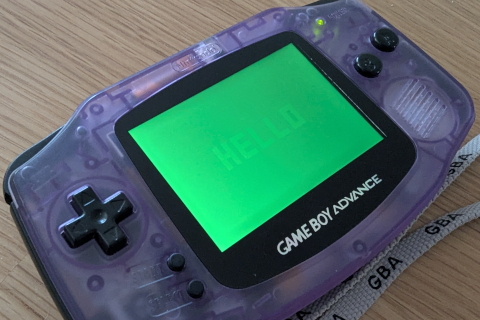 |
Practical guidance
- For normal palette authoring, treat colours as 15-bit.
- If you rely on hardware colour effects and exact output parity, test on real hardware (or FPGA implementations that model this behaviour).
- Keep this behaviour in mind when debugging “looks different on emulator vs hardware” reports.
Undocumented Namespace
stdgba exposes a small set of BIOS calls and hardware registers through gba::undocumented. These are real features of the hardware, but they sit outside the better-traveled part of the public GBA programming model.
Use them when you know exactly why you need them. For everyday game code, prefer the documented BIOS wrappers and peripheral registers first.
What lives in gba::undocumented
Two public headers contribute to the namespace:
<gba/peripherals>for undocumented memory-mapped registers<gba/bios>for undocumented BIOS SWIs
Why these APIs are separate
The namespace is a warning label as much as an API grouping:
- behaviour is less commonly documented in community references
- emulator support can be uneven
- some features are useful mostly for diagnostics, boot-state inspection, or hardware experiments
- some settings can break assumptions if changed casually
BIOS: GetBiosChecksum()
<gba/bios> exposes one undocumented BIOS helper:
#include <gba/bios>
auto checksum = gba::undocumented::GetBiosChecksum();
if (checksum == 0xBAAE187F) {
// Official GBA BIOS checksum
}
This is mainly useful for:
- sanity-checking the BIOS on real hardware
- emulator/debug diagnostics
- research tools that want to distinguish known BIOS images
Undocumented registers
<gba/peripherals> exposes these registers:
| Address | API | Type | Typical use |
|---|---|---|---|
0x4000002 | reg_stereo_3d | bool | Historical GREENSWAP / stereo-3D experiment |
0x4000300 | reg_postflg | bool | Check whether the system has already passed the BIOS boot sequence |
0x4000301 | reg_haltcnt | halt_control | Low-power mode control |
0x4000410 | reg_obj_center | volatile char | Rare OBJ-centre hardware experiment register |
0x4000800 | reg_memcnt | memory_control | BIOS/EWRAM control |
The Undocumented Registers reference page lists the raw addresses. This page focuses on when they are practically useful.
reg_stereo_3d
#include <gba/peripherals>
gba::undocumented::reg_stereo_3d = true;
This register is historically known as GREENSWAP. It is not part of normal rendering workflows, and support can vary across emulators and hardware interpretations.
It is best treated as a curiosity or research feature, not a mainstream graphics tool.
If you are investigating colour-path behaviour, also see Green Low Bit (grn_lo).
reg_postflg
#include <gba/peripherals>
bool booted_via_bios = gba::undocumented::reg_postflg;
POSTFLG is useful when you need to know whether the machine has already passed the BIOS startup path. That mostly comes up in:
- diagnostics
- boot-time experiments
- research around soft reset or alternate loaders
Most games never need to read it.
reg_haltcnt
#include <gba/peripherals>
gba::undocumented::reg_haltcnt = { .low_power_mode = true };
This directly controls low-power behaviour. In normal code, prefer the documented BIOS wrappers from <gba/bios>:
gba::Halt()to sleep until interruptgba::Stop()to enter deeper low-power mode
Those helpers are clearer and easier to read in application code. reg_haltcnt is most useful when you want exact register-level control.
reg_obj_center
#include <gba/peripherals>
gba::undocumented::reg_obj_center = 0;
It is unknown what this register does, but no emulator supports it. Needs additional experimentation on real hardware to determine its behaviour, if any.
reg_memcnt
#include <gba/peripherals>
gba::undocumented::reg_memcnt = {
.ewram = true,
.ws_ewram = 0xd,
};
MEMCNT is the most practically interesting entry in the namespace. It controls:
- BIOS swap state
- whether the CGB BIOS is disabled
- whether EWRAM is enabled
- EWRAM wait-state configuration
This makes it relevant for:
- hardware experiments
- boot/loader code
- benchmarking memory timing changes
It is also one of the easiest ways to make the system unstable if you write nonsense values, so treat it carefully.
Testing expectations
Because these APIs are outside the mainline path:
- test on real hardware when possible
- expect emulator differences
- isolate undocumented writes behind small helper functions so the rest of the codebase stays understandable
That is the main reason stdgba keeps them behind an explicit namespace instead of mixing them into the everyday API surface.
ECS Overview
gba::ecs is stdgba’s static Entity-Component-System for fixed-capacity Game Boy Advance projects.
It exists for the same reason most of stdgba exists: many modern patterns are nice on desktop, but they only make sense on GBA if they can be made deterministic, fixed-size, and cheap to iterate.
Why GBA needs a different ECS
Classic GBA games organise data in one of two ways:
-
Array-per-concept:
player_positions[],player_velocities[],enemy_states[], etc.- Fast to iterate
- Easy to understand
- Scales poorly (dozens of arrays become unwieldy)
-
Object-heavy: C++ objects with pointers holding player/enemy state
- Natural to write
- Introduces indirection and unpredictable memory access patterns
- ARM7TDMI has no branch predictor; pointer chasing kills frame time
gba::ecs takes a third approach: flat dense arrays organised by the ECS, but with compile-time component lists and shift-based addressing tuned for GBA’s constraints.
The result is data-oriented design without sacrificing readability.
Core principles
gba::ecs is designed around:
- zero heap allocation – all storage is stack-allocated or embedded in EWRAM/IWRAM structs
- compile-time component lists – types are resolved at link-time, not runtime
- predictable iteration costs – no sparse sets, no type-erased callbacks
- flat dense storage – all-of-type component arrays in memory order
- generation-based entity handles – 16-bit packed handles with stale-handle detection
- automatic stride padding – each pool rounds its slot size up to the next power of two, so indexing stays shift-based without manual component padding
- constexpr safety – invalid operations fail at compile time in constant-evaluation contexts
The mental model
entity -> 16-bit handle (8-bit slot + 8-bit generation)
registry -> owns all component arrays inline in EWRAM
group -> compile-time logical grouping of components (zero runtime cost)
view<Cs...> -> lightweight filtered iterator over entities matching all Cs
match<Cs...> -> ordered per-entity conditional dispatch by component query cases
system -> plain function operating on one or more views
Example: physics movement system
void physics_system(world_type& world) {
world.view<position, velocity>().each_arm([](position& pos, const velocity& vel) {
pos.x += vel.vx;
pos.y += vel.vy;
});
}
Every ECS operation is deterministic and measurable – no hidden allocation, no callback chains.
Quick start
#include <gba/ecs>
struct position { int x, y; };
struct velocity { int vx, vy; };
struct health { int hp; };
using world_type = gba::ecs::registry<128, position, velocity, health>;
world_type world;
auto player = world.create();
world.emplace<position>(player, 10, 20);
world.emplace<velocity>(player, 1, 0);
world.emplace<health>(player, 100);
for (auto [pos, vel] : world.view<position, velocity>()) {
pos.x += vel.vx;
pos.y += vel.vy;
}
Writing a system
The most important mental shift is that systems are just functions over views.
#include <gba/ecs>
#include <gba/fixed_point>
struct position {
gba::fixed<int, 8> x;
gba::fixed<int, 8> y;
};
struct velocity {
gba::fixed<int, 8> vx;
gba::fixed<int, 8> vy;
};
struct health { int hp; };
struct sprite_id {
std::uint8_t id;
};
using world_type = gba::ecs::registry<128, position, velocity, health, sprite_id>;
void movement_system(world_type& world) {
world.view<position, velocity>().each_arm([](position& pos, const velocity& vel) {
pos.x += vel.vx;
pos.y += vel.vy;
});
}
void damage_system(world_type& world) {
world.view<health>().each([](health& hp) {
if (hp.hp > 0) --hp.hp;
});
}
Use .each() when you want the most portable, straightforward path. Use .each_arm() for hot loops that you have measured and want running from ARM mode + IWRAM.
Complete API Reference
Registry construction
// Simple: list all components
using world = gba::ecs::registry<128, position, velocity, health>;
// With groups: organise components logically
using physics = gba::ecs::group<position, velocity, acceleration>;
using graphics = gba::ecs::group<sprite_id, palette_bank>;
using world = gba::ecs::registry<128, physics, graphics, health>;
Both are equivalent at runtime; groups are flattened to individual components at compile time.
Entity lifecycle
| Operation | Signature | Notes |
|---|---|---|
create() | -> entity | Allocate a new entity slot |
destroy(e) | (entity) -> void | Destroy entity; increment generation |
valid(e) | (entity) -> bool | Check if entity handle is still alive |
clear() | () -> void | Destroy all entities at once |
size() | () -> std::size_t | Current count of alive entities |
Component operations
| Operation | Signature | Notes |
|---|---|---|
emplace<C>(e, args...) | -> C& | Add component C to entity e; construct with args |
remove<C>(e) | (entity) -> void | Remove component C from entity e |
remove_unchecked<C>(ref) | (C&) -> void | Remove by component reference (faster) |
get<C>(e) | (entity) -> C& | Access component (unchecked) |
try_get<C>(e) | (entity) -> C* | Access component (returns nullptr if absent) |
Queries and predicates
| Operation | Signature | Notes |
|---|---|---|
all_of<Cs...>(e) | (entity) -> bool | Entity has all listed components |
any_of<Cs...>(e) | (entity) -> bool | Entity has any listed component |
Iteration APIs
| API | Best for |
|---|---|
view<Cs...>() and range-for | Ergonomic gameplay systems with structured bindings |
.each(fn) | Portable systems; constexpr-friendly |
.each_arm(fn) | Measured hot loops requiring ARM mode + IWRAM |
.each(entity, fn) | Systems that need the entity ID alongside components |
Use gba::ecs::exclude<Cs...> inside a view query to require that the listed
components are absent. Groups can be passed to exclude or can contain
exclusion wrappers. Excluded components are filters only and are not passed to
the callback:
world.view<position, gba::ecs::exclude<dead>>().each([](position& pos) {
// Only entities with position and without dead are visited.
});
Conditional dispatch APIs
| API | Best for |
|---|---|
with<Query...>(e, fn) | Single guarded callback when all queried components are present |
match<Cases...>(e, fn1, fn2, ...) | Ordered multi-case dispatch for one entity; all matched cases run |
match_arm<Cases...>(e, fn1, fn2, ...) | ARM/IWRAM hot-path version of match(...) for measured dispatch loops |
match(...) snapshots case matches before callbacks run, then executes matched cases in the order declared.
// Range-for with structured bindings
for (auto [pos, vel] : world.view<position, velocity>()) {
pos.x += vel.vx;
}
// Callback style
world.view<position, velocity>().each([](position& pos, velocity& vel) {
pos.x += vel.vx;
});
// With entity ID
world.view<health>().each([](gba::entity id, health& hp) {
if (hp.hp <= 0) world.destroy(id);
});
// ARM-mode hot loop
world.view<position, velocity>().each_arm([](position& pos, velocity& vel) {
pos.x += vel.vx; // Runs from ARM mode + IWRAM
});
match(...) example
using physics = gba::ecs::group<position, velocity>;
world.match<physics, health>(player,
[](position& pos, velocity& vel) {
pos.x += vel.vx;
pos.y += vel.vy;
},
[](health& hp) {
if (hp.hp > 0) --hp.hp;
}
);
For an entity that has both physics and health, both callbacks run in order. For an entity that only has one case, only that callback runs. The return value is true if at least one case matched.
Why the component list is compile-time
gba::ecs asks you to name every component type up front:
using world_type = gba::ecs::registry<128, position, velocity, health>;
That buys the implementation several things:
- no runtime type registry
- no sparse-set hash maps
- direct type-to-bit and type-to-pool lookup
- compile-time diagnostics when you request a component the world does not own
It is a strong fit for GBA projects, where the total set of gameplay component types is usually small and stable.
Automatic component stride padding
The runtime keeps the fast shift-based addressing, but it does it automatically. Each pool stores values at a per-slot stride of std::bit_ceil(sizeof(T)), so components do not need to be manually padded to a power-of-two size.
struct sprite_id {
std::uint8_t id;
};
static_assert(std::bit_ceil(sizeof(sprite_id)) == 1);
This keeps the implementation cheap and predictable without forcing users to sprinkle pad<N> members through their data model.
Constexpr-friendly behaviour
All core registry operations are constexpr. In constant-evaluation contexts, invalid operations produce compile-time failures instead of silent bad state.
static constexpr auto result = [] {
gba::ecs::registry<8, int, short> reg;
auto e = reg.create();
reg.emplace<int>(e, 42);
reg.emplace<short>(e, short{7});
return reg.get<int>(e) * 100 + reg.get<short>(e);
}();
static_assert(result == 4207);
Memory consumption in EWRAM
Registry memory is all inline – no heap allocation or indirection. For a typical game setup:
gba::ecs::registry<128, position, velocity, health> world;
| Category | Size | Notes |
|---|---|---|
| Metadata | ~900 bytes | Per-entity tracking + free stack |
| Component pools | ~2,560 bytes | 128 × (8 + 8 + 4) bytes |
| Total | ~3.5 KB | ~26% overhead, 74% actual data |
Key insight: Metadata grows linearly per entity slot (7 bytes/slot) regardless of component count. Adding more components adds component-pool storage, not metadata overhead.
Scaling examples
- 64 entities, 3 components: ~1.7 KB
- 128 entities, 3 components: ~3.5 KB (typical action game)
- 256 entities, 6 components: ~8.8 KB (large world)
For context: GBA has 256 KB EWRAM and 32 KB IWRAM. A 128-entity registry uses ~1.4% of EWRAM, leaving room for graphics buffers, tilemaps, and multiple registries if needed.
Optimising EWRAM usage
If registry memory is tight:
-
Reduce capacity: Each entity slot = 7 bytes overhead
- 64 entities instead of 128 saves 448 bytes metadata
-
Combine sparse components: If only 10% of entities need a component, you still allocate space for 100%
- Consider whether to split into separate registries
-
Careful padding: Power-of-two sizes are required but not wasteful
- 1-byte component -> 1 byte (pad to 1, not 4)
- 3-byte component -> needs padding to 4
Why ECS benefits GBA game architecture
Predictable memory access patterns
Arrays-of-components means systems iterate only the memory regions they need, reducing bus traffic:
View iteration over position + velocity:
Read sequential position array
Read sequential velocity array
vs
Array-of-structs (without ECS):
Read interleaved position/velocity/health data
Fetch unused health values into memory bus
Without ECS, every sprite iteration would pull extra data into the memory bus even if only position is needed. Arrays keep access patterns linear and predictable.
No hidden allocations during gameplay
- Registry is pre-allocated at startup
- All memory lives in EWRAM or IWRAM
- Zero dynamic allocation in the game loop
- Deterministic frame time (no GC pauses, no allocation failures)
Flexible game architecture
- Physics system operates on
<position, velocity> - Rendering system operates on
<sprite_id, depth> - Destruction system operates on
<health>(with entity IDs)
Each system only touches the data it needs, keeping working set small and predictable on GBA’s 32 KB IWRAM.
Small learning curve
If you know how to write for (auto& entity : entities), you can write an ECS system. The mental model is straightforward: views are filtered arrays, systems operate on views.
Where to go next
- ECS Architecture explains the data layout, memory model, and iteration strategies.
- Internal Implementation covers the metadata arrays, fast-path selection, and why power-of-two sizes matter.
tests/ecs/test_ecs.cpp– comprehensive runtime examples of all APIs.
ECS Architecture
gba::ecs uses a static, flat-storage architecture tuned for ARM7TDMI constraints. The design goal is straightforward: make the common operations for a small fixed-capacity game world cheap enough that you can reason about them without a profiler open all day.
File layout and public interface
include/gba/ecs -> public facade
+- registry<Capacity, Components...>
+- group<Components...>
+- entity (handle with generation)
include/gba/bits/ecs/ -> internal implementation
+- entity.hpp
+- group.hpp
+- registry.hpp
Why this ECS is static
Many desktop ECS libraries optimise for:
- unlimited entity counts
- runtime component registration
- dynamic archetype churn
- scheduler/tooling integration
gba::ecs optimises for something entirely different:
- a known maximum entity count (fits in 8 bits; max 255 entities)
- a small compile-time component set (max 31 components)
- simple arrays that can live inline inside one registry object
- predictable loops for handheld game logic
That is why the registry type specifies everything at compile time:
using world_type = gba::ecs::registry<128, position, velocity, health>;
The type itself answers the architectural questions: maximum 128 live entities, exactly three component pools.
Registry storage model
Every registry owns its storage inline – no heap allocation, no indirection.
registry<Capacity, Components...>
|
+- hot metadata (cached in Thumb mode)
| +- m_component_count[N] (1 byte/component)
| +- m_free_top (1 byte)
| +- m_next_slot (1 byte)
| +- m_alive (1 byte)
| +- m_dense_prefix (1 byte)
|
+- per-slot tracking
| +- m_mask[Capacity] (4 bytes/slot)
| +- m_gen[Capacity] (1 byte/slot)
| +- m_free_stack[Capacity] (1 byte/slot)
| +- m_alive_list[Capacity] (1 byte/slot)
| +- m_alive_index[Capacity] (1 byte/slot)
|
+- component pools
+- std::array<C1, Capacity> (Capacity x sizeof(C1))
+- std::array<C2, Capacity> (Capacity x sizeof(C2))
+- ...
No heap allocation, sparse sets, or type-erased component maps are involved.
Memory consumption breakdown
For gba::ecs::registry<128, position, velocity, health>:
| Item | Size | Notes |
|---|---|---|
| Metadata overhead | ||
| Hot scalars (5 bytes) | 5 B | |
| Per-slot tracking (7 × 128) | 896 B | m_mask + m_gen + stacks + indices |
| Per-component count (3) | 3 B | |
| Metadata subtotal | 904 B | (26% of total) |
| Component pools | ||
| position (8 × 128) | 1024 B | |
| velocity (8 × 128) | 1024 B | |
| health (4 × 128) | 512 B | |
| Data subtotal | 2560 B | (74% of total) |
| Total | 3464 B | (~3.4 KB) |
General formula
For a registry with Capacity slots and N components:
Metadata = Capacity × 7 + N + 5
Component data = Capacity × Σ(sizeof(Component))
Total = Metadata + Component data
Scaling characteristics
Metadata grows linearly per slot (7 bytes) but is independent of component count. Adding more components only adds to the pool size, not metadata.
| Config | Metadata | Data | Total | % Overhead |
|---|---|---|---|---|
| 64 entities, 3 components | 453 B | 1280 B | 1733 B | 26% |
| 128 entities, 3 components | 904 B | 2560 B | 3464 B | 26% |
| 256 entities, 3 components | 1803 B | 5120 B | 6923 B | 26% |
| 128 entities, 6 components | 904 B | 4608 B | 5512 B | 16% |
Larger registries and more components both reduce metadata percentage, making large game worlds more efficient.
Component groups and logical organisation
Component groups provide compile-time organisation without runtime overhead.
// Define conceptual groups
using physics = gba::ecs::group<position, velocity, acceleration>;
using rendering = gba::ecs::group<sprite_id, palette_bank, x_offset>;
// Use groups in registry declaration
gba::ecs::registry<128, physics, rendering, health> world;
// Internally flattened to:
// gba::ecs::registry<128, position, velocity, acceleration,
// sprite_id, palette_bank, x_offset, health>
Groups are completely erased at compile time. They exist for code organisation and readability, not runtime behaviour.
Why groups matter
- Logical namespace: Physics components stay together in the code
- No runtime cost: Groups are pure templates; zero overhead
- No ambiguity: The registry type fully specifies what exists
- Iterating unchanged: Use
view<position, velocity>()regardless of groups
// All of these work the same way:
world.view<position, velocity>().each([](position& p, velocity& v) {
p.x += v.vx;
});
Entity identity
entity is a 16-bit handle:
| Bits | Meaning |
|---|---|
| low 8 bits | slot index |
| high 8 bits | generation counter |
15 8 7 0
+---------------+---------------+
| generation | slot |
+---------------+---------------+
Consequences:
- maximum slots per registry: 255
0xFFFFis reserved forgba::entity_null- stale handles become invalid after
destroy()increments generation
This is a very good match for GBA games, where worlds are usually dozens or low hundreds of entities, not tens of thousands.
Presence tracking with one mask per slot
Each slot has one std::uint32_t mask:
- bit 31 = entity alive flag
- bits 0-30 = component presence bits
That supports cheap queries:
all_of<Cs...>()-> bitwise AND against a compile-time maskany_of<Cs...>()-> bitwise AND against a compile-time mask- view filtering -> compare the slot mask with a required mask
Logical per-entity layout vs physical storage
One of the easiest ways to misunderstand the registry is to imagine each entity as one packed struct. That is not what happens.
Logical view
For example, with these components:
| Component | Size |
|---|---|
position | 8 bytes |
velocity | 8 bytes |
health | 4 bytes |
sprite_id | 1 byte |
The logical entity data is 21 bytes of component payload.
Physical view
The registry stores them as separate arrays:
position pool: [p0][p1][p2][p3] ...
velocity pool: [v0][v1][v2][v3] ...
health pool: [h0][h1][h2][h3] ...
sprite pool: [s0][s1][s2][s3] ...
That is why a view<position, velocity>() can iterate directly over only the pools it needs.
Metadata arrays and what they buy you
| Field | Role |
|---|---|
m_component_count[] | Count of alive entities owning each component |
m_free_top | Size of the free-slot stack |
m_next_slot | Next never-before-used slot |
m_alive | Current alive entity count |
m_mask[] | Alive + component presence bits |
m_gen[] | Per-slot generation counters |
m_free_stack[] | Recycled slot stack |
m_alive_list[] | Dense list of alive slots |
m_alive_index[] | Reverse map for O(1) removal from m_alive_list |
This is the backbone of the ECS. The component pools are simple; the metadata is what makes creation, destruction, and iteration cheap.
View dispatch strategy
view<Cs...>() does not use one always-generic loop. It picks among three runtime paths:
| Path | Condition | Cost profile |
|---|---|---|
| Dense + all-match | every alive entity has every requested component, and alive slots are still dense from 0..N-1 | no alive-list lookup, no mask check |
| All-match with gaps | every alive entity has every requested component, but slots are no longer dense | alive-list lookup, no mask check |
| Mixed | some alive entities are missing requested components | alive-list lookup plus per-slot mask check |
This matters because many gameplay worlds spend most of their time in one of the first two cases.
Iteration styles
| API | Best for |
|---|---|
range-for over view<Cs...>() | ergonomic gameplay code |
.each(fn) | explicit callback style, constexpr-friendly code |
.each_arm(fn) | measured hot loops where ARM-mode + IWRAM placement matters |
Example:
world.view<position, velocity>().each([](position& pos, const velocity& vel) {
pos.x += vel.vx;
pos.y += vel.vy;
});
Automatic component stride padding
The implementation keeps cheap shift-based addressing without forcing users to pad their component types manually. Each component pool rounds its per-slot stride up to the next power of two with std::bit_ceil(sizeof(T)).
| Component size | Pool stride |
|---|---|
| 1 | 1 |
| 2 | 2 |
| 3 | 4 |
| 4 | 4 |
| 5 | 8 |
| 8 | 8 |
The user-visible type stays natural; the storage layout is padded internally when needed.
What the architecture intentionally omits
To stay small and predictable, gba::ecs deliberately does not include:
- runtime component registration
- dynamic archetype storage
- event buses or schedulers
- system graphs or task runners
- serialisation or reflection
The expectation is that you compose those policies at a higher layer if your project needs them.
See Internal Implementation for the field ordering, alive-list mechanics, and the fast-path details that fall out of this architecture.
Internal Implementation
This page covers the mechanics behind gba::ecs: how entities are recycled, why metadata is ordered the way it is, and how the iteration fast paths are selected.
Field ordering inside registry
registry.hpp places small hot metadata first and large pools later:
| Order | Field | Why it is near the front |
|---|---|---|
| 1 | m_component_count[] | touched by view setup and component attach/remove |
| 2 | m_free_top | touched by create() and destroy() |
| 3 | m_next_slot | touched by create() |
| 4 | m_alive | touched by create/destroy/view setup |
| 5+ | masks, generations, stacks, alive lists | still hot, but larger |
| last | component pools | large bulk storage; offset cost matters less |
The comment in registry.hpp explains the main codegen reason: in Thumb-mode call paths such as create(), destroy(), and emplace(), low offsets make for cheaper loads and stores.
How entity creation works
Creation prefers recycled slots, then falls back to a never-used slot.
if free stack not empty:
pop slot from m_free_stack
else:
use m_next_slot and increment it
mark slot alive
append slot to m_alive_list
record reverse index in m_alive_index
increment m_alive
return entity(slot, generation)
That makes slot reuse deterministic and cheap.
How destruction works
Destroying an entity performs four distinct jobs:
- decrement component counts for every component present on that slot
- clear the mask and increment the generation
- push the slot onto
m_free_stack - remove the slot from
m_alive_listwith swap-and-pop
The important bit is swap-and-pop:
alive list before: [ 4, 7, 2, 9 ]
destroy slot 7
swap in last slot 9
alive list after: [ 4, 9, 2 ]
That keeps removal O(1) instead of shifting a long list.
Why there is both m_alive_list and m_alive_index
| Field | Role |
|---|---|
m_alive_list[Capacity] | dense list of alive slots in iteration order |
m_alive_index[Capacity] | reverse map from slot -> index in m_alive_list |
You need both to delete from the dense list in O(1). Without the reverse map, destruction would have to scan the list to find the removed slot.
Component count tracking and fast-path selection
m_component_count[] stores how many alive entities currently own each component type.
Before iterating, a view checks whether every requested component count equals m_alive.
If true, then every alive entity has every requested component, and the loop can skip per-entity mask checks.
That is the basis of the three iteration paths:
| Path | Condition | Inner-loop work |
|---|---|---|
| Dense + all-match | m_alive == m_next_slot and all requested component counts equal m_alive | direct slot walk |
| All-match with gaps | all requested component counts equal m_alive, but dense-slot condition is false | walk m_alive_list only |
| Mixed | not all alive entities have the requested components | walk m_alive_list and test mask |
This is a simple but effective optimisation. Many game systems operate on worlds where almost every live entity in a layer shares the same core components.
Iterator vs callback style
Both range-for and .each() are implemented on top of the same storage model, but they serve slightly different goals:
| Style | Best trait |
|---|---|
| range-for | ergonomic syntax with structured bindings |
.each() | explicit callback, easy to specialise or switch to .each_arm() |
.each_arm() | hottest runtime path |
The callback path also auto-detects whether your lambda wants an entity first:
world.view<health>().each([](gba::entity e, health& hp) {
// id-aware system
});
match() dispatch semantics
match<Case1, Case2, ...>(entity, fn1, fn2, ...) is implemented in two phases:
- Evaluate all case queries and snapshot which cases match.
- Invoke callbacks for matched cases in declaration order.
This gives predictable dispatch when one entity can satisfy multiple cases.
| Property | Behaviour |
|---|---|
| Match timing | snapshotted before callbacks run |
| Callback order | same order as case template arguments |
| Return value | true if at least one case matched |
| Hot-path variant | match_arm(...) in ARM mode + IWRAM |
each_arm() and why it exists
basic_view::each_arm() is annotated to build for ARM mode and live in IWRAM:
gnu::target("arm")gnu::section(".iwram._gba_ecs_each")gnu::flatten
That combination is intended for the loops you run every frame on hardware.
Why it can be faster
| Choice | Benefit |
|---|---|
| ARM mode | more registers and richer addressing modes than Thumb |
| IWRAM placement | faster instruction fetch on target hardware |
| flattened callback body | better inlining in tight loops |
In the benchmark suite, this is the path used for runtime movement and full-update loops.
Compile-time safety behaviour
The registry uses if consteval checks for invalid operations such as:
- capacity overflow in
create() - destroying an invalid entity
- double-emplacing the same component
- removing from an invalid entity
That means a misuse inside a static constexpr setup produces a compiler error instead of a bad runtime state.
Automatic stride padding, internally
The registry relies on power-of-two strides for cheap indexed addressing, and it applies this rule internally instead of requiring users to pad their component types manually.
static constexpr std::size_t stride = std::bit_ceil(sizeof(C));
Each component pool uses a slot stride of stride bytes. A 3-byte component therefore occupies 4-byte slots, and a 5-byte component occupies 8-byte slots. The user-facing type remains unchanged; only the storage layout is padded when needed.
A concrete storage example
For this registry:
using world_type = gba::ecs::registry<128, position, velocity, health, sprite_id>;
With the component sizes:
| Component | Size | Pool storage |
|---|---|---|
position | 8 | 128 × 8 = 1024 bytes |
velocity | 8 | 128 × 8 = 1024 bytes |
health | 4 | 128 × 4 = 512 bytes |
sprite_id | 4 | 128 × 4 = 512 bytes (padded from 1) |
Metadata breakdown:
| Field | Size | Notes |
|---|---|---|
m_component_count[4] | 4 B | |
| Hot scalars | 4 B | free_top, next_slot, alive, dense_prefix |
m_mask[128] | 512 B | 4 bytes × 128 slots |
m_gen[128] | 128 B | 1 byte × 128 slots |
m_free_stack[128] | 128 B | 1 byte × 128 slots |
m_alive_list[128] | 128 B | 1 byte × 128 slots |
m_alive_index[128] | 128 B | 1 byte × 128 slots |
| Metadata subtotal | 1040 B | |
| Component pools | 3072 B | |
| Total | 4112 B | (~4 KB) |
Logical payload per entity is 21 bytes (or 25 with padding), but physical storage is split into arrays. That split is what makes selective views iterate only the data they need, keeping memory access patterns linear and predictable.
Related tests and benchmarks
The implementation is best understood alongside these files:
- public API:
include/gba/ecs - implementation:
include/gba/bits/ecs/registry.hpp - entity ID helpers:
include/gba/bits/ecs/entity.hpp - tests:
tests/ecs/test_ecs.cpp - runtime benchmark:
benchmarks/bench_ecs.cpp - debug benchmark:
benchmarks/bench_ecs_debug.cpp
The tests exercise lifecycle, generation invalidation, view filtering, structured bindings, constexpr use, and padding rules. The benchmarks show why the implementation keeps leaning so hard into dense arrays and low-overhead iteration.
Practical examples and patterns
Setting up a game world with groups
#include <gba/ecs>
#include <gba/fixed_point>
// Define component groups
struct position {
gba::fixed<int, 8> x, y;
};
struct velocity {
gba::fixed<int, 8> vx, vy;
};
struct sprite_id {
std::uint8_t id;
};
struct health {
int hp;
};
// Group for physics (reusable organisation)
using physics = gba::ecs::group<position, velocity>;
using rendering = gba::ecs::group<sprite_id>;
// Single registry with multiple groups
using world_type = gba::ecs::registry<256, physics, rendering, health>;
world_type world;
This is readable and scales: you can see exactly what the world contains without searching through code.
Writing systems with different iteration strategies
// Ergonomic: range-based for with structured bindings
void movement_system(world_type& world) {
for (auto [pos, vel] : world.view<position, velocity>()) {
pos.x += vel.vx;
pos.y += vel.vy;
}
}
// Portable: callback style (works in constexpr contexts)
void render_system(world_type& world) {
world.view<sprite_id>().each([](sprite_id& sprite) {
// upload sprite to OAM
});
}
// Hot-path: ARM mode + IWRAM for every-frame updates
void collision_system(world_type& world) {
world.view<position, health>().each_arm([](position& pos, health& hp) {
// tight loop runs from IWRAM in ARM mode
if (hp.hp <= 0) {
// destruction handled separately
}
});
}
// With entity IDs for selective destruction
void health_system(world_type& world) {
world.view<health>().each([](gba::entity e, health& hp) {
if (hp.hp <= 0) {
world.destroy(e); // safe due to generation
}
});
}
Typical frame loop
int main() {
world_type world;
// Setup entities
auto player = world.create();
world.emplace<position>(player, 0, 0);
world.emplace<velocity>(player, 0, 0);
world.emplace<sprite_id>(player, 0);
while (true) {
gba::VBlankIntrWait();
// Update phase
movement_system(world); // all physics
collision_system(world); // all collisions
health_system(world); // remove dead entities
// Render phase
render_system(world); // upload to hardware
// Handle input, etc.
}
}
Every system has predictable cost. No hidden allocations, no iteration overhead.
gba::critical_section Reference
gba::critical_section is a non-copyable, non-movable RAII guard that masks
maskable CPU IRQs for the lifetime of the object. It is defined in
<gba/critical_section>.
Include
#include <gba/critical_section>
Type summary
namespace gba {
struct critical_section final {
critical_section() noexcept;
~critical_section() noexcept;
critical_section(const critical_section&) = delete;
critical_section& operator=(const critical_section&) = delete;
critical_section(critical_section&&) = delete;
critical_section& operator=(critical_section&&) = delete;
explicit operator bool() const noexcept;
};
}
Typical usage
Construction saves the current CPSR IRQ-disable bit and disables maskable IRQs. Destruction restores the saved bit:
{
const gba::critical_section section;
update_shared_state();
}
// The IRQ masking state from before the scope is restored.
The guard must remain in the scope that it protects. Its deleted copy and move operations prevent transferring the saved CPU state to another object.
Use a critical section for a short update that must be atomic with respect to an IRQ handler:
volatile unsigned int pending_work = 0;
void add_work(unsigned int amount) {
const gba::critical_section section;
pending_work += amount;
}
Keep the protected region short. Do not wait for an interrupt, perform a long copy, or do frame-scale work while the guard is alive.
Nesting
Guards can be nested. Destroying an inner guard restores the state that was active when that inner guard was constructed, so it cannot re-enable IRQs while an outer guard is still alive:
{
const gba::critical_section outer;
{
const gba::critical_section inner;
// IRQs are masked.
}
// IRQs are still masked.
}
operator bool
operator bool() always returns true and exists to support an if-condition
scope:
if (const gba::critical_section section{}) {
update_shared_state();
}
It does not report whether masking succeeded and should not be used as an interrupt-state query. A normal block is usually clearer for longer scopes.
Register interaction
The guard masks IRQ acceptance in the CPU’s CPSR. It does not modify
gba::reg_ime or the individual enables in gba::reg_ie. Use those registers
to configure interrupt delivery; use critical_section to make a short
sequence atomic with respect to IRQ handlers.
For example, reg_ime remains enabled while the CPU is masked:
#include <gba/peripherals>
gba::reg_ime = true;
{
const gba::critical_section section;
// `gba::reg_ime` is still true, but maskable IRQs are not accepted.
}
Pending interrupts are handled after the guard is destroyed when the normal interrupt conditions are enabled. A critical section does not synchronize DMA memory access.
Related pages
- Interrupts - configuring and handling IRQs
- Interrupt Peripheral Reference - interrupt register layout
gba::keypad Reference
gba::keypad is the high-level input state tracker from <gba/keyinput>. It wraps active-low keypad hardware semantics and provides frame-based edge detection helpers.
For raw register details (reg_keyinput, reg_keycnt), see Peripheral Registers: Keypad.
Include
#include <gba/keyinput>
#include <gba/peripherals>
Type summary
struct keypad {
constexpr keypad& operator=(key_control keys) noexcept;
template<template<typename> typename LogicalOp = std::logical_and, typename... Keys>
constexpr bool held(Keys... keys) const noexcept;
template<template<typename> typename LogicalOp = std::logical_and, typename... Keys>
constexpr bool pressed(Keys... keys) const noexcept;
template<template<typename> typename LogicalOp = std::logical_and, typename... Keys>
constexpr bool released(Keys... keys) const noexcept;
constexpr int xaxis() const noexcept;
constexpr int i_xaxis() const noexcept;
constexpr int yaxis() const noexcept;
constexpr int i_yaxis() const noexcept;
constexpr int lraxis() const noexcept;
constexpr int i_lraxis() const noexcept;
};
Frame update contract
keypad stores previous and current state internally. Update it by assigning from gba::reg_keyinput once per game frame:
gba::keypad keys;
for (;;) {
gba::VBlankIntrWait();
keys = gba::reg_keyinput;
// Query after exactly one sample per frame
}
Sampling multiple times in one frame advances history multiple times, which can make pressed()/released() behaviour appear inconsistent.
Query methods
Keys... must be gba::key masks (gba::key_a, gba::key_left, etc.).
held(keys...)
Returns whether keys are currently down.
if (keys.held(gba::key_a)) {
// A is down this frame
}
pressed(keys...)
Returns whether keys transitioned up -> down on this frame.
if (keys.pressed(gba::key_start)) {
// Start edge this frame
}
released(keys...)
Returns whether keys transitioned down -> up on this frame.
if (keys.released(gba::key_b)) {
// B release edge this frame
}
Logical operators
All three query methods default to std::logical_and semantics for multiple keys.
if (keys.held(gba::key_l, gba::key_r)) {
// L and R both held
}
You can also select std::logical_or or std::logical_not:
if (keys.pressed<std::logical_or>(gba::key_a, gba::key_b)) {
// A or B was newly pressed
}
Axis helpers
Axis helpers are tri-state (-1, 0, 1) from the current key sample.
xaxis():-1left,+1righti_xaxis(): inverted horizontal axisyaxis():-1down,+1up (mathematical convention)i_yaxis(): inverted vertical axis (+1down for screen-space movement)lraxis():-1L,+1Ri_lraxis(): inverted shoulder axis
Key masks and combos
Use operator| on gba::key constants to build combinations:
auto combo = gba::key_a | gba::key_b;
if (keys.held(combo)) {
// A+B held
}
gba::reset_combo is predefined as A + B + Select + Start.
Related pages
- Key Input - practical gameplay patterns
- Peripheral Registers: Keypad - raw register layout and IRQ bits
music_player Reference
music_player is the runtime dispatcher that plays compiled music patterns created by gba::music::compile().
It uses NTTP (non-type template parameter) syntax to bind a compile-time compiled_music value at type-instantiation time, eliminating runtime overhead.
Include
#include <gba/music>
Type summary
template<const gba::music::compiled_music& Music>
struct music_player {
constexpr music_player() noexcept;
bool operator()() noexcept;
void reset();
};
Template parameter
Music - A compile-time reference to a gba::music::compiled_music object created by gba::music::compile().
Must be marked static constexpr to ensure it lives in ROM.
static constexpr auto music = gba::music::compile(gba::music::note("c4 e4 g4"));
auto player = gba::music::music_player<music>{};
Constructor
constexpr music_player() noexcept;
Default constructor. Resets internal playback state to the start of the pattern.
operator()
bool operator()() noexcept;
Behaviour
Advances the pattern by one VBlank frame (1/60 second). Dispatches any note-on, note-off, and instrument-change events scheduled for the current time.
Return value
trueif the pattern is still playing (looped patterns always returntrue).falseif the pattern has ended (only for non-looping patterns compiled withoutloop()).
Call frequency
Call exactly once per frame, typically in the main game loop after gba::VBlankIntrWait().
auto player = gba::music::music_player<music>{};
while (true) {
gba::VBlankIntrWait();
if (!player()) {
break; // Pattern finished (non-looping only)
}
// Game logic
}
reset()
void reset();
Restores the player to the beginning of the compiled pattern. It clears the finished state and resets the frame and event cursors. The current instrument state is not explicitly cleared; it is updated again by instrument-change events as playback advances.
Looping patterns
If the pattern is wrapped in gba::music::loop(), the player cycles back to the start when the sequence ends and always returns true.
static constexpr auto looped = gba::music::compile(
gba::music::loop(gba::music::note("c4 e4 g4"))
);
auto player = gba::music::music_player<looped>{};
while (true) {
gba::VBlankIntrWait();
player(); // Always returns true; pattern repeats forever
}
Non-looping patterns
If the pattern is not wrapped in loop(), the player stops after the final event and returns false.
static constexpr auto oneshot = gba::music::compile(
gba::music::note("c4 e4 g4 c5")
);
auto player = gba::music::music_player<oneshot>{};
while (player()) {
gba::VBlankIntrWait();
}
Performance
- Idle frame (no events scheduled): ~400 cycles (~0.6% of VBlank budget)
- 4-channel batch dispatch: ~760 cycles (~1.1% of VBlank budget)
- Tail-call recursive dispatch: Compile-time specialised for each timepoint, zero runtime overhead for pattern structure
Sound setup
Before instantiating a player, enable sound output:
#include <gba/peripherals>
gba::reg_soundcnt_x = { .master_enable = true };
gba::reg_soundcnt_l = {
.volume_right = 7, .volume_left = 7,
.enable_1_right = true, .enable_1_left = true,
.enable_2_right = true, .enable_2_left = true,
.enable_3_right = true, .enable_3_left = true,
.enable_4_right = true, .enable_4_left = true
};
gba::reg_soundcnt_h = { .psg_volume = 2 };
static constexpr auto music = gba::music::compile(gba::music::note("c4 e4 g4"));
auto player = gba::music::music_player<music>{};
Common pattern
#include <gba/bios>
#include <gba/music>
#include <gba/peripherals>
using namespace gba::music;
int main() {
// Enable sound
gba::reg_soundcnt_x = { .master_enable = true };
gba::reg_soundcnt_l = {
.volume_right = 7, .volume_left = 7,
.enable_1_right = true, .enable_1_left = true,
.enable_2_right = true, .enable_2_left = true,
.enable_3_right = true, .enable_3_left = true,
.enable_4_right = true, .enable_4_left = true
};
gba::reg_soundcnt_h = { .psg_volume = 2 };
// Compile and play
static constexpr auto music = compile(loop(note("c4 e4 g4 c5")));
auto player = music_player<music>{};
while (true) {
gba::VBlankIntrWait();
player();
}
}
Related pages
- Music Composition - pattern syntax and compilation
- Embedded WAV Samples - waveform and sample embedding
- Sound Peripheral Reference - PSG channel registers and sound control
gba::link Reference
gba::link is the process-wide serial-port slot from <gba/link>. It holds exactly one active link transport
(gba::link_multi or gba::link_normal), constructed in static storage and reached by its own type at every call
site.
For a tutorial-style walkthrough, see Multi-Player Link, Normal Link, and Link Protocol.
Include
#include <gba/link>
Type summary
namespace gba {
struct link_slot {
template<typename Link>
Link& operator=(Link&& value);
template<typename Link, typename... Args>
Link& emplace(Args&&... args);
template<typename Link>
Link& get() const noexcept;
template<typename Link>
Link* get_if() const noexcept;
template<typename Link>
bool holds() const noexcept;
void reset() noexcept;
explicit operator bool() const noexcept;
};
inline link_slot& link;
template<const auto& Codec, std::size_t Capacity, typename Word = unsigned char>
using link_normal = /* ... */;
template<const auto& Codec, std::size_t Capacity>
using link_multi = /* ... */;
enum class link_error : std::uint16_t {
none, receive_overflow, malformed_frame, integrity_failure, decode_failure, hardware_failure, topology_changed
};
enum class multi_player : unsigned short {
player_0, player_1, player_2, player_3
};
}
gba::link
emplace<Link>(args...)
Destroys whatever transport is currently held, constructs a new Link in static storage from args, and returns a
typed reference to it. operator= forwards to this.
auto& link = gba::link.emplace<link_type>(gba::sio_baud_115200);
get<Link>()
Returns a typed reference to the currently held transport. It traps if Link is not the held type; use
get_if<Link>() when the type is not already known.
get_if<Link>()
Returns a pointer to the held transport when its type is exactly Link, otherwise nullptr.
holds<Link>()
Returns whether the currently held transport’s type is exactly Link.
reset()
Destroys the currently held transport, if any. gba::link then holds nothing until the next emplace/operator=.
explicit operator bool()
Whether any transport is currently held.
gba::link_multi<Codec, Capacity>
Multi-Player serial mode: two to four systems, each transfer exchanging one 16-bit word with every connected system.
| Method | Description |
|---|---|
send(value) | Begin sending one encoded value to every connected peer. false if a value is already in flight or the framed value exceeds Capacity. |
sending() | Whether a value is still in flight. |
read(player) | Next decoded value from player’s stream, or std::nullopt. player is a gba::multi_player. |
pending_wire(player) | Bytes currently buffered, undecoded, for player. |
player() | The local gba::multi_player identifier. |
is_parent() | Whether the local player is player 0. |
connected() | Current four-player connection mask. |
connected_count() | Number of currently connected peers, including self. |
poll() | Process completed transfers, update topology, dispatch errors, start new rounds. Call continuously. |
irq() | Forward the serial interrupt here; captures the completed hardware transfer only. |
errors(player) / has_error(player, error) | Query player’s sticky error state. |
clear_error(player, error) / clear_errors(player) | Clear one or all of player’s sticky errors. |
on_error(handler) | handler(std::size_t player, link_error error), called from poll(). |
reset_peer(player) | Reset player’s receive stream state. |
busy() | Whether a hardware transfer is currently in flight. |
configure(baud) (static) reconfigures Multi-Player mode at the given gba::sio_baud; the constructor calls this
with Capacity’s codec and sio_baud_115200 by default. Available rates: sio_baud_9600, sio_baud_38400,
sio_baud_57600, sio_baud_115200.
gba::multi_player is the bounded peer identifier: player_0, player_1, player_2, or player_3.
Iterate all four with gba::multi_players, and use gba::multi_player_index(player) when indexing your own
per-player array.
gba::link_normal<Codec, Capacity, Word>
Normal serial mode: a direct two-system connection. Word selects the hardware transfer width, unsigned char for
8-bit mode (default) or unsigned int for 32-bit mode.
| Method | Description |
|---|---|
send(value) | Begin sending one encoded value. false if a value is already in flight or the framed value exceeds Capacity. |
sending() | Whether a value is still in flight. |
read() | Next decoded value from the one peer, or std::nullopt. |
pending_wire() | Bytes currently buffered, undecoded. |
poll() | Process completed transfers, dispatch errors, start new rounds. Call continuously. |
irq() | Forward the serial interrupt here. |
errors() / has_error(error) | Query the one peer’s sticky error state. |
clear_error(error) / clear_errors() | Clear one or all sticky errors. |
on_error(handler) | handler(std::size_t, link_error error), called from poll(); std::size_t is always 0. |
reset_peer() | Reset the receive stream state. |
reset() | Stop the current hardware transfer and clear queued transport state, so polling starts a fresh transfer. |
busy() | Whether a hardware transfer is currently in flight. |
The constructor takes one bool: true on the system supplying the shift clock (the parent), false on the other.
gba::link_error
A bitmask of sticky error flags, combinable with operator|:
| Flag | Meaning |
|---|---|
receive_overflow | Incoming wire data exceeded Capacity before a full value decoded. |
malformed_frame | Framing/escaping was invalid. |
integrity_failure | The frame’s integrity check failed. |
decode_failure | The codec failed to decode a well-formed frame. |
hardware_failure | The serial hardware reported an error. |
topology_changed | (Multi-Player only) A peer connected, disconnected, or the local player ID changed. |
Related pages
- Multi-Player Link - creating and polling a Multi-Player link
- Normal Link - two-system connections, 8-bit and 32-bit modes
- Link Protocol - framing, escaping, and integrity check details
- Composing Codecs - defining the message codec
gba::backup Reference
gba::backup is the process-wide backup-chip slot from <gba/backup>. It is type-erased the same way as
gba::link’s slot: assigning it a table (built by a gba::backup_* factory) determines the concrete
gba::bits::backup::table type it holds, until the next assignment.
For a tutorial-style walkthrough, see Backup Storage and Redundancy & Fragmentation.
Include
#include <gba/backup>
Type summary
namespace gba {
struct backup_slot {
public:
template<typename Held>
decltype(auto) operator=(Held&& value);
template<typename Held>
decltype(auto) emplace(Held&& value);
template<typename Held, typename... Args>
Held& emplace(Args&&... args);
template<typename Held>
Held& get() const noexcept;
template<typename Held>
Held* get_if() const noexcept;
template<typename Held>
bool holds() const noexcept;
void reset() noexcept;
explicit operator bool() const noexcept;
};
inline backup_slot& backup;
template<const auto&... Codecs> inline constexpr auto backup_sram = /* ... */;
template<const auto&... Codecs> inline constexpr auto backup_flash_64k = /* ... */;
template<const auto&... Codecs> inline constexpr auto backup_flash_128k = /* ... */;
template<const auto&... Codecs> inline constexpr auto backup_flash_atmel = /* ... */;
template<const auto&... Codecs> inline constexpr auto backup_eeprom_512b = /* ... */;
template<const auto&... Codecs> inline constexpr auto backup_eeprom_8k = /* ... */;
template<gba::codec::Codec C>
consteval auto backup_redundant(const C& codec) noexcept;
}
namespace gba::bits::backup {
template<typename... Records>
class table {
public:
static constexpr std::size_t size = /* ... */;
template<std::size_t I> using field_type = /* ... */;
template<std::size_t I> decltype(auto) field();
template<typename T> decltype(auto) field();
template<std::size_t I> std::optional<typename field_type<I>::value_type> get() const;
template<typename T> std::optional<T> get() const;
template<std::size_t I> std::optional<typename field_type<I>::value_type> get_alternate() const;
template<typename T> std::optional<T> get_alternate() const;
template<std::size_t I, typename... Args> bool emplace(Args&&... args);
template<typename T, typename... Args> bool emplace(Args&&... args);
template<std::size_t I> void erase();
template<typename T> void erase();
template<std::size_t I> constexpr std::size_t offset() const noexcept;
template<std::size_t I> constexpr std::pair<std::size_t, std::size_t> redundant_offsets() const noexcept;
bool is_fragmented() const noexcept;
void defragment();
std::size_t free_granules() const noexcept;
std::size_t largest_free_run() const noexcept;
};
}
gba::backup
operator= / emplace(value)
Assigns a backup_* factory (or an already-built table), replacing whatever was previously held. A zero-argument
callable Held (a backup_* factory) is invoked to build the actual table; either form returns a reference to the
newly held table:
gba::backup = gba::backup_sram<player_save::codec, settings_save::codec>;
// or, capturing the returned reference:
auto& saves = gba::backup.emplace(gba::backup_sram<player_save::codec, settings_save::codec>);
emplace<Held>(args...)
Constructs a Held from args (default: none), replacing whatever was previously held, and returns a reference to
it. Held is the concrete table type, e.g. decltype(gba::backup_sram<...>)::table_type; every gba::bits::backup::table
is default-constructible, so args is rarely needed.
get<Held>()
Returns a reference to the held table. Held must be named explicitly, exactly as gba::link.get<link_type>() does;
there is no way to recover it without already knowing it, since the slot itself carries no compile-time type
information about what it holds. It traps if Held is not the held type; use get_if<Held>() when the type may
differ.
get_if<Held>()
Returns a pointer to the held table when its type is exactly Held, otherwise nullptr.
holds<Held>()
Whether the currently held table’s type is Held.
reset()
Destroys the currently held table, if any.
explicit operator bool()
Whether any table is currently held.
gba::bits::backup::table<Records...>
The concrete type built by a gba::backup_* factory (e.g. decltype(gba::backup_sram<Codecs...>)::table_type), and
the type gba::backup.emplace(...) returns a reference to. Every operation below is a plain method on this type;
there is no further indirection through gba::backup once you hold the reference.
Fields are addressed either by declaration index I (position in the Codecs... list passed to the backup_*
factory) or by decoded value type T, exactly like std::tuple’s std::get<I>/std::get<T>. A type-based overload
is ill-formed unless exactly one field decodes to T.
| Method | Description |
|---|---|
size | Number of fields (static constexpr). |
field_type<I> | The declared gba::bits::backup::record type at index I. |
field<I>() / field<T>() | The record at index I (or decoding to T): a persistent reference for a fixed-size field, a fresh snapshot for a variable-size one. |
get<I>() / get<T>() | Load the field; std::nullopt if never stored, erased, or its redundant save intent is still pending after an interrupted save. |
get_alternate<I>() / get_alternate<T>() | Load a redundant field’s previous committed value when an interrupted save is pending. Fixed-size fields also expose their inactive slot after a completed save. See Recovering the alternate copy. |
emplace<I>(args...) / emplace<T>(args...) | Construct a value from args (default: none) and store it. Returns false if it did not fit. |
erase<I>() / erase<T>() | Erase the field; a subsequent get reports no value again. |
offset<I>() | The granularity-aligned byte offset of a non-redundant fixed-size field. |
redundant_offsets<I>() | The pair of granularity-aligned offsets reserved for a redundant fixed-size field. |
is_fragmented() | Whether the dynamic (variable-size) arena’s free space is split across more than one run. |
defragment() | Compact every allocated variable-size field to the arena’s front, consolidating free space into one trailing run. Called automatically, once, by emplace(...) when a value doesn’t fit as-is. It is a no-op while a redundant save is pending. |
free_granules() | Total unallocated space in the dynamic arena, in Backend::granularity units. |
largest_free_run() | Size of the largest contiguous free run in the dynamic arena. |
gba::backup_* factories
Each factory is a stateless tag naming a physical backend and root codecs; the actual table (and its directory read
from the backend) is only built once assigned to gba::backup. Each factory’s table_type member alias names the
concrete gba::bits::backup::table it produces.
| Factory | Backend | Granularity |
|---|---|---|
backup_sram<Codecs...> | SRAM (32KB) | 1 byte, packed byte-for-byte |
backup_flash_64k<Codecs...> | Flash, standard chips (64KB) | 4KB sector |
backup_flash_128k<Codecs...> | Flash, standard chips (128KB) | 4KB sector |
backup_flash_atmel<Codecs...> | Flash, Atmel chips | 128-byte page |
backup_eeprom_512b<Codecs...> | EEPROM (512B) | 8-byte block |
backup_eeprom_8k<Codecs...> | EEPROM (8KB) | 8-byte block |
Every field in one table shares the same backend. Codecs must decode to mutually distinct types to use the
type-based get<T>()/emplace<T>()/erase<T>() overloads; there is no header, footer, or schema version, only a
CRC-checked directory of per-field offsets.
gba::backup_redundant(codec)
Tags codec’s field so a new value is never written over the currently stored one; it always lands somewhere else
first, and the field’s directory entry only flips to it once that write fully lands. Works for both fixed- and
variable-size codecs. See Redundancy & Fragmentation.
Related pages
- Backup Storage - creating the slot, loading and storing values
- Redundancy & Fragmentation - power-loss safety,
get_alternate, defragmentation - Low-Level Save Access - raw SRAM/Flash/EEPROM access underneath
gba::backup
gba::object Reference
gba::object is the regular (non-affine) OAM object entry type from <gba/video>.
Use it with gba::obj_mem when you want standard sprite placement with optional horizontal/vertical flipping.
For affine objects, see gba::object_affine.
Include
#include <gba/video>
Type summary
struct object {
// Attribute 0
unsigned short y : 8;
bool : 1;
bool disable : 1;
gba::mode mode : 2;
bool mosaic : 1;
gba::depth depth : 1;
gba::shape shape : 2;
// Attribute 1
unsigned short x : 9;
short : 3;
bool flip_x : 1;
bool flip_y : 1;
unsigned short size : 2;
// Attribute 2
unsigned short tile_index : 10;
unsigned short background : 2;
unsigned short palette_index : 4;
};
sizeof(gba::object) == 6 bytes.
Typical usage
gba::obj_mem[0] = {
.y = 80,
.x = 120,
.shape = gba::shape_square,
.size = 1, // 16x16 for square sprites
.depth = gba::depth_4bpp,
.tile_index = 0,
.palette_index = 0,
};
Field notes
disable: hide this object without clearing its other fields.mode: object blend/window mode (mode_normal,mode_blend,mode_window).depth: choosedepth_4bpp(16-colour banked palette) ordepth_8bpp(256-colour OBJ palette).shape+size: together determine dimensions.flip_x/flip_y: valid for regular objects.background: OBJ priority relative to backgrounds (0highest,3lowest).
Regular vs affine comparison
| Aspect | gba::object (regular) | gba::object_affine |
|---|---|---|
| Typed OAM view | gba::obj_mem | gba::obj_aff_mem |
| Attr0 mode bit | disable hide flag | affine enabled, optional double_size |
| Attr1 control bits | flip_x / flip_y | affine_index (0..31) |
| Rotation/scaling | Not supported | Supported via affine matrix |
| Transform source | Flip bits only | mem_obj_affa/b/c/d entry selected by affine_index |
| Shared fields | x, y, shape, size, tile_index, background, palette_index, depth, mode, mosaic | Same shared fields |
| Best fit | Standard sprites, mirroring, UI, low overhead | Rotating/scaling sprites, camera-facing effects |
Shape/size table
| Shape | Size 0 | Size 1 | Size 2 | Size 3 |
|---|---|---|---|---|
| Square | 8x8 | 16x16 | 32x32 | 64x64 |
| Wide | 16x8 | 32x8 | 32x16 | 64x32 |
| Tall | 8x16 | 8x32 | 16x32 | 32x64 |
Related symbols
gba::obj_mem- typed OAM asobject[128]gba::tile_index(ptr)- compute OBJ tile index from an OBJ VRAM pointergba::mem_vram_obj- raw object VRAM
Related pages
gba::object_affine Reference
gba::object_affine is the affine OAM object entry type from <gba/video>.
Use it with gba::obj_aff_mem when sprite rotation/scaling (OBJ affine transform) is required.
For regular objects with flip bits, see gba::object.
Include
#include <gba/video>
Type summary
struct object_affine {
// Attribute 0
unsigned short y : 8;
bool affine : 1 = true;
bool double_size : 1;
gba::mode mode : 2;
bool mosaic : 1;
gba::depth depth : 1;
gba::shape shape : 2;
// Attribute 1
unsigned short x : 9;
unsigned short affine_index : 5;
unsigned short size : 2;
// Attribute 2
unsigned short tile_index : 10;
unsigned short background : 2;
unsigned short palette_index : 4;
};
sizeof(gba::object_affine) == 6 bytes.
Typical usage
gba::obj_aff_mem[0] = {
.y = 80,
.x = 120,
.affine_index = 0,
.shape = gba::shape_square,
.size = 1,
.depth = gba::depth_4bpp,
.tile_index = 0,
};
// Configure affine matrix 0 through mem_obj_affa/b/c/d as needed.
Field notes
affine: set for affine rendering mode (enabled by default in the struct).double_size: doubles the render box so rotated/scaled sprites are less likely to clip.affine_index: selects one of 32 affine parameter sets (0..31).shape+size: still determine the base dimensions before affine transform.flip_x/flip_ydo not exist on affine entries; transform comes from the affine matrix.
Affine parameter memory
<gba/video> provides these typed views over OAM affine parameters:
gba::mem_obj_affa(pa)gba::mem_obj_affb(pb)gba::mem_obj_affc(pc)gba::mem_obj_affd(pd)
Related pages
Embedded Sprite Type Reference
gba::embed::indexed4() and gba::embed::indexed8() expose sprite-facing helpers in slightly different shapes.
Include
#include <gba/embed>
indexed4 result summary
template<unsigned int Width, unsigned int Height, std::size_t PaletteSize, std::size_t TileCount, std::size_t MapSize>
struct indexed4_result {
std::array<gba::color, PaletteSize> palette;
gba::sprite4<Width, Height, TileCount> sprite;
std::array<gba::screen_entry, MapSize> map;
};
Key members
palette: indexed palette datasprite: 4bpp tile payload +obj()/obj_aff()OAM helpersmap: background-style tilemap (screenblock order)
indexed8 result summary
template<unsigned int Width, unsigned int Height, std::size_t PaletteSize, std::size_t TileCount, std::size_t MapSize>
struct indexed8_result {
std::array<gba::color, PaletteSize> palette;
std::array<gba::tile8bpp, TileCount> tiles;
std::array<gba::screen_entry, MapSize> map;
static constexpr gba::object obj(unsigned short tile_index = 0);
static constexpr gba::object_affine obj_aff(unsigned short tile_index = 0);
};
indexed8 exposes OAM helpers directly on the result type instead of through a nested sprite field.
OAM helpers (4bpp)
obj(tile_index)
Returns a regular (non-affine) gba::object entry pre-configured with:
- sprite dimensions from the source image
- tile index set to
tile_index(default 0) - 4bpp/8bpp depth matching the source
- all other fields zeroed (position, flip, palette bank)
constexpr auto sprite = gba::embed::indexed4<gba::embed::dedup::none>([] {
return std::to_array<unsigned char>({
#embed "hero.png"
});
});
gba::obj_mem[0] = sprite.sprite.obj(tile_base);
gba::obj_mem[0].x = 120;
gba::obj_mem[0].y = 80;
obj_aff(tile_index)
Returns an affine gba::object_affine entry pre-configured the same way as obj(), but with:
affineflag always setaffine_indexzeroed (assign your affine matrix index after)
gba::obj_aff_mem[0] = sprite.sprite.obj_aff(tile_base);
gba::obj_aff_mem[0].affine_index = 0;
gba::obj_aff_mem[0].x = 120;
gba::obj_aff_mem[0].y = 80;
Valid sprite sizes
The sprite type is only created when the source image dimensions match a legal GBA OBJ size:
| Shape | Sizes |
|---|---|
| Square | 8x8, 16x16, 32x32, 64x64 |
| Wide | 16x8, 32x8, 32x16, 64x32 |
| Tall | 8x16, 8x32, 16x32, 32x64 |
If the source does not match, the converter rejects it at compile time.
Upload pattern
// Copy tile data to OBJ VRAM
const auto base_tile = gba::tile_index(gba::memory_map(gba::mem_vram_obj));
std::memcpy(gba::memory_map(gba::mem_vram_obj), sprite.sprite.data(), sprite.sprite.size());
// Copy palette to OBJ palette RAM
std::copy(sprite.palette.begin(), sprite.palette.end(), gba::pal_obj_bank[0]);
// Create OAM entry
gba::obj_mem[0] = sprite.sprite.obj(base_tile);
Related pages
Animated Sprite Sheet Type Reference
The result structure returned by gba::embed::indexed4_sheet<FrameW, FrameH>() holds frame-packed tile data and compile-time animation builders.
Include
#include <gba/embed>
Sheet result type summary
template<unsigned int FrameW, unsigned int FrameH, unsigned int Cols, unsigned int Rows, std::size_t PaletteSize>
struct sheet4_result {
static constexpr unsigned int frame_count = Cols * Rows;
static constexpr unsigned int tiles_per_frame = (FrameW / 8u) * (FrameH / 8u);
static constexpr std::size_t total_tiles = frame_count * tiles_per_frame;
std::array<gba::color, PaletteSize> palette;
gba::sprite4<FrameW, FrameH, total_tiles> sprite;
// Frame indexing
static constexpr unsigned int tile_offset(unsigned int frame) noexcept;
static constexpr gba::object frame_obj(unsigned short base_tile, unsigned int frame, unsigned short palette_index = 0);
static constexpr gba::object_affine frame_obj_aff(unsigned short base_tile, unsigned int frame, unsigned short palette_index = 0);
// Animation builders (return flipbook types with .frame(tick) methods)
static consteval auto forward<Start, Count>();
static consteval auto ping_pong<Start, Count>();
static consteval auto sequence<"...">();
static consteval auto row<R>();
};
Members
palette- 16-colour OBJ palette shared across all framessprite- frame-packed 4bpp tile payload ready for OBJ VRAM upload
Frame access
tile_offset(frame)
Returns the tile offset (in tiles, not bytes) for a given frame. Used when manually managing OBJ VRAM layout.
const auto base_tile = gba::tile_index(gba::memory_map(gba::mem_vram_obj));
auto offset = actor.tile_offset(frame_index);
gba::obj_mem[0].tile_index = base_tile + offset;
frame_obj(base_tile, frame, palette_index)
Returns a regular (non-affine) gba::object entry for a specific frame.
gba::obj_mem[0] = actor.frame_obj(base_tile, current_frame, 0);
gba::obj_mem[0].x = 120;
gba::obj_mem[0].y = 80;
frame_obj_aff(base_tile, frame, palette_index)
Returns an affine gba::object_affine entry for a specific frame.
gba::obj_aff_mem[0] = actor.frame_obj_aff(base_tile, current_frame, 0);
gba::obj_aff_mem[0].affine_index = 0;
Animation builders
All animation builders are compile-time helpers that return a flipbook type with a .frame(tick) method.
forward<Start, Count>()
Compile-time sequential flipbook: frames play in order once.
static constexpr auto idle = actor.forward<0, 4>();
unsigned int frame = idle.frame(tick / 8); // Cycles: 0, 1, 2, 3, 0, 1, 2, 3, ...
ping_pong<Start, Count>()
Compile-time forward-then-reverse flipbook: frames play forward, then reverse (excluding the endpoints to avoid doubling them).
static constexpr auto walk = actor.ping_pong<0, 4>();
unsigned int frame = walk.frame(tick / 8); // Cycles: 0, 1, 2, 3, 2, 1, 0, 1, 2, 3, 2, 1, ...
sequence<"...">()
Explicit frame sequence via string literal. Characters 0-9 map to frames 0-9; a-z continue from frame 10 upward, and A-Z map the same way as lowercase.
static constexpr auto attack = actor.sequence<"01232100">();
unsigned int frame = attack.frame(tick / 10); // Cycles through the specified sequence
row<R>()
Returns a row-scoped builder for multi-row sprite sheets (e.g., one direction per row).
static constexpr auto down = actor.row<0>().ping_pong<0, 3>();
static constexpr auto left = actor.row<1>().ping_pong<0, 3>();
static constexpr auto right = actor.row<2>().ping_pong<0, 3>();
static constexpr auto up = actor.row<3>().ping_pong<0, 3>();
The result is still a sheet-global frame index, so it plugs directly into frame_obj().
Flipbook .frame(tick) method
All animation builders return a flipbook type with:
constexpr std::size_t frame(std::size_t tick) const;
This maps a monotonically-increasing tick value to a frame index within the animation sequence.
unsigned int tick = 0;
const auto walk = actor.ping_pong<0, 4>();
while (true) {
gba::VBlankIntrWait();
unsigned int frame = walk.frame(tick / 8); // Update every 8 ticks
gba::obj_mem[0] = actor.frame_obj(base_tile, frame, 0);
++tick;
}
Sheet layout
Frames are laid out contiguously in OBJ VRAM. The converter ensures:
- whole sheet uses one shared 15-colour palette + transparent index 0
- frames are tile-aligned for simple
base_tile + tile_offset(frame)indexing - no runtime repacking is needed
Upload pattern
#include <algorithm>
#include <cstring>
#include <gba/embed>
static constexpr auto actor = gba::embed::indexed4_sheet<16, 16>([] {
return std::to_array<unsigned char>({
#embed "actor.png"
});
});
// Copy tile data and palette to hardware
const auto base_tile = gba::tile_index(gba::memory_map(gba::mem_vram_obj));
std::memcpy(gba::memory_map(gba::mem_vram_obj), actor.sprite.data(), actor.sprite.size());
std::copy(actor.palette.begin(), actor.palette.end(), gba::pal_obj_bank[0]);
// Use frame_obj() to create OAM entries
auto walk = actor.ping_pong<0, 4>();
gba::obj_mem[0] = actor.frame_obj(base_tile, walk.frame(tick / 8), 0);
Constraints
- all frames must fit within one 15-colour palette (index 0 always transparent)
- frame dimensions must match a legal GBA OBJ size
- frame width x height must divide the source image evenly
Violations are rejected at compile time.
Related pages
Peripheral Register Reference
This is a complete reference of every memory-mapped I/O register exposed by stdgba. Registers are grouped by subsystem and listed by hardware address.
All registers are declared in <gba/peripherals> unless noted otherwise. DMA registers are in <gba/dma>, palette memory symbols are in <gba/color>, and VRAM/OAM symbols are in <gba/video>.
How to read this reference
Each entry shows:
- stdgba name - the
inline constexprvariable you use in code - Address - the memory-mapped hardware address
- Access - R (read), W (write), or RW (read-write)
- Type - the bitfield struct or integer type
- tonclib name - the equivalent
#definefrom tonclib/libtonc
Array registers are written as name[N] with their element stride.
LCD
| Address | stdgba | Access | Type | tonclib |
|---|---|---|---|---|
0x4000000 | reg_dispcnt | RW | display_control | REG_DISPCNT |
0x4000004 | reg_dispstat | RW | display_status | REG_DISPSTAT |
0x4000006 | reg_vcount | R | const unsigned short | REG_VCOUNT |
display_control
struct display_control {
unsigned short video_mode : 3; // Video mode (0-5)
bool cgb : 1; // CGB mode flag (read-only)
unsigned short page : 1; // Page select for mode 4/5
bool hblank_oam_free : 1; // Allow OAM access during HBlank
bool linear_obj_tilemap : 1; // OBJ VRAM 1D mapping
bool disable : 1; // Force blank
bool enable_bg0 : 1;
bool enable_bg1 : 1;
bool enable_bg2 : 1;
bool enable_bg3 : 1;
bool enable_obj : 1;
bool enable_win0 : 1;
bool enable_win1 : 1;
bool enable_obj_win : 1;
};
gba::reg_dispcnt = { .video_mode = 3, .enable_bg2 = true };
display_status
struct display_status {
const bool currently_vblank : 1;
const bool currently_hblank : 1;
const bool currently_vcount : 1;
bool enable_irq_vblank : 1;
bool enable_irq_hblank : 1;
bool enable_irq_vcount : 1;
short : 2;
unsigned short vcount_setting : 8; // VCount trigger value
};
gba::reg_dispstat = { .enable_irq_vblank = true };
Backgrounds
| Address | stdgba | Access | Type | tonclib |
|---|---|---|---|---|
0x4000008 | reg_bgcnt[4] | RW | background_control[4] | REG_BG0CNT..REG_BG3CNT |
0x4000010 | reg_bgofs[4][2] | W | volatile short[4][2] | REG_BG0HOFS etc. |
0x4000020 | reg_bgp[2][4] | W | volatile fixed<short>[2][4] | REG_BG2PA etc. |
0x4000028 | reg_bgx[2] | W | volatile fixed<int,8>[2] | REG_BG2X, REG_BG3X |
0x400002C | reg_bgy[2] | W | volatile fixed<int,8>[2] | REG_BG2Y, REG_BG3Y |
0x4000020 | reg_bg_affine[2] | W | volatile background_matrix[2] | REG_BG_AFFINE |
background_control
struct background_control {
unsigned short priority : 2; // BG priority (0 = highest)
unsigned short charblock : 2; // Character base block (0-3)
short : 2;
bool mosaic : 1; // Enable mosaic effect
bool bpp8 : 1; // 8bpp mode (false = 4bpp)
unsigned short screenblock : 5; // Screen base block (0-31)
bool wrap_affine_tiles : 1; // Wrap for affine BGs
unsigned short size : 2; // BG size
};
gba::reg_bgcnt[0] = { .screenblock = 31, .charblock = 0 };
background_matrix
struct background_matrix {
fixed<short> p[4]; // pa, pb, pc, pd
fixed<int, 8> x; // Reference point X
fixed<int, 8> y; // Reference point Y
};
The scroll registers reg_bgofs[bg][axis] are indexed as [bg_index][0=x, 1=y]. The affine registers reg_bgp[bg][coeff] are indexed relative to BG2 (index 0 = BG2, index 1 = BG3).
Windowing
| Address | stdgba | Access | Type | tonclib |
|---|---|---|---|---|
0x4000040 | reg_winh[2] | W | volatile unsigned char[2] | REG_WIN0H |
0x4000044 | reg_winv[2] | W | volatile unsigned char[2] | REG_WIN0V |
0x4000048 | reg_winin[2] | RW | window_control[2] | REG_WININ |
0x400004A | reg_winout | RW | window_control | REG_WINOUT |
0x400004B | reg_winobj | RW | window_control | REG_WINOUT (hi byte) |
window_control
struct window_control {
bool enable_bg0 : 1;
bool enable_bg1 : 1;
bool enable_bg2 : 1;
bool enable_bg3 : 1;
bool enable_obj : 1;
bool enable_color_effect : 1;
};
gba::reg_winin[0] = { .enable_bg0 = true, .enable_obj = true };
Mosaic
| Address | stdgba | Access | Type | tonclib |
|---|---|---|---|---|
0x400004C | reg_mosaicbg | RW | mosaic_control | REG_MOSAIC (lo) |
0x400004D | reg_mosaicobj | RW | mosaic_control | REG_MOSAIC (hi) |
mosaic_control
struct mosaic_control {
unsigned char add_h : 4; // Horizontal stretch (0-15)
unsigned char add_v : 4; // Vertical stretch (0-15)
};
Colour Effects
| Address | stdgba | Access | Type | tonclib |
|---|---|---|---|---|
0x4000050 | reg_bldcnt | RW | blend_control | REG_BLDCNT |
0x4000052 | reg_bldalpha[2] | RW | fixed<unsigned char>[2] | REG_BLDALPHA |
0x4000054 | reg_bldy | RW | fixed<unsigned char> | REG_BLDY |
blend_control
struct blend_control {
bool dest_bg0 : 1; // 2nd target layers
bool dest_bg1 : 1;
bool dest_bg2 : 1;
bool dest_bg3 : 1;
bool dest_obj : 1;
bool dest_backdrop : 1;
blend_op blend_op : 2; // none / alpha / brighten / darken
bool src_bg0 : 1; // 1st target layers
bool src_bg1 : 1;
bool src_bg2 : 1;
bool src_bg3 : 1;
bool src_obj : 1;
bool src_backdrop : 1;
};
gba::reg_bldcnt = {
.src_bg0 = true,
.dest_bg1 = true,
.blend_op = gba::blend_op_alpha
};
gba::reg_bldalpha[0] = 0.5_fx; // EVA (source weight)
gba::reg_bldalpha[1] = 0.5_fx; // EVB (target weight)
Sound
Channel 1 (Square with Sweep)
| Address | stdgba | Access | Type | tonclib |
|---|---|---|---|---|
0x4000060 | reg_sound1cnt_l | RW | sound1_sweep | REG_SND1SWEEP |
0x4000062 | reg_sound1cnt_h | RW | sound_duty_envelope | REG_SND1CNT |
0x4000064 | reg_sound1cnt_x | RW | sound_frequency | REG_SND1FREQ |
sound1_sweep
struct sound1_sweep {
unsigned short shift : 3; // Sweep shift (0-7)
unsigned short direction : 1; // 0 = increase, 1 = decrease
unsigned short time : 3; // Sweep time (units of 7.8ms)
};
sound_duty_envelope
Shared by channels 1 and 2.
struct sound_duty_envelope {
unsigned short length : 6; // Sound length (0-63)
unsigned short duty : 2; // Duty cycle (0=12.5%, 1=25%, 2=50%, 3=75%)
unsigned short env_step : 3; // Envelope step time
unsigned short env_direction : 1; // 0 = decrease, 1 = increase
unsigned short env_volume : 4; // Initial volume (0-15)
};
sound_frequency
Shared by channels 1, 2, and 3.
struct sound_frequency {
unsigned short rate : 11; // Frequency rate (131072/(2048-rate) Hz)
unsigned short : 3;
bool timed : 1; // false = continuous, true = use length
bool trigger : 1; // Write true to start/restart
};
gba::reg_sound1cnt_l = { .shift = 2, .time = 3 };
gba::reg_sound1cnt_h = { .duty = 2, .env_volume = 15 };
gba::reg_sound1cnt_x = { .rate = 1750, .trigger = true }; // ~440 Hz
Channel 2 (Square)
| Address | stdgba | Access | Type | tonclib |
|---|---|---|---|---|
0x4000068 | reg_sound2cnt_l | RW | sound_duty_envelope | REG_SND2CNT |
0x400006C | reg_sound2cnt_h | RW | sound_frequency | REG_SND2FREQ |
Uses the same sound_duty_envelope and sound_frequency types as channel 1.
Channel 3 (Wave)
| Address | stdgba | Access | Type | tonclib |
|---|---|---|---|---|
0x4000070 | reg_sound3cnt_l | RW | sound3_control | REG_SND3SEL |
0x4000072 | reg_sound3cnt_h | RW | sound3_length_volume | REG_SND3CNT |
0x4000074 | reg_sound3cnt_x | RW | sound_frequency | REG_SND3FREQ |
0x4000090 | reg_wave_ram[4] | RW | unsigned int[4] | REG_WAVE_RAM |
sound3_control
struct sound3_control {
unsigned short : 5;
bool bank_mode : 1; // false = 2x32 samples, true = 1x64
bool bank_select : 1; // Select bank (0 or 1) for 2x32
bool enable : 1;
};
sound3_length_volume
struct sound3_length_volume {
unsigned short length : 8; // Sound length (0-255)
unsigned short : 5;
unsigned short volume : 2; // 0=mute, 1=100%, 2=50%, 3=25%
bool force_75 : 1; // Force 75% volume
};
Channel 4 (Noise)
| Address | stdgba | Access | Type | tonclib |
|---|---|---|---|---|
0x4000078 | reg_sound4cnt_l | RW | sound4_envelope | REG_SND4CNT |
0x400007C | reg_sound4cnt_h | RW | sound4_frequency | REG_SND4FREQ |
sound4_envelope
struct sound4_envelope {
unsigned short length : 6;
unsigned short : 2;
unsigned short env_step : 3;
unsigned short env_direction : 1; // 0 = decrease, 1 = increase
unsigned short env_volume : 4; // Initial volume (0-15)
};
sound4_frequency
struct sound4_frequency {
unsigned short div_ratio : 3; // Frequency divider ratio
bool width : 1; // Counter width (false=15-bit, true=7-bit)
unsigned short shift : 4; // Shift clock frequency
unsigned short : 6;
bool timed : 1;
bool trigger : 1;
};
Master Control
| Address | stdgba | Access | Type | tonclib |
|---|---|---|---|---|
0x4000080 | reg_soundcnt_l | RW | sound_control_l | REG_SNDDMGCNT |
0x4000082 | reg_soundcnt_h | RW | sound_control_h | REG_SNDDSCNT |
0x4000084 | reg_soundcnt_x | RW | sound_control_x | REG_SNDSTAT |
0x4000088 | reg_soundbias | RW | sound_bias | REG_SNDBIAS |
0x40000A0 | reg_fifo_a | W | volatile unsigned int | REG_FIFO_A |
0x40000A4 | reg_fifo_b | W | volatile unsigned int | REG_FIFO_B |
sound_control_l - PSG volume and routing
struct sound_control_l {
unsigned short volume_right : 3; // Right master volume (0-7)
unsigned short : 1;
unsigned short volume_left : 3; // Left master volume (0-7)
unsigned short : 1;
bool enable_1_right : 1;
bool enable_2_right : 1;
bool enable_3_right : 1;
bool enable_4_right : 1;
bool enable_1_left : 1;
bool enable_2_left : 1;
bool enable_3_left : 1;
bool enable_4_left : 1;
};
sound_control_h - DirectSound/mixer
struct sound_control_h {
unsigned short psg_volume : 2; // PSG volume (0=25%, 1=50%, 2=100%)
bool dma_a_volume : 1; // DMA A volume (0=50%, 1=100%)
bool dma_b_volume : 1; // DMA B volume (0=50%, 1=100%)
unsigned short : 4;
bool dma_a_right : 1;
bool dma_a_left : 1;
bool dma_a_timer : 1; // 0=timer0, 1=timer1
bool dma_a_reset : 1; // Reset FIFO
bool dma_b_right : 1;
bool dma_b_left : 1;
bool dma_b_timer : 1;
bool dma_b_reset : 1;
};
sound_control_x - Master enable
struct sound_control_x {
bool sound1_on : 1; // (read-only)
bool sound2_on : 1; // (read-only)
bool sound3_on : 1; // (read-only)
bool sound4_on : 1; // (read-only)
unsigned short : 3;
bool master_enable : 1;
};
gba::reg_soundcnt_x = { .master_enable = true };
gba::reg_soundcnt_l = {
.volume_right = 7, .volume_left = 7,
.enable_1_right = true, .enable_1_left = true
};
DMA
Declared in <gba/dma>.
| Address | stdgba | Access | Type | tonclib |
|---|---|---|---|---|
0x40000B0 | reg_dmasad[4] | W | const void* volatile[4] | REG_DMA0SAD..REG_DMA3SAD |
0x40000B4 | reg_dmadad[4] | W | void* volatile[4] | REG_DMA0DAD..REG_DMA3DAD |
0x40000B8 | reg_dmacnt_l[4] | W | volatile unsigned short[4] | REG_DMA0CNT_L..REG_DMA3CNT_L |
0x40000BA | reg_dmacnt_h[4] | RW | dma_control[4] | REG_DMA0CNT_H..REG_DMA3CNT_H |
0x40000B0 | reg_dma[4] | W | volatile dma[4] | - |
All DMA arrays have a stride of 12 bytes between channels.
dma_control
struct dma_control {
short : 5;
dest_op dest_op : 2; // increment / decrement / fixed / increment_reload
src_op src_op : 2; // increment / decrement / fixed
bool repeat : 1;
dma_type dma_type : 1; // half (16-bit) / word (32-bit)
bool gamepak_drq : 1;
dma_cond dma_cond : 2; // now / vblank / hblank / sound_fifo (or video_capture)
bool irq_on_finish : 1;
bool enable : 1;
};
dma - high-level descriptor
struct dma {
const void* source;
void* destination;
unsigned short units;
dma_control control;
static constexpr dma copy(const void* src, void* dst, std::size_t count);
static constexpr dma copy16(const void* src, void* dst, std::size_t count);
static constexpr dma fill(const void* val, void* dst, std::size_t count);
static constexpr dma fill16(const void* val, void* dst, std::size_t count);
static constexpr dma on_vblank(const void* src, void* dst, std::size_t count);
static constexpr dma on_hblank(const void* src, void* dst, std::size_t count);
static constexpr dma to_fifo_a(const void* samples);
static constexpr dma to_fifo_b(const void* samples);
};
gba::reg_dma[3] = gba::dma::copy(src, dst, 256);
Timers
| Address | stdgba | Access | Type | tonclib |
|---|---|---|---|---|
0x4000100 | reg_tmcnt_l[4] | RW | unsigned short[4] | REG_TM0D..REG_TM3D |
0x4000100 | reg_tmcnt_l_stat[4] | R | const unsigned short[4] | REG_TM0D (read) |
0x4000100 | reg_tmcnt_l_reload[4] | W | volatile unsigned short[4] | REG_TM0D (write) |
0x4000102 | reg_tmcnt_h[4] | RW | timer_control[4] | REG_TM0CNT..REG_TM3CNT |
0x4000100 | reg_tmcnt[4] | RW | timer_config[4] | - |
All timer arrays have a stride of 4 bytes between channels.
timer_control
struct timer_control {
cycles cycles : 2; // cycles_1 / cycles_64 / cycles_256 / cycles_1024
bool cascade : 1; // Cascade from previous timer
short : 3;
bool overflow_irq : 1;
bool enabled : 1;
};
timer_config is a plex<unsigned short, timer_control> that writes the reload value and control register as a single 32-bit store.
gba::reg_tmcnt_h[0] = { .cycles = gba::cycles_1024, .enabled = true };
Serial Communication
| Address | stdgba | Access | Type | tonclib |
|---|---|---|---|---|
0x4000120 | reg_siodata32 | RW | unsigned int | REG_SIODATA32 |
0x4000120 | reg_siomulti[4] | RW | unsigned short[4] | REG_SIOMULTI0..3 |
0x4000128 | reg_siocnt | RW | sio_control | REG_SIOCNT |
0x4000128 | reg_siocnt_multi | RW | sio_multi_control | REG_SIOCNT |
0x4000128 | reg_siocnt_uart | RW | sio_uart_control | REG_SIOCNT |
0x400012A | reg_siodata8 | RW | unsigned char | REG_SIODATA8 |
0x400012A | reg_siomlt_send | RW | unsigned short | REG_SIOMLT_SEND |
0x4000134 | reg_rcnt | RW | rcnt_control | REG_RCNT |
0x4000140 | reg_joycnt | RW | joycnt_control | REG_JOYCNT |
0x4000150 | reg_joy_recv | R | const unsigned int | REG_JOY_RECV |
0x4000154 | reg_joy_trans | W | volatile unsigned int | REG_JOY_TRANS |
0x4000158 | reg_joystat | RW | joystat_status | REG_JOYSTAT |
The serial registers at 0x4000120-0x400012A are aliased for different modes. Use reg_siocnt for Normal mode,
reg_siocnt_multi for Multi-Player mode, and reg_siocnt_uart for UART mode. In UART mode, reg_siodata8 addresses
the send/receive shift register, or the send/receive FIFO when enabled. Likewise reg_siodata32 / reg_siomulti share
the same address.
Keypad
| Address | stdgba | Access | Type | tonclib |
|---|---|---|---|---|
0x4000130 | reg_keyinput | R | const key_control | REG_KEYINPUT |
0x4000132 | reg_keycnt | RW | key_control | REG_KEYCNT |
key_control
struct key_control {
bool a : 1;
bool b : 1;
bool select : 1;
bool start : 1;
bool right : 1;
bool left : 1;
bool up : 1;
bool down : 1;
bool r : 1;
bool l : 1;
short : 4;
bool irq_enabled : 1;
bool irq_all : 1; // IRQ when ALL selected keys pressed
};
reg_keyinput is active low - a button reads false when pressed.
if (!gba::reg_keyinput.a) { /* A is held */ }
For the high-level input helper (gba::keypad) with held()/pressed()/released() and axis helpers, see book/src/reference/keypad.md.
Interrupts
| Address | stdgba | Access | Type | tonclib |
|---|---|---|---|---|
0x4000200 | reg_ie | RW | irq | REG_IE |
0x4000202 | reg_if | RW | irq | REG_IF |
0x4000202 | reg_if_stat | R | const irq | REG_IF (read) |
0x4000202 | reg_if_ack | W | volatile irq | REG_IF (write) |
0x4000208 | reg_ime | RW | bool | REG_IME |
irq
struct irq {
bool vblank : 1;
bool hblank : 1;
bool vcounter : 1;
bool timer0 : 1;
bool timer1 : 1;
bool timer2 : 1;
bool timer3 : 1;
bool serial : 1;
bool dma0 : 1;
bool dma1 : 1;
bool dma2 : 1;
bool dma3 : 1;
bool keypad : 1;
bool gamepak : 1;
};
gba::reg_ie = { .vblank = true };
gba::reg_ime = true;
System
| Address | stdgba | Access | Type | tonclib |
|---|---|---|---|---|
0x4000204 | reg_waitcnt | RW | waitcnt | REG_WAITCNT |
waitcnt
waitcnt is the GBA wait-control register (WAITCNT), also referred to as waitctl in some documentation.
struct waitcnt {
unsigned short sram : 2{3};
unsigned short ws0_first : 2{1};
unsigned short ws0_second : 1{1};
unsigned short ws1_first : 2{};
unsigned short ws1_second : 1{};
unsigned short ws2_first : 2{3};
unsigned short ws2_second : 1{};
unsigned short phi : 2{};
short : 1;
bool prefetch : 1{true};
const bool is_cgb : 1{};
};
Default-initializing with {} sets optimal ROM access timings and enables the prefetch buffer:
gba::reg_waitcnt = {};
Video Memory
Palette memory symbols are declared in <gba/color>. VRAM and OAM symbols are declared in <gba/video>.
| Address | stdgba | Type | tonclib |
|---|---|---|---|
0x5000000 | mem_pal | short[512] | pal_mem |
0x5000000 | mem_pal_bg | short[256] | pal_bg_mem |
0x5000200 | mem_pal_obj | short[256] | pal_obj_mem |
0x5000000 | pal_bg_mem | color[256] | pal_bg_mem |
0x5000200 | pal_obj_mem | color[256] | pal_obj_mem |
0x5000000 | pal_bg_bank | color[16][16] | pal_bg_bank |
0x5000200 | pal_obj_bank | color[16][16] | pal_obj_bank |
0x6000000 | mem_vram | short[0xC000] | vid_mem |
0x6000000 | mem_vram_bg | short[0x8000] | vid_mem |
0x6010000 | mem_vram_obj | short[0x4000] | tile_mem_obj |
0x6000000 | mem_tile_4bpp | tile4bpp[4][512] | tile_mem |
0x6000000 | mem_tile_8bpp | tile8bpp[4][256] | tile8_mem |
0x6000000 | mem_se | screen_entry[32][1024] | se_mem |
0x7000000 | mem_oam | short[128][3] | oam_mem |
0x7000000 | obj_mem | object[128] | obj_mem |
0x7000000 | obj_aff_mem | object_affine[128] | obj_aff_mem |
0x7000006 | mem_obj_aff | fixed<short>[128] | - |
0x7000006 | mem_obj_affa | fixed<short>[32] | obj_aff_mem[n].pa |
0x700000E | mem_obj_affb | fixed<short>[32] | obj_aff_mem[n].pb |
0x7000016 | mem_obj_affc | fixed<short>[32] | obj_aff_mem[n].pc |
0x700001E | mem_obj_affd | fixed<short>[32] | obj_aff_mem[n].pd |
Undocumented Registers
These are functional but not part of the community-documented register set. Access via the gba::undocumented namespace.
| Address | stdgba | Access | Type | Common Name |
|---|---|---|---|---|
0x4000002 | undocumented::reg_stereo_3d | RW | bool | GREENSWAP |
0x4000300 | undocumented::reg_postflg | RW | bool | POSTFLG |
0x4000301 | undocumented::reg_haltcnt | RW | halt_control | HALTCNT |
0x4000410 | undocumented::reg_obj_center | W | volatile char | - |
0x4000800 | undocumented::reg_memcnt | RW | memory_control | Internal Memory Control |