Colours & Palettes
The GBA uses 16-bit colours: 5 bits each for red, green, and blue in bits 0-14.
"..."_clr lives in gba::literals and accepts both hex ("#RRGGBB") and CSS web colour names (for example "cornflowerblue").
Named-colour list: MDN CSS named colors.
Colour format
Bit:  15      14-10  9-5    4-0
      grn_lo  Blue   Green  Red
Most software treats bit 15 as unused and works with 15-bit colour (5-5-5). This is perfectly fine for general use.
#include <gba/video>

// Write colours to background palette
gba::pal_bg_mem[0] = { .red = 0 };                  // Black (background colour)
gba::pal_bg_mem[1] = { .red = 31 };                  // Red   (5 bits max = 31)
gba::pal_bg_mem[2] = { .green = 31 };                // Green (5-bit, range 0-31)
gba::pal_bg_mem[3] = { .blue = 31 };                 // Blue
gba::pal_bg_mem[4] = { .red = 31, .green = 31, .blue = 31 }; // White

// Hex colour literals (grn_lo is derived from the green channel)
using namespace gba::literals;
gba::pal_bg_mem[5] = "#FF8040"_clr;
gba::pal_bg_mem[6] = "cornflowerblue"_clr;
Here are several colours displayed as palette swatches using Mode 0 tiles:
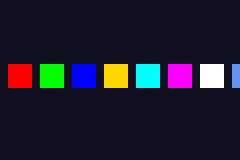
#include <gba/bios>
#include <gba/interrupt>
#include <gba/video>

static void fill_tile_solid(int tile_idx) {
    // Fill every nibble with palette index 1 (0x11111111 per row)
    gba::mem_tile_4bpp[0][tile_idx] = {
        0x11111111, 0x11111111, 0x11111111, 0x11111111, 0x11111111, 0x11111111, 0x11111111, 0x11111111,
    };
}

int main() {
    gba::irq_handler = {};
    gba::reg_dispstat = {.enable_irq_vblank = true};
    gba::reg_ie = {.vblank = true};
    gba::reg_ime = true;

    gba::reg_dispcnt = {
        .video_mode = 0,
        .enable_bg0 = true,
    };

    // Use charblock 0 for tiles, screenblock 31 for map
    gba::reg_bgcnt[0] = {.screenblock = 31};

    // Create a solid tile (palette index 1 everywhere)
    fill_tile_solid(1);

    // Set up 8 color swatches across the top row
    using namespace gba;
    using namespace gba::literals;
    pal_bg_bank[0][1] = "red"_clr;            // CSS: red
    pal_bg_bank[1][1] = "lime"_clr;           // CSS: lime (pure green)
    pal_bg_bank[2][1] = "blue"_clr;           // CSS: blue
    pal_bg_bank[3][1] = "gold"_clr;           // CSS: gold
    pal_bg_bank[4][1] = "cyan"_clr;           // CSS: cyan
    pal_bg_bank[5][1] = "magenta"_clr;        // CSS: magenta
    pal_bg_bank[6][1] = "white"_clr;          // CSS: white
    pal_bg_bank[7][1] = "cornflowerblue"_clr; // CSS: cornflowerblue

    // Background color (palette 0, index 0)
    pal_bg_mem[0] = {.red = 2, .green = 2, .blue = 4};

    // Place 3x3 blocks of the solid tile across screen row 8-10
    for (int swatch = 0; swatch < 8; ++swatch) {
        for (int dy = 0; dy < 3; ++dy) {
            for (int dx = 0; dx < 3; ++dx) {
                int map_x = 1 + swatch * 4 + dx;
                int map_y = 8 + dy;
                mem_se[31][map_x + map_y * 32] = {
                    .tile_index = 1,
                    .palette_index = static_cast<unsigned short>(swatch),
                };
            }
        }
    }

    while (true) {
        gba::VBlankIntrWait();
    }
}
Palette memory layout
The GBA has 512 palette entries total (1 KB), split evenly:
| Region | Address | Entries | Used by |
|---|---|---|---|
mem_pal_bg | 0x05000000 | 256 | Background tiles |
mem_pal_obj | 0x05000200 | 256 | Sprites (objects) |
In 4bpp (16-colour) mode, the 256 entries are organised as 16 sub-palettes of 16 colours each. Each tile chooses which sub-palette to use.
In 8bpp (256-colour) mode, all 256 entries form one large palette.
Palette index 0
Palette index 0 is special: it is the transparent colour for both backgrounds and sprites. For the very first background palette (sub-palette 0, index 0), it also serves as the screen backdrop colour - the colour you see when no background or sprite covers a pixel.
// Set the backdrop to dark blue
gba::pal_bg_mem[0] = { .blue = 16 };
Bit 15 and hardware blending
Bit 15 (grn_lo) is usually safe to ignore for everyday palette work.
When colour effects are enabled (brighten, darken, or alpha blend), hardware treats green as an internal 6-bit value and may use grn_lo. This can create hardware-visible differences that many emulators do not reproduce.
For full details, demo code, and emulator-vs-hardware screenshots, see Advanced: Green Low Bit (grn_lo).
tonclib comparison
Colour construction
| stdgba | tonclib | Notes |
|---|---|---|
{ .red = r, .green = g, .blue = b } | RGB15(r, g, b) | 5-bit channels (0-31) |
"#RRGGBB"_clr | RGB8(r, g, b) | 8-bit channels (0-255) |
RGB8 and "#RRGGBB"_clr are direct equivalents - both accept 8-bit per channel values and truncate to 5 bits.
Named colour constants
tonclib defines a small set of CLR_* constants for the primary colours. The stdgba equivalents use CSS web colour names with _clr:
| tonclib | stdgba | Value |
|---|---|---|
CLR_BLACK | "black"_clr | #000000 |
CLR_RED | "red"_clr | #FF0000 |
CLR_LIME | "lime"_clr | #00FF00 |
CLR_YELLOW | "yellow"_clr | #FFFF00 |
CLR_BLUE | "blue"_clr | #0000FF |
CLR_MAG | "magenta"_clr or "fuchsia"_clr | #FF00FF |
CLR_CYAN | "cyan"_clr or "aqua"_clr | #00FFFF |
CLR_WHITE | "white"_clr | #FFFFFF |
CLR_MAROON | "maroon"_clr | #800000 |
CLR_GREEN | "green"_clr | #008000 |
CLR_NAVY | "navy"_clr | #000080 |
CLR_TEAL | "teal"_clr | #008080 |
CLR_PURPLE | "purple"_clr | #800080 |
CLR_OLIVE | "olive"_clr | #808000 |
CLR_ORANGE | "orange"_clr | #FFA500 |
CLR_GRAY / CLR_GREY | "gray"_clr or "grey"_clr | #808080 |
CLR_SILVER | "silver"_clr | #C0C0C0 |
stdgba’s CSS colour set is a strict superset - all 147 CSS Color Level 4 names are supported, including colours like "cornflowerblue"_clr that have no tonclib constant.