Key Input
The GBA has 10 buttons: A, B, L, R, Start, Select, and the 4-direction D-pad.
gba::keypad gives you:
- level checks (
held) - edge checks (
pressed,released) - axis helpers (
xaxis,i_xaxis,yaxis,i_yaxis,lraxis,i_lraxis) - a predefined combo constant named
gba::reset_combo
Reading keys
#include <gba/keyinput>
#include <gba/peripherals>

gba::keypad keys;

// In your game loop:
for (;;) {
    gba::VBlankIntrWait();
    keys = gba::reg_keyinput;  // One sample per frame

    if (keys.held(gba::key_a)) {
        // A is currently held down
    }

    if (keys.pressed(gba::key_b)) {
        // B was just pressed this frame (edge detection)
    }

    if (keys.released(gba::key_start)) {
        // Start was just released this frame
    }
}
Frame update contract
gba::keypad stores previous and current state internally. Each assignment from gba::reg_keyinput updates that state (normally once per frame). This is what powers pressed() and released().
Recommended pattern: call keys = gba::reg_keyinput; exactly once per game frame (usually right before game state needs to be updated).
If you sample multiple times in the same frame, edge checks can appear inconsistent because you advanced the internal history more than once.
The keypad hardware register itself is active-low (0 means pressed), but gba::keypad normalizes this so held(key) reads naturally.
Practical patterns
// One-shot action: only fires on the transition frame.
if (keys.pressed(gba::key_a)) {
    jump();
}

// Release-triggered action: useful for menus and drag/release interactions.
if (keys.released(gba::key_b)) {
    close_menu();
}
D-pad axes
For movement, use the axis helpers. yaxis() uses the mathematical convention where up is positive:
int dx = keys.xaxis();  // -1 (left), 0, or 1 (right)
int dy = keys.yaxis();  // -1 (down), 0, or 1 (up)
These return a tri-state value based on the D-pad. If both left and right are held simultaneously, they cancel out to 0.
Inverted axes
The inverted variants flip the sign. i_xaxis() is useful when your camera or gameplay logic expects right-negative coordinates, and i_yaxis() matches screen coordinates where Y increases downward:
int dx = keys.i_xaxis();  // -1 (right), 0, or 1 (left)
int dy = keys.i_yaxis();  // -1 (up), 0, or 1 (down)

player_x += dx;
player_y += dy;
For most gameplay movement, i_yaxis() is the convenient choice because screen-space Y grows downward.
Shoulder axis
The L and R buttons can also be read as an axis:
int lr = keys.lraxis();    // -1 (L), 0, or 1 (R)
int ilr = keys.i_lraxis(); // -1 (R), 0, or 1 (L)
Key constants
| Constant | Button |
|---|---|
gba::key_a | A |
gba::key_b | B |
gba::key_l | L shoulder |
gba::key_r | R shoulder |
gba::key_start | Start |
gba::key_select | Select |
gba::key_up | D-pad up |
gba::key_down | D-pad down |
gba::key_left | D-pad left |
gba::key_right | D-pad right |
Combos and reset_combo
Use operator| to combine button masks:
auto combo = gba::key_a | gba::key_b;
if (keys.held(combo)) {
    // Both A and B are held
}
stdgba also provides gba::reset_combo, defined as A + B + Select + Start:
if (keys.held(gba::reset_combo)) {
    // Enter your reset path
}
Rationale: this is the long-standing GBA soft-reset convention. Requiring four buttons reduces accidental resets during normal play while still giving a predictable emergency-exit combo.
If you use it for reset, wait until the combo is released before returning to normal flow to avoid immediate retrigger:
if (keys.held(gba::reset_combo)) {
    request_reset();
    do {
        keys = gba::reg_keyinput;
    } while (keys.held(gba::reset_combo));
}
Common Pitfalls
- Sampling
keys = gba::reg_keyinput;multiple times in one frame: this advances history repeatedly and can breakpressed()/released()expectations. - Using
pressed()for continuous movement:pressed()is edge-only, so movement usually belongs onheld()or axis helpers. - Mixing
yaxis()and screen-space coordinates:yaxis()treats up as+1; usei_yaxis()when down-positive screen coordinates are what you want. - Forgetting that
i_xaxis()is also available: if horizontal math is inverted in your coordinate system, usei_xaxis()instead of manually negatingxaxis(). - Forgetting release-wait after reset combo handling: without the short hold-until-release loop, reset paths can retrigger immediately.
- Treating the hardware register as active-high in custom low-level code:
KEYINPUTis active-low; prefergba::keypadunless you intentionally handle bit inversion yourself.
tonclib comparison
| stdgba | tonclib |
|---|---|
keys = gba::reg_keyinput; | key_poll(); |
keys.held(gba::key_a) | key_is_down(KEY_A) |
keys.pressed(gba::key_a) | key_hit(KEY_A) |
keys.released(gba::key_a) | key_released(KEY_A) |
keys.xaxis() | key_tri_horz() |
keys.i_xaxis() | -key_tri_horz() |
keys.yaxis() | key_tri_vert() |
keys.i_yaxis() | -key_tri_vert() |
keys.held(gba::reset_combo) | key_is_down(KEY_A|KEY_B|KEY_SELECT|KEY_START) |
key_tri_vert() and keys.yaxis() both treat up as positive. For screen-space movement where Y increases downward, use keys.i_yaxis().
For keypad API details (gba::keypad, key masks, edge and axis methods), see book/src/reference/keypad.md.
For keypad register details (including active-low hardware semantics), see book/src/reference/peripherals/keypad.md.
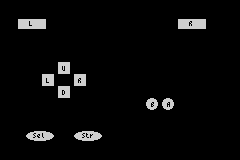
Demo: Visual button layout
This demo renders a simple GBA-style button layout and updates each button colour from pressed(), released(), and held() state:
#include <gba/bios>
#include <gba/color>
#include <gba/interrupt>
#include <gba/keyinput>
#include <gba/shapes>
#include <gba/video>

#include <array>
#include <cstring>

using namespace gba::shapes;
using gba::operator""_clr;

namespace {

    // D-pad directional buttons: 16x16 squares with direction labels
    constexpr auto dpad_up_button = sprite_16x16(rect(2, 2, 12, 12), palette_idx(0), text(6, 6, "U"));

    constexpr auto dpad_down_button = sprite_16x16(rect(2, 2, 12, 12), palette_idx(0), text(6, 6, "D"));

    constexpr auto dpad_left_button = sprite_16x16(rect(2, 2, 12, 12), palette_idx(0), text(6, 6, "L"));

    constexpr auto dpad_right_button = sprite_16x16(rect(2, 2, 12, 12), palette_idx(0), text(6, 6, "R"));

    // A button: 16x16 circle with label
    constexpr auto a_button = sprite_16x16(circle(8.0, 8.0, 6.0), // Filled circle
                                           palette_idx(0), text(7, 6, "A"));

    // B button: 16x16 circle with label
    constexpr auto b_button = sprite_16x16(circle(8.0, 8.0, 6.0), // Filled circle
                                           palette_idx(0), text(7, 6, "B"));

    // L button: 32x16 wide rectangle
    constexpr auto l_button = sprite_32x16(rect(2, 3, 28, 10), palette_idx(0), text(13, 5, "L"));

    // R button: 32x16 wide rectangle
    constexpr auto r_button = sprite_32x16(rect(2, 3, 28, 10), palette_idx(0), text(13, 5, "R"));

    // Start button: 32x16 oval with label
    constexpr auto start_button = sprite_32x16(oval(2, 3, 28, 10), palette_idx(0), text(10, 5, "Str"));

    // Select button: 32x16 oval with label
    constexpr auto select_button = sprite_32x16(oval(2, 3, 28, 10), palette_idx(0), text(9, 5, "Sel"));

    // Controller layout: buttons with different shapes
    struct ButtonDef {
        int obj_index;   // Which OAM object
        gba::key mask;   // Associated key mask
        int sprite_type; // 0=dpad_up, 1=dpad_down, 2=dpad_left, 3=dpad_right, 4=a, 5=b, 6=l, 7=r, 8=start, 9=select
    };

    // Map out the 10 GBA buttons in OAM space
    std::array<ButtonDef, 10> buttons{
        {
         {0, gba::key_up, 0},     // Up - dpad_up
            {1, gba::key_down, 1},   // Down - dpad_down
            {2, gba::key_left, 2},   // Left - dpad_left
            {3, gba::key_right, 3},  // Right - dpad_right
            {4, gba::key_a, 4},      // A - a_button
            {5, gba::key_b, 5},      // B - b_button
            {6, gba::key_l, 6},      // L - l_button
            {7, gba::key_r, 7},      // R - r_button
            {8, gba::key_start, 8},  // Start - start_button
            {9, gba::key_select, 9}, // Select - select_button
        }
    };

    // Position data for each button (arranged in a GBA-like layout)
    // Adjusted for larger sprite sizes
    struct Position {
        int x, y;
    };

    std::array<Position, 10> positions{
        {
         {56, 60},  // Up - dpad top
            {56, 84},  // Down - dpad bottom
            {40, 72},  // Left - dpad left
            {72, 72},  // Right - dpad right (meet in middle)
            {160, 96}, // A - circle
            {144, 96}, // B - circle
            {16, 16},  // L - left shoulder
            {176, 16}, // R - right shoulder
            {72, 128}, // Start - bottom left
            {24, 128}, // Select - bottom center
        }
    };

} // namespace

int main() {
    gba::irq_handler = {};
    gba::reg_dispstat = {.enable_irq_vblank = true};
    gba::reg_ie = {.vblank = true};
    gba::reg_ime = true;

    // Video mode 0, objects enabled
    gba::reg_dispcnt = {
        .video_mode = 0,
        .linear_obj_tilemap = true,
        .enable_obj = true,
    };

    // Set up palette banks (shared across all button types)
    // Palette 0: untouched (gray)
    gba::pal_obj_bank[0][0] = "#888888"_clr; // background
    gba::pal_obj_bank[0][1] = "#CCCCCC"_clr; // untouched button
    gba::pal_obj_bank[0][2] = "#999999"_clr; // text placeholder

    // Palette 1: pressed (bright green)
    gba::pal_obj_bank[1][0] = "#888888"_clr;
    gba::pal_obj_bank[1][1] = "#00FF00"_clr; // pressed (bright green)
    gba::pal_obj_bank[1][2] = "#FFFFFF"_clr; // text

    // Palette 2: released (red)
    gba::pal_obj_bank[2][0] = "#888888"_clr;
    gba::pal_obj_bank[2][1] = "#FF0000"_clr; // released (red)
    gba::pal_obj_bank[2][2] = "#FFFFFF"_clr; // text

    // Palette 3: held (medium green)
    gba::pal_obj_bank[3][0] = "#888888"_clr;
    gba::pal_obj_bank[3][1] = "#00AA00"_clr; // held (medium green)
    gba::pal_obj_bank[3][2] = "#FFFFFF"_clr; // text

    auto* objVRAM = gba::memory_map(gba::mem_vram_obj);
    auto* vramPtr = reinterpret_cast<std::uint8_t*>(objVRAM);

    // Copy all button sprite shapes to VRAM and track tile indices
    std::uint16_t baseTileIdx = gba::tile_index(objVRAM);
    std::uint16_t tileOffset = 0;

    // D-pad buttons (8x8 squares, each with its own label)
    std::memcpy(vramPtr + tileOffset, dpad_up_button.data(), dpad_up_button.size());
    const auto dpad_up_tile = baseTileIdx + (tileOffset / 32);
    tileOffset += dpad_up_button.size();

    std::memcpy(vramPtr + tileOffset, dpad_down_button.data(), dpad_down_button.size());
    const auto dpad_down_tile = baseTileIdx + (tileOffset / 32);
    tileOffset += dpad_down_button.size();

    std::memcpy(vramPtr + tileOffset, dpad_left_button.data(), dpad_left_button.size());
    const auto dpad_left_tile = baseTileIdx + (tileOffset / 32);
    tileOffset += dpad_left_button.size();

    std::memcpy(vramPtr + tileOffset, dpad_right_button.data(), dpad_right_button.size());
    const auto dpad_right_tile = baseTileIdx + (tileOffset / 32);
    tileOffset += dpad_right_button.size();

    // A button (8x8 circle)
    std::memcpy(vramPtr + tileOffset, a_button.data(), a_button.size());
    const auto a_tile = baseTileIdx + (tileOffset / 32);
    tileOffset += a_button.size();

    // B button (8x8 circle)
    std::memcpy(vramPtr + tileOffset, b_button.data(), b_button.size());
    const auto b_tile = baseTileIdx + (tileOffset / 32);
    tileOffset += b_button.size();

    // L button (16x8 rectangle)
    std::memcpy(vramPtr + tileOffset, l_button.data(), l_button.size());
    const auto l_tile = baseTileIdx + (tileOffset / 32);
    tileOffset += l_button.size();

    // R button (16x8 rectangle)
    std::memcpy(vramPtr + tileOffset, r_button.data(), r_button.size());
    const auto r_tile = baseTileIdx + (tileOffset / 32);
    tileOffset += r_button.size();

    // Start button (16x8 oval)
    std::memcpy(vramPtr + tileOffset, start_button.data(), start_button.size());
    const auto start_tile = baseTileIdx + (tileOffset / 32);
    tileOffset += start_button.size();

    // Select button (16x8 oval)
    std::memcpy(vramPtr + tileOffset, select_button.data(), select_button.size());
    const auto select_tile = baseTileIdx + (tileOffset / 32);
    tileOffset += select_button.size();

    // Store tile indices for use in rendering
    std::array<std::uint16_t, 10> spritesTiles{
        {
         dpad_up_tile, dpad_down_tile,
         dpad_left_tile, dpad_right_tile,
         a_tile, b_tile,
         l_tile, r_tile,
         start_tile, select_tile,
         }
    };

    // Store sprite data for each button (sprite, tile)
    struct SpriteData {
        gba::object obj;
        int x, y;
    };
    std::array<SpriteData, 10> buttonSprites;

    // Initialize all button sprites once
    for (int i = 0; i < 10; ++i) {
        const auto& btn = buttons[i];
        const auto& pos = positions[i];

        gba::object obj;

        switch (btn.sprite_type) {
            case 0: // D-pad Up
                obj = dpad_up_button.obj(spritesTiles[0]);
                break;
            case 1: // D-pad Down
                obj = dpad_down_button.obj(spritesTiles[1]);
                break;
            case 2: // D-pad Left
                obj = dpad_left_button.obj(spritesTiles[2]);
                break;
            case 3: // D-pad Right
                obj = dpad_right_button.obj(spritesTiles[3]);
                break;
            case 4: // A button
                obj = a_button.obj(spritesTiles[4]);
                break;
            case 5: // B button
                obj = b_button.obj(spritesTiles[5]);
                break;
            case 6: // L button
                obj = l_button.obj(spritesTiles[6]);
                break;
            case 7: // R button
                obj = r_button.obj(spritesTiles[7]);
                break;
            case 8: // Start button
                obj = start_button.obj(spritesTiles[8]);
                break;
            case 9: // Select button
                obj = select_button.obj(spritesTiles[9]);
                break;
            default: obj = dpad_up_button.obj(spritesTiles[0]);
        }

        obj.x = pos.x;
        obj.y = pos.y;
        obj.palette_index = 0; // Start with palette 0 (untouched)

        buttonSprites[i] = {obj, pos.x, pos.y};
        gba::obj_mem[i] = obj;
    }

    // Disable remaining OAM entries
    for (int i = 10; i < 128; ++i) {
        gba::obj_mem[i] = {.disable = true};
    }

    gba::keypad keys;

    while (true) {
        gba::VBlankIntrWait();

        keys = gba::reg_keyinput;

        // Update each button's palette based on current state
        for (int i = 0; i < 10; ++i) {
            const auto& btn = buttons[i];
            auto& sprite = buttonSprites[i];

            // Determine palette based on key state
            if (keys.pressed(btn.mask)) {
                // Just pressed this frame (bright green)
                sprite.obj.palette_index = 1;
            } else if (keys.released(btn.mask)) {
                // Just released this frame (red)
                sprite.obj.palette_index = 2;
            } else if (keys.held(btn.mask)) {
                // Currently held (medium green)
                sprite.obj.palette_index = 3;
            } else {
                // Not held (gray)
                sprite.obj.palette_index = 0;
            }

            gba::obj_mem[i] = sprite.obj;
        }
    }
}